Automatic Transmission Operation
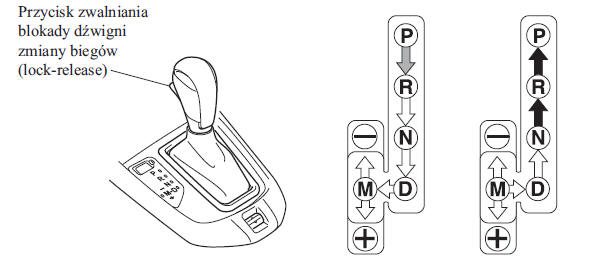
Using the lever:
 Indicates that you must press the
brake pedal and hold the shift lock release button to move the lever (ignition switch must be in the ON position).
 Indicates that the gear selector lever
can be moved freely to any position
 Indicates that you must hold the
shift lock release button to move the lever.
CAUTION
The SKYACTIV-Drive automatic transmission has an option not found on conventional automatic transmissions, which allows the driver to manually select each gear. When using the transmission in normal automatic mode, be aware that the mode may be switched to manual control by accident. In this case, an increase in driving speed will not cause a gear change. If you notice that the engine speed suddenly increases, or you hear the engine revving high, make sure you have not accidentally activated manual shift mode (page 4-54).
Gear Selector Lever Position Indication
 The lever position is displayed
when the ignition switch is in the ON position.
CAUTION
If one of the following actions is performed, the lever position is displayed for 5 minutes, even if the ignition switch is in a position other than ON.
The ignition switch is in the OFF position.
The driver's door is open.
Gear shift lever position indicator
In manual shift mode, the gear selector lever position "M" and the number of the selected gear are displayed.
Warning Light
The warning light comes on if a malfunction occurs in the system.
See the section "Warning and Indicator Lights" on page 4-41.
Gear Selector Lever Positions
- The gear selector lever position indicator light in the instrument cluster comes on. See the section "Warning/Indicator Lights" on page 4-40.
- The gear selector lever must be in the P or N position to start the engine.
P (Park)
The P position locks the transmission and prevents the vehicle from moving.
WARNING
Always place the gear selector lever in the P position and apply the parking brake: Placing the gear selector lever in the P position without applying the parking brake is a safety hazard. If the transmission's P position does not immobilize the vehicle, it may move and cause an accident.
CAUTION
- Moving the gear selector lever to P, N or R while the vehicle is in motion may damage the transmission.
- Selecting a forward or reverse gear while the engine is running above idle speed may damage the transmission.
R (Reverse)
In position R the vehicle moves only in reverse. Stop the vehicle before you shift into or out of reverse, except in the few situations described in the section "Starting on Slippery Road Surfaces" (page 3-55).
N (Neutral)
In position N the wheels and the transmission are not locked. The vehicle will roll even on a slight slope unless the parking brake is applied or the brake pedal is pressed.
WARNING
Do not move the shift lever from N or P to a driving position while the engine is running above idle speed. This is dangerous because the vehicle may suddenly move and cause an accident. If this happens, the vehicle may suddenly move and cause an accident or serious injury.
Do not shift to N while driving. Do not move the shift lever to N while the vehicle is moving. This is dangerous. You cannot slow the vehicle by engine braking. This may cause an accident or serious injury.
CAUTION
Do not shift to N while driving. You may damage the transmission.
CAUTION
To prevent the vehicle from suddenly moving, apply the parking brake or press the brake pedal before you move the shift lever out of N.
D (Drive)
Position D is the normal driving position. From starting off, the transmission automatically uses all 6 gears.
M (Manual Shift Mode)
Position M is the manual shift mode. You can shift to higher or lower gears with the shift lever. See the section "Manual Shift Mode" on page 4-54.
Active Adaptive Shift (AAS) System
The Active Adaptive Shift (AAS) system automatically adjusts the shift timing to road conditions and to the driver's inputs. This improves driving comfort. When the shift lever is in position D, the transmission may switch to AAS mode in the following situations: driving uphill, driving downhill, cornering, driving at high altitude, and pressing the accelerator pedal suddenly. Depending on driving conditions, vehicle condition and road surface, shifting may be delayed or may not occur at all. This does not indicate a malfunction, because the AAS system keeps the optimum gear selected.
Shift-Lock System
The shift-lock system prevents the shift lever from being moved out of P unless the brake pedal is pressed.
To move the shift lever from P: 1. Press and hold the brake pedal.
2. Start the engine.
3. Press and hold the shift lock release button.
4. Move the shift lever.
CAUTION
When the ignition switch is in ACC or the ignition is off, the shift lever cannot be moved out of P.
When the shift lever is not in P, the ignition switch cannot be turned to OFF.
Manual Shift Lever Release
If the shift lever cannot be moved out of P in the normal way, keep the brake pedal pressed at all times.
Type A
1. Lift the cover of the manual shift lever release using a flat-blade screwdriver wrapped in a cloth.
2. Insert the screwdriver and push it downward.
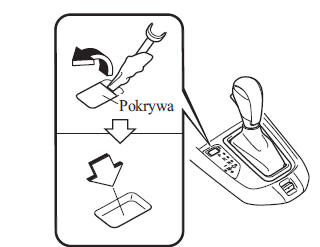
3. Press and hold the shift lock release button.
4. Move the shift lever.
3. Have the system checked at a qualified workshop.
We recommend an authorized Mazda dealer.
Type B
1. While holding the button, press the shift lock release button.
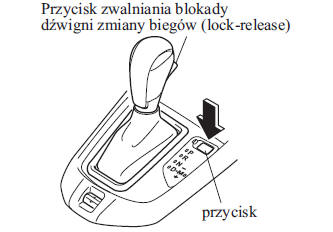
2. Move the shift lever.
3. Have the system checked at a qualified workshop.
We recommend an authorized Mazda dealer.
Manual Shift Mode
This mode gives the feeling of driving a vehicle with a manual transmission, where you change gears with the shift lever.
This allows you to control engine speed and the torque transmitted to the wheels, as with a manual transmission, when more control is required.
To activate manual shift mode, move the shift lever from D to M.

CAUTION
You can switch to manual shift mode while driving without damaging the transmission.
To cancel manual shift mode, move the shift lever from M to D.
CAUTION
If you switch to manual shift mode while the vehicle is stationary, the gear will change to M1.
If you switch to manual shift mode in D while driving in 5th/6th gear without pressing the accelerator pedal, the gear will change to M4/M5.
Instruments
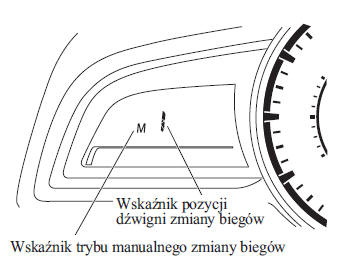
Manual Shift Mode Indicator
In manual shift mode, the "M" indicator lights up in the instrument cluster.
Gear shift lever position indicator
The number of the selected gear lights up.
Type A
Type B
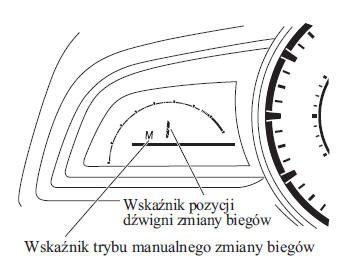
Type C
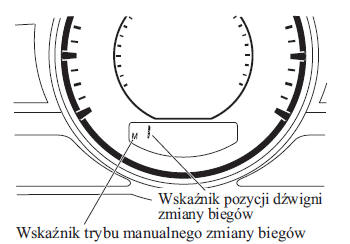
Type D
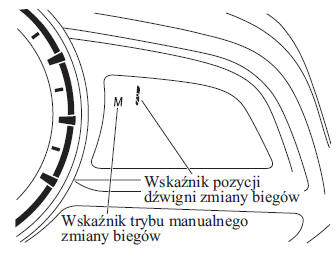
CAUTION
If the gear cannot be downshifted while driving at high speed, the selected gear indicator flashes twice to show that the gear cannot be downshifted (to protect the transmission).
If the automatic transmission fluid (ATF) temperature is too high, the transmission may switch from manual shift mode to automatic mode, and the selected gear indicator will go off. This is a normal protective function of the automatic transmission. When the ATF temperature drops, the selected gear indicator will light up again and manual shift mode will be restored.
Selected Gear Indicator*
The shift indicator helps you reduce fuel consumption and achieve a smooth driving style.
It shows the selected gear in the instrument cluster and also notifies the driver when to change gears based on current driving conditions.
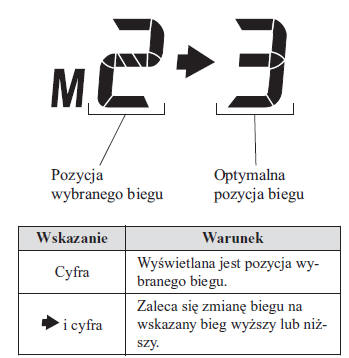
CAUTION
Do not rely solely on the upshift or downshift recommendations shown. Current driving conditions may require shifting to a gear other than the one indicated. To avoid the risk of an accident, the driver must properly assess traffic conditions before changing gears.
CAUTION
The shift indicator turns off in the following cases.
The vehicle is stopped.
Manual shift mode has been turned off.
Manual Upshift
You can upshift using the shift lever or the steering wheel paddles.*
M1  M2
 M3
 M4
 M5
 M6
Using the Shift Lever
To upshift, move the shift lever backward
once.

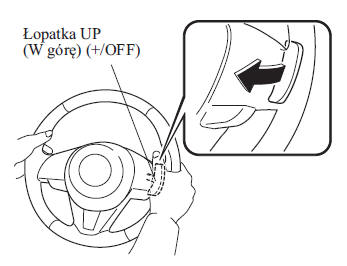
Using the Steering Wheel Paddles*
To upshift using the steering wheel paddles, pull the UP paddle ( ) toward you.
WARNING
When using the shift paddles, keep your hands correctly on the steering wheel rim: Putting your hands inside the steering wheel while using the shift paddles is dangerous. If the airbag deploys in a collision, your hands may suffer serious injury.
CAUTION
- When coasting, the transmission may not shift up.
- In manual shift mode, do not use engine speeds where the needle is in the RED ZONE. When engine speed is high, the transmission may automatically upshift to protect the engine.
- When the accelerator pedal is fully depressed, the transmission will downshift to a gear suitable for the vehicle speed.
- The steering wheel shift paddles can be used temporarily even when the selector lever is in the D position while driving.
 )
is pulled back for a sufficient amount of time.
Manual downshifting
You can downshift using the shift lever or the steering wheel shift paddles.*
M6 M5 M4 M3 M2
M1
Using the Shift Lever
To downshift, push the shift lever forward once.

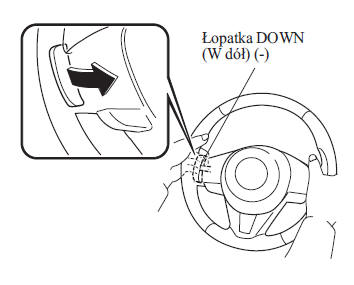
Using the steering wheel shift paddles
To downshift using the steering wheel shift paddles, pull the DOWN- paddle toward you.
WARNING
Do not use engine braking at high speed or on slippery road surfaces: Downshifting while driving on wet, snowy or icy roads, or while driving at high speed, causes the engine-driven wheels to brake suddenly, which is dangerous. A sudden change in wheel speed may cause the tires to slip. This situation may lead to loss of control of the vehicle and, consequently, an accident.
When using the shift paddles, keep your hands correctly on the steering wheel rim: Putting your hands inside the steering wheel while using the shift paddles is dangerous. If the airbag deploys in a collision, your hands may suffer serious injury.
CAUTION
When driving fast, the transmission may not shift down.
When decelerating, the gears may downshift automatically depending on the vehicle speed.
When the accelerator pedal is fully depressed, the transmission will downshift to a gear suitable for the vehicle speed.
Fixed second gear mode
When the shift lever is pushed toward - while the vehicle speed is about 10 km/h or lower, the transmission sets fixed second gear mode. Fixed second gear mode makes it easier to start off and drive on slippery surfaces such as snow-covered roads.
When the shift lever is pushed toward + or - while in fixed second gear mode, this mode is cancelled.
Shift speed limits
In manual mode, a speed limit is set for each gear, as shown below. If the shift lever is operated within the speed limit for that gear, the gear is changed.

Upshifting
The gear will not upshift when the vehicle speed is lower than the speed limit.
Downshifting
The gear will not downshift when the vehicle speed exceeds the speed limit.
If the vehicle speed exceeds the speed limit and the gear does not downshift, the gear indicator flashes 2 times to notify the driver that the gear cannot be changed.
Kickdown
When the accelerator pedal is fully depressed while driving, the transmission quickly downshifts.
CAUTION
Kickdown also operates in fixed second gear mode.
Automatic downshifting
The gear is downshifted automatically depending on the vehicle speed when decelerating.
CAUTION
If the vehicle decelerates to a stop in fixed second gear mode, second gear remains engaged.
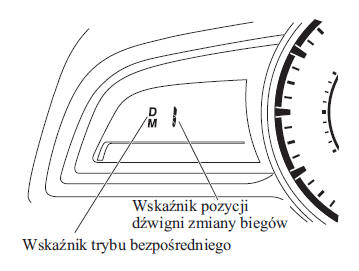
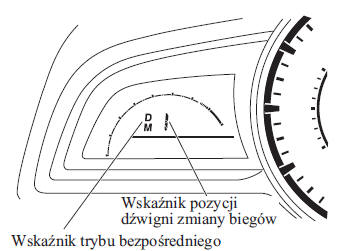
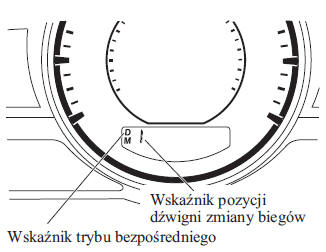
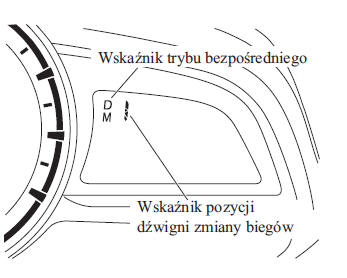
Direct mode*
Direct mode can be used to temporarily change gears using the steering wheel shift paddles when the selector lever is in the D position.
In direct mode, the D and M indicators light up, and the currently selected gear is displayed.
Direct mode is cancelled (released) under the following conditions.
- UP paddle (
 ) is
pulled toward you for a certain period of time or longer. - The vehicle has been driven for a certain period of time or longer (this time varies depending on driving conditions).
- The vehicle is stopped or moving at low speed.
Type A
Type B
Type C
Type D
CAUTION
Depending on the vehicle speed, upshifting or downshifting in direct mode may not be possible. In addition, because direct mode is cancelled (released) depending on the degree of acceleration or whether the accelerator pedal is fully depressed, it is recommended to use manual shift mode if you intend to drive in a specific gear for an extended period.
Driving recommendations
WARNING
Do not let the vehicle move in the direction opposite to the one selected with the selector lever: Do not let the vehicle move backward when the selector lever is in a forward drive position, and do not let the vehicle move forward when the selector lever is in reverse.
Otherwise, the engine may stall, causing loss of brake and steering assistance, which makes the vehicle harder to control.
This may cause an accident.
Overtaking
For extra power when overtaking another vehicle or climbing a steep hill, fully depress the accelerator pedal. The transmission will downshift to a gear suitable for the vehicle speed.
CAUTION
(Selected models) The accelerator pedal may feel firm at first when pressed, but becomes soft when pressed further. This change in pedal resistance allows the engine control system to determine how far the accelerator pedal has been pressed for rapid acceleration, and allows the system to decide whether rapid acceleration should be performed or not.
Starting on a Steep Hill
To start on a steep hill: 1. Depress the brake pedal.
2. Move the shift lever to D or M1, depending on the vehicle load and the steepness of the hill.
3. Gradually release the brake pedal while accelerating.
Driving Down a Steep Hill
When driving down a steep hill, shift to a lower gear, depending on the vehicle load and the steepness of the downhill. Drive slowly, using the brakes only when necessary to prevent them from overheating.
Test yourself
A quick Mazda 2 quiz: every answer comes with an explanation and a link to the manual page.