Trip computer
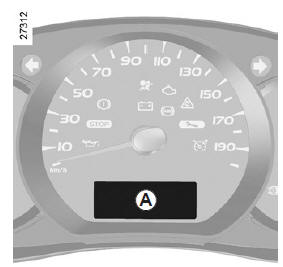
On-board computer A
Depending on the vehicle, it combines the following functions:
- distance travelled;
- journey parameters;
- information messages;
- malfunction messages (associated with the warning light
 ) ;
- alert messages (associated with the warning light
 ).
All these functions are described on the following pages.
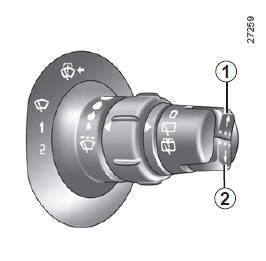
Display selection buttons 1 and 2
Display selection buttons 1 and 2
Scroll up (button 1) or down (button 2) through the following information by pressing the buttons briefly and repeatedly (the display depends on vehicle equipment and country).
- Total and trip distance odometers,
- trip settings:
- fuel consumed;
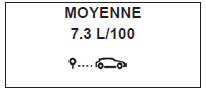
- average fuel consumption;
- instantaneous fuel consumption;
- estimated range;
- distance travelled;
- average speed;
- service interval range;
- speed limiter and cruise control set speed;
- trip log, scrolling of information and fault messages.
Resetting the trip odometer
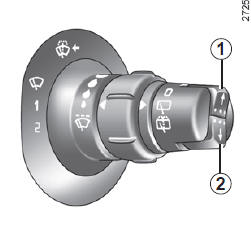
Resetting the trip odometer to zero
With the display set to "trip odometer", press either button 1 or 2 until the odometer resets to zero.
Resetting the trip parameters (Top Départ)
With the display set to one of the trip parameters, press either button 1 or 2 until the display resets to zero.
Interpreting certain values displayed after a Top Départ
The average fuel consumption, range and average speed values become more stable and meaningful the greater the distance driven since the last Top Départ.
During the first kilometers driven after a Trip Start, you may notice:
- that the range increases as you drive.
This is because it takes into account the average consumption since the last Trip Start. The average consumption may decrease when:
- the vehicle comes out of an acceleration phase;
- the engine reaches its operating temperature (Top Départ: cold engine);
- you switch from urban driving to road driving.
Automatic resetting of the trip parameters
The reset is automatic when the capacity of one of the parameters is exceeded.
THE INFORMATION DESCRIBED BELOW DEPENDS ON VEHICLE EQUIPMENT AND COUNTRY.
| Selection examples | Interpreting the selected display | |
 |
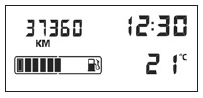 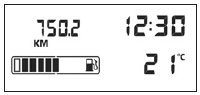 |
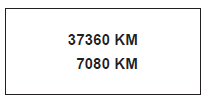
a) Total and trip odometers |
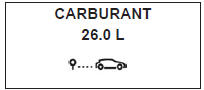 |
b) Trip parameters Fuel consumed since the last Trip Start. |
|
 |
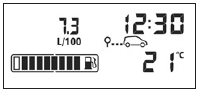 |
Average consumption since the last Trip Start. Value displayed after traveling 400 meters, taking into account the distance traveled and the fuel used since the last Trip Start. |
THE INFORMATION DESCRIBED BELOW DEPENDS ON VEHICLE EQUIPMENT AND COUNTRY.
| Selection examples | Interpreting the selected display | |
 |
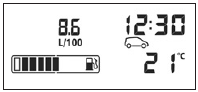 |
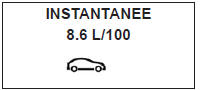
Instantaneous consumption Value displayed after reaching a speed of 30 km/h. |
 |
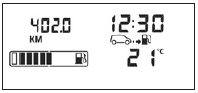 |
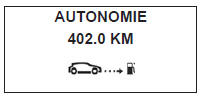
Estimated range with remaining fuel This range takes into account the average consumption since the last trip reset. Value displayed after travelling 400 metres. A few minutes after the reserve warning light comes on (refer to the "Instrument panel" section), the estimated range is no longer displayed. |
 |
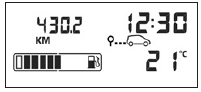 |
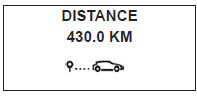
Distance traveled since the last Trip Start. |
 |
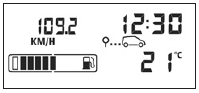 |
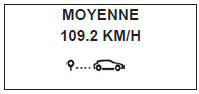
Average speed since the last Trip Start. Value displayed after 400 metres have been travelled. |
THE INFORMATION DESCRIBED BELOW DEPENDS ON VEHICLE EQUIPMENT AND COUNTRY.
| Selection examples | Interpreting the selected display | |
 |
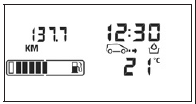 |
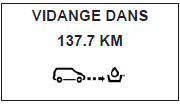
c) Oil change rangeDistance remaining until the next service (displayed in kilometers). When the range approaches zero, several cases may occur:
The vehicle requires a service as soon as possible. |
Note: depending on the vehicle, the service range adapts to driving style (frequent driving at low speeds, stop-and-go traffic, prolonged idling, towing a trailer, ...). The distance remaining until the next service may therefore in some cases decrease faster than the distance actually traveled. Resetting the display after servicing in accordance with the maintenance schedule.The service range should only be reset after servicing in accordance with the recommendations in the maintenance document. If you decide to change the oil more frequently, do not reset this data at each oil change, to avoid exceeding the replacement intervals of other parts specified in the maintenance schedule. Special note: to reset the service range, go to the service page (see image above) and press and hold either display reset button for about 10 seconds without interruption until the service range is displayed steadily. Refer to the "On-board computer: general information" section in chapter 2. |
||
 and the warning light
 .
THE INFORMATION DESCRIBED BELOW DEPENDS ON VEHICLE EQUIPMENT AND COUNTRY.
| Selection examples | Interpreting the selected display |
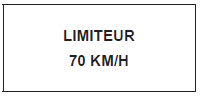 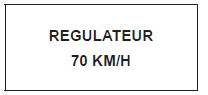 |
d) Speed limiter-cruise control set speed (depending on vehicle) Refer to the "Speed limiter-cruise control" sections in chapter 2. |
Information messages
They may help you start the vehicle or inform you of a selection or driving status.
Examples of information messages are given below.
| Message examples | Message interpretation |
| "NO MESSAGE STORED" | e) Message log Successive display of:
|
| "BOOT OPEN" | Indicates that the tailgate was left open. |
| "BATTERY SAVE MODE" | Indicates that vehicle accessories have been switched off to preserve the battery. |
| "OIL LEVEL OK" | Indicates on ignition switch-on that the oil level is correct. |
| "AUTO LIGHTING OFF" | Indicates that the automatic headlight function is deactivated. |
Operating fault messages
They appear with warning light  and require the vehicle to be taken to a Brand Representative as soon as possible, driving gently. Failure to observe this recommendation may cause damage to the vehicle.
They disappear when you press the display selection button or after a few seconds, and are stored in the message log. The warning light stays on. Examples of operating fault messages are given below.
| Message examples | Message interpretation |
| "ESP CHECK" | Indicates a fault in the anti-skid system (refer to the "Driving correction and assistance systems" section in chapter 2). |
| "DRAIN DIESEL FILTER" | Indicates the presence of water in the diesel fuel. Consult a brand representative as soon as possible. |
| "GEARBOX CHECK" | Indicates that a fault has occurred in the gearbox; consult a Brand Representative promptly. |
| "AUTO LIGHTING CHECK" | Indicates a fault in the automatic headlight operation; consult a Brand Representative. |
| "STEERING CHECK" | Indicates a fault in the operation of the power steering. |
Warning messages
They appear with warning light  and, for your safety, require an immediate stop as soon as traffic conditions allow. Stop the engine and do not restart it. Contact a Brand Representative.
Examples of warning messages are given below. Note: messages appear on the display either individually or alternately (when several messages need to be shown), and may be accompanied by a warning light and/or an audible beep.
| Message examples | Message interpretation |
| "INJECTION FAULT" | Indicates a serious engine problem on the vehicle. |
| "ENGINE OVERHEATING" | Indicates that the vehicle engine is overheating. |
| "STEERING FAULT" | Indicates a problem with the vehicle's power steering. |
| "GEARBOX OVERHEATING" | Indicates that the gearbox is overheating. |
Test yourself
A quick Renault Kangoo quiz: every answer comes with an explanation and a link to the manual page.