Remote lock / unlock function does not operate
DESCRIPTION
When the ignition switch is ON, the main body ECU assembly sends remote close and open signals to each power window motor assembly via the LIN communication line.
WIRING DIAGRAM
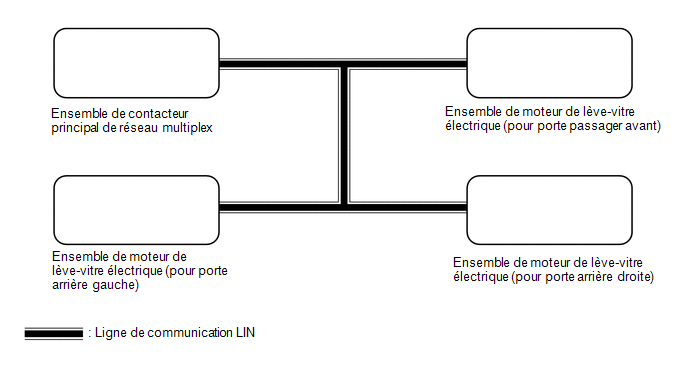
PRECAUTION / NOTICE / HINT
NOTICE:
- The power window control system uses the LIN communication system. Check the communication function by following the procedure described in the HOW TO USE TROUBLESHOOTING section. Perform troubleshooting of the power window control system after confirming that the communication system operates normally.
Click here

- If a power window motor assembly has been replaced with a new one, initialize the power window control system.
Click here
PROCEDURE
READ THE VALUE USING THE TECHSTREAM (MAIN BODY)
(a) Connect the Techstream to the DLC3.
(b) Turn the ignition switch to ON.
(c) Turn on the Techstream.
(d) Select the following menus: Body Electrical / Main Body / Data List.
(e) Read the Data List by following the instructions on the Techstream.
Body Electrical > Main Body > Data ListTester display | Item | Range | Normal Condition | Diagnostic Note |
|---|---|---|---|---|
P-Door Motor Communication |
Connection status between the front passenger door power window regulator motor assembly and the main body ECU (multiplex network body ECU) |
STOP or OK |
STOP: Communication interrupted OK: Communication normal |
- |
RR-Door Motor Communication |
Connection status between the rear RH door power window regulator motor assembly and the main body ECU (multiplex network body ECU) |
STOP or OK |
STOP: Communication interrupted OK: Communication normal |
- |
RL-Door Motor Communication |
Connection status between the rear LH door power window regulator motor assembly and the main body ECU (multiplex network body ECU) |
STOP or OK |
STOP: Communication interrupted OK: Communication normal |
- |
Master SW Communication |
Connection status between the multiplex network master switch assembly and the main body ECU (multiplex network body ECU) |
STOP or OK |
STOP: Communication interrupted OK: Communication normal |
- |
Tester display |
|---|
P-Door Motor Communication |
RR-Door Motor Communication |
RL-Door Motor Communication |
Master SW Communication |
OK:
OK is displayed for each item in the data list above.
| NG |  |
GO TO LIN COMMUNICATION SYSTEM (Follow the How to Proceed with Troubleshooting procedure) |
|

READ THE VALUE USING THE TECHSTREAM (MASTER SWITCH)
(a) Select the following menu items: Body Electrical / Master Switch / Data List.
(b) Read the Data List following the Techstream instructions.
Body Electrical > Master Switch > Data ListTester display | Item | Range | Normal Condition | Diagnostic Note |
|---|---|---|---|---|
P Door P/W Auto SW |
Front passenger side power window auto switch signal |
OFF or ON |
OFF: Front passenger door power window auto close or open switch not operated ON: Front passenger door power window auto close or open switch operated |
- |
RR Door P/W Auto SW |
Rear right door power window auto switch signal |
OFF or ON |
OFF: Rear right door power window auto close or open switch not operated ON: Rear right door power window auto close or open switch operated |
- |
RL Door P/W Auto SW |
Rear left door power window auto switch signal |
OFF or ON |
OFF: Rear left door power window auto close or open switch not operated ON: Rear left door power window auto close or open switch operated |
- |
P Door P/W Up SW |
Front passenger door power window manual close switch signal |
OFF or ON |
OFF: Front passenger door power window manual close switch not operated ON: Front passenger door power window manual close switch operated |
- |
RR Door P/W up switch |
Rear right door power window manual close switch signal |
OFF or ON |
OFF: Rear right door power window manual close switch not operated ON: Rear right door power window manual close switch operated |
- |
RL Door P/W up switch |
Rear left door power window manual close switch signal |
OFF or ON |
OFF: Rear left door power window manual close switch not operated ON: Rear left door power window manual close switch operated |
- |
P Door P/W Down SW |
Front passenger door power window manual open switch signal |
OFF or ON |
OFF: Front passenger door power window manual open switch not operated ON: Front passenger door power window manual open switch operated |
- |
RR Door P/W Down SW |
Rear right door power window manual open switch signal |
OFF or ON |
OFF: Rear right door power window manual open switch not operated ON: Rear right door power window manual open switch operated |
- |
RL Door P/W Down SW |
Rear left door power window manual open switch signal |
OFF or ON |
OFF: Rear left door power window manual open switch not operated ON: Rear left door power window manual open switch operated |
- |
Window Lock Switch Status |
Window lock switch signal |
OFF or ON |
OFF: Window lock switch in OFF position (not pressed) ON: Window lock switch in ON position (pressed) |
- |
Tester display |
|---|
P Door P/W Auto SW |
RR Door P/W Auto SW |
RL Door P/W Auto SW |
P Door P/W Up SW |
RR Door P/W up switch |
RL Door P/W up switch |
P Door P/W Down SW |
RR Door P/W Down SW |
RL Door P/W Down SW |
Window Lock Switch Status |
OK:
On the Techstream screen, ON or OFF is displayed accordingly.
Result:
Result | Proceed to |
|---|---|
NG |
A |
OK (front passenger power window remote close and open functions do not operate) |
B |
OK (rear LH power window remote close and open functions do not operate) |
C |
OK (rear RH power window remote close and open functions do not operate) |
| A | |
REPLACE MULTIPLEX NETWORK MAIN SWITCH ASSEMBLY |
| B | |
REPLACE POWER WINDOW MOTOR ASSEMBLY (FOR FRONT PASSENGER DOOR) |
| C | |
REPLACE POWER WINDOW MOTOR ASSEMBLY (FOR REAR LH DOOR OR REAR RH DOOR) |