Operation Check
OPERATION CHECK
CHECK WINDOW LOCK FUNCTION
HINT:
Before checking the operation of the window lock switch, make sure that the window lock switch is in the OFF position (switch not pressed).
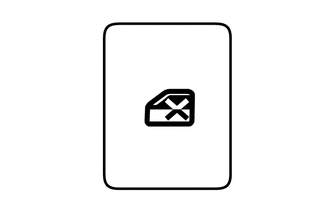
(a) Set the window lock switch on the multiplex network master switch assembly to the ON position (pressed), and check that the front passenger and rear windows are disabled.
OK:
The front passenger and rear windows are disabled.
(b) Set the window lock switch to the OFF position (not pressed), and check that the front passenger and rear windows can be operated normally.
OK:
The front passenger and rear windows operate normally.
CHECK MANUAL UP/DOWN FUNCTION
(a) Make sure that the driver door power window operates as follows:
OKCondition | Master Switch | Switch Operation | Power Window |
|---|---|---|---|
Ignition Switch in ON position |
Driver Door |
Pulled up halfway |
UP (Closes) |
Pressed halfway |
DOWN (Opens) |
(b) Check that the front passenger door and rear door power windows operate as follows:
OKCondition | Window Regulator Switch | Switch Operation | Power Window |
|---|---|---|---|
|
Front Passenger Door |
Pulled up halfway |
UP (Closes) |
Pressed halfway |
DOWN (Opens) |
||
Rear Left Door |
Pulled up halfway |
UP (Closes) |
|
Pressed halfway |
DOWN (Opens) |
||
Rear Right Door |
Pulled up halfway |
UP (Closes) |
|
Pressed halfway |
DOWN (Opens) |
CHECK AUTO UP/DOWN FUNCTION
(a) Make sure that the driver door power window operates as follows:
OKCondition | Master Switch | Switch Operation | Power Window |
|---|---|---|---|
Ignition Switch in ON position |
Driver Door |
Pulled (one-touch operation) |
AUTO UP (Closes) |
Pressed (one-touch operation) |
AUTO DOWN (Opens) |
(b) Check that the front passenger door and rear door power windows operate as follows:
OKCondition | Window Regulator Switch | Switch Operation | Power Window |
|---|---|---|---|
|
Front Passenger Door |
Pulled (one-touch operation) |
AUTO UP (Closes) |
Pressed (one-touch operation) |
AUTO DOWN (Opens) |
||
Rear Left Door |
Pulled (one-touch operation) |
AUTO UP (Closes) |
|
Pressed (one-touch operation) |
AUTO DOWN (Opens) |
||
Rear Right Door |
Pulled (one-touch operation) |
AUTO UP (Closes) |
|
Pressed (one-touch operation) |
AUTO DOWN (Opens) |
CHECK REMOTE MANUAL UP/DOWN FUNCTION
(a) Check that the front passenger door and rear door power windows operate as follows:
OKCondition | Master Switch | Switch Operation | Power Window |
|---|---|---|---|
|
Front Passenger Door |
Pulled up halfway |
UP (Closes) |
Pressed halfway |
DOWN (Opens) |
||
Rear Left Door |
Pulled up halfway |
UP (Closes) |
|
Pressed halfway |
DOWN (Opens) |
||
Rear Right Door |
Pulled up halfway |
UP (Closes) |
|
Pressed halfway |
DOWN (Opens) |
CHECK REMOTE AUTO UP/DOWN FUNCTION
(a) Check that the front passenger door and rear door power windows operate as follows:
OKCondition | Master Switch | Switch Operation | Power Window |
|---|---|---|---|
|
Front Passenger Door |
Pulled (one-touch operation) |
AUTO UP (Closes) |
Pressed (one-touch operation) |
AUTO DOWN (Opens) |
||
Rear Left Door |
Pulled (one-touch operation) |
AUTO UP (Closes) |
|
Pressed (one-touch operation) |
AUTO DOWN (Opens) |
||
Rear Right Door |
Pulled (one-touch operation) |
AUTO UP (Closes) |
|
Pressed (one-touch operation) |
AUTO DOWN (Opens) |
CHECK OPERATION WITHOUT KEY
(a) Make sure each power window can be operated using the multiplex network master switch assembly, power window regulator switch assembly or rear power window regulator switch assembly after turning the ignition switch OFF.
HINT:
If the window lock switch is ON, the power windows cannot be operated using the power window regulator switch assembly or rear power window regulator switch assemblies. Therefore, set the window lock switch to OFF before checking power window operation.
(b) Make sure that operation without key does not activate immediately after the driver or front passenger door is opened.
HINT:
- If a power window is activated by auto operation while operation without key is ON and the driver or front passenger door is open, the power window continues to operate.*1
- If a power window is activated by auto operation while operation without key is ON and the driver or front passenger door is open, the power window continues to operate.*2
- *1: without Pre-Crash Safety System
- *2: with Pre-Crash Safety System
(c) Make sure that none of the power windows can be operated when the ignition switch has been in the OFF position for approximately 45 seconds or more.
CHECK OPERATION RELATED TO REMOTE CONTROL TRANSMITTER
- *: This function is set using a customization setting because it is disabled by default.
(a) Check that all power windows operate as follows while the electronic key transmitter assembly is operating:
OKCondition | Transmitter Operation | Power Window |
|---|---|---|
No electronic key transmitter assembly is inside the vehicle, and all doors are closed and locked. |
UNLOCK switch operated for more than 3 seconds |
DOWN (Opens) |
No electronic key transmitter assembly is inside the vehicle, and all doors are closed and locked. |
UNLOCK switch released |
STOP |
CHECK FUNCTION RELATED TO KEY*
- *: This function is set using a customization setting because it is disabled by default.
(a) Make sure that all power windows operate as follows:
OKCondition | Door Key Cylinder Operation | Power Window |
|---|---|---|
No electronic key transmitter assembly is inside the vehicle, and all doors are closed. |
Turned to the lock position and held for more than 1.5 seconds |
UP (Closes) |
No electronic key transmitter assembly is inside the vehicle, and all doors are closed. |
Returned to neutral position |
STOP |
No electronic key transmitter assembly is inside the vehicle, and all doors are closed. |
Turned to the unlock position and held for more than 1.5 seconds |
DOWN (Opens) |
No electronic key transmitter assembly is inside the vehicle, and all doors are closed. |
Returned to neutral position |
STOP |
CHECK WINDOW OPEN WARNING FUNCTION
(a) Open a window using the power window switch.
(b) Change the ignition switch from ON to OFF, open the driver door using the electronic key transmitter assembly inside the vehicle, and check that the instrument cluster assembly buzzer sounds once. Then, check that "Window open" is displayed on the multi-information display in the instrument cluster assembly.
CHECK ANTI-PINCH FUNCTION
(a) Check the basic operation.
CAUTION:
Do not put your fingers between the door frame and the door glass to check the anti-pinch function. Also, be careful to protect any part of the body during the check.
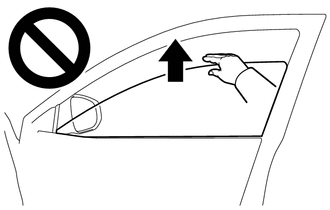
HINT:
The anti-pinch function operates during both automatic and manual close operations while the engine is running or the ignition switch is in the ON position, and also for approximately 45 seconds after the ignition switch is changed to the OFF position.
(1) Fully open the power window.
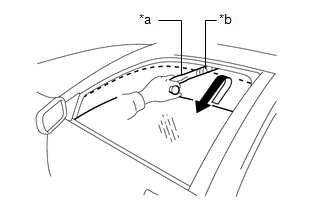
*a |
Check installation |
*b |
Rag |
(2) Wrap a check gauge in a piece of cloth and place it near the fully closed position of the power window.
(3) Operate the automatic or manual close function and make sure that the power window stops and then lowers once the check gauge is caught between the door glass and the door frame.
HINT:
- If a manual close operation is performed from the driver seat, the door glass will lower approximately 30 mm (1.181 in.) from the contact point with the hammer end, or continue to lower for approximately 5 seconds and then stop.
- If a manual close operation is not performed from the driver seat, the door glass will lower approximately 125 mm (4.921 in.) from the contact point with the hammer end, or continue to lower for approximately 5 seconds and then stop.
- After the anti-pinch function is activated during an automatic or manual close operation, the anti-pinch function will not operate if the manual close function is activated again within approximately 4 seconds.
- After the anti-catch function is activated, the automatic close function will not operate the first time the power window automatic close switch is operated. The automatic close function will operate normally after the power window switch is activated for the first time.
(4) While the power window is lowering, make sure that the door glass cannot be closed again using the power window switch.
CHECK ANTI-CATCH FUNCTION
(a) Check the basic operation.
CAUTION:
Do not put your fingers between the door frame and the door glass to check the anti-pinch function. Also, be careful to protect any part of the body during the check.
(1) Fully close all power windows.
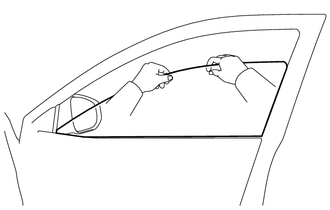
(2) Operate the automatic or manual open function of the power window, grasp the upper edge of the door glass with one or both hands, and make sure that the power window operation stops.
HINT:
After the anti-catch function is activated during an automatic or manual open operation, the anti-catch function will not operate if the manual open function is activated again within approximately 4 seconds.
CHECK POWER WINDOW SWITCH LED ILLUMINATION
(a) Check that the LED illuminates (multiplex network master switch assembly).
(1) Check that the LEDs in the multiplex network master switch assembly illuminate when the headlight dimmer switch is in the TAIL position.
(b) Check that the LED illuminates (power window regulator switch assembly).
(1) Check that the LEDs in the power window regulator switch assembly illuminate when the headlight dimmer switch is in the TAIL position.
(c) Check that the LED illuminates (rear power window regulator switch assembly).
(1) Check that the LEDs in the rear power window regulator switch assembly illuminate when the headlight dimmer switch is in the TAIL position.