Parking assistant. Operating requirements. Switching on and activating. Display on the Control Display. Parking with the parking assistant
The parking assistant in the BMW 5 Series G30 provides semi-automatic support for parking in and out. Using ultrasonic sensors, the system detects suitable parking spaces along the road and takes over steering, while the driver controls braking and acceleration. The graphic display on the Control Display is particularly helpful, marking free parking spaces and showing the progress of the parking maneuver. Activation takes place via reverse gear or the parking assistant button, with clear notes on optimal use. Acoustic signals and intelligent integration into the vehicle menu make the parking process safe and convenient. The system not only saves time but also protects the vehicle from typical parking damage.
Prerequisites for operation
Ultrasonic sensors
Ensure full functionality:
- Do not cover the sensors, e.g. with stickers.
- Keep the sensors clean and free of obstructions.
For measuring parking spaces
- Drive straight ahead up to approx. 35 km/h.
- Maximum distance from the row of parked vehicles: 1.5 m.
Suitable parking space
General:
- Space behind an object that is at least 0.5 m long.
- Space between two objects that are each at least 0.5 m long.
Parallel parking, parallel to the road:
- Minimum length of the space between two objects: own vehicle length plus approx.
Perpendicular parking:
- Minimum width of the space: own vehicle width plus approx. 0.7 m.
- Minimum depth: own vehicle length.
Parking procedure
- Doors and tailgate are closed.
- Parking brake is released.
Manual transmission:
- When parking in spaces on the driver's side, the corresponding turn signal must be set.
Steptronic transmission:
- Driver's seat belt is fastened.
Switching on and activating
Switching on with the button
 Press the Parking Assistant button.
LED lights up.
The current status of the parking space search is shown on the Control Display.
 Parking assistant is switched on automatically.
Switching on with reverse gear
Engage reverse gear.
The current status of the parking space search is shown on the Control Display.
Activating: "Parking assistant"
Display on the Control Display
System activated/deactivated
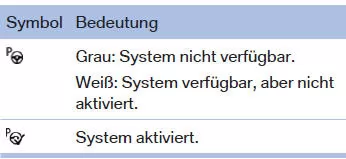
Parking space search and system status
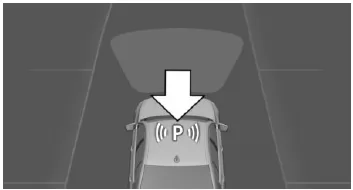
- P symbol in the vehicle display: parking assistant is activated and parking space search is active.
- Suitable parking spaces are highlighted in color on the Control Display next to the vehicle symbol along the edge of the road when the parking assistant is active, and a signal sounds. Switch the warning tone on/off.
- When perpendicular or parallel parking spaces are clearly detected, the system automatically sets the appropriate parking method. For spaces where both parallel and perpendicular parking is possible, a selection menu is displayed. In this case, select the desired parking method manually.
 Parking maneuver active. Steering has been taken over.
- The parking space search is always active when driving forward slowly and straight, even when the system is deactivated. When the system is deactivated, the displays on the Control Display are shown in grey.
Parking with the parking assistant
Parking
 Press the parking assistant button or engage reverse gear to switch on the parking assistant 224.
Activate the parking assistant if necessary.
 Parking assistant is activated.
The status of the parking space search and possible parking spaces are shown on the Control Display.
Manual transmission: To reach an optimal parking position, wait for the automatic steering to complete after the gear change while stationary.
Steptronic transmission: Keep the parking assistant button pressed for the duration of the parking maneuver. At the end of the parking maneuver, selector lever position P is engaged.
The end of the parking maneuver is shown on the Control Display.Canceling manually
The parking assistant can be canceled at any time:
 Steptronic transmission: Release the parking assistant button during the parking maneuver.
 Manual transmission: Press the parking assistant button.
 Select the "Parking assistant" symbol on the Control Display.
Automatic cancellation
The system cancels automatically in the following situations:
- When the steering wheel is held or when steering is applied manually.
- If the road is snow-covered or slippery.
- If there are obstacles that are difficult to overcome, e.g. curbs.
- When obstacles appear suddenly.
- When the Park Distance Control PDC displays distances that are too short.
- When the maximum number of parking maneuvers or the parking duration is exceeded.
- When switching to other functions on the Control Display.
Manual transmission:
- When the selected gear does not match the instruction on the Control Display.
- At speeds above approx. 10 km/h.
- When the turn signal is set toward the side opposite the intended parking side.
Steptronic transmission:
- When the parking assistant button is released.
- When the tailgate is open.
- When doors are open.
- When the parking brake is applied.
- When accelerating.
- If the brake pedal remains depressed for an extended period while the vehicle is stationary.
- When unfastening the driver's seat belt.
Resume
An interrupted parking maneuver can be resumed, if necessary.
To do so, activate the Park Assistant again and follow the instructions on the Control Display.
Switching off
The system can be switched off manually: press the Park Assist button.
Switch the audible signal for suitable parking spaces on/off
Via iDrive:
- "My Vehicle"
- "Vehicle settings"
- "Parking"
- "Parking assistant"
- "Tone for parking space"
The setting is saved for the currently used driver profile.
The Park Assistant of the BMW 5 Series G30/G31 provides intelligent support when parking into and out of parallel and perpendicular parking spaces. Ultrasonic sensors and cameras precisely capture the surroundings and reliably detect suitable parking spaces. The system takes over the steering and helps the driver maneuver the vehicle safely into the parking space.
The display on the Control Display is particularly convenient, clearly showing the status of the parking space search, the active parking maneuver and warning messages. Activation is simple, either via the button or by engaging reverse gear. The system can be adapted to individual needs, for example by switching the signal for detected parking spaces on or off.
With this system, the BMW 5 Series G30/G31 demonstrates how innovative technology makes everyday driving easier while increasing safety and comfort when parking.
Test yourself
A quick BMW 5 quiz: every answer comes with an explanation and a link to the manual page.