Remote Control Parking. Requirements. Parking forward. Pulling out in reverse. System limitations
With Remote Control Parking in the BMW 5 VII Gen, the vehicle can be moved safely and under control using the BMW Display Key. Requirements such as clean sensors, suitable gaps and level surfaces are essential. The driver can park the vehicle forward into narrow gaps or pull it out in reverse – at minimum speed and with constant visibility of the surroundings. Activation is performed via the Display Key's menu, and movement only takes place while the button is held down. Stopping or resuming is also possible without difficulty. System limitations such as radio interference or difficult weather conditions must be observed. For a safe result, the driver's own responsibility is indispensable.
Prerequisites for operation
Cameras and ultrasonic sensors
- Do not cover the sensors, e.g. with stickers.
- Keep sensors clean and free of obstructions and, if necessary,
clean.
Suitable parking space
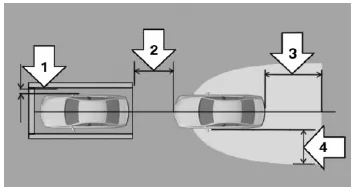
- Parking forward into the parking space is possible centered and straight.
- Width of the parking space: Own vehicle width without exterior mirrors plus approx. 0.4 m on each side, arrow 1.
- Distance to the parking space, max. 2 m, arrow 2.
- During remote control parking, the driver is outside the vehicle with the BMW Display Key.
- Behind the vehicle, approx. 3–4 m, arrow 3.
- To the side of the vehicle, approx. 1.5 m, arrow 4.
- Incline or decline max. 5 %.
- No duplex garages.
Parking forward
Parking
When driving forward, the system may make
minor steering corrections.
- Drive forward toward the parking space, centered and straight, and stop at a distance of no more than 2 m.
- Apply the parking brake and switch off ready mode with the Start/Stop button.
- Have all occupants exit and close the doors.
- If necessary, switch on the display on the BMW Display Key and cancel the display lock.
On the BMW Display Key, go to the menu: "Remote Control Parking"
 Press and hold the button on the side of the BMW Display Key for the duration of the parking maneuver.
The engine starts.
 Hold the button: The vehicle moves as long as the button is pressed. If there are obstacles in the travel path, release the button to stop the vehicle.
For maneuvering movements: Touch the reverse arrow symbol.
The vehicle stops.
"ENGINE STOP": Touch the button.
The engine is switched off.
Lock the vehicle.
The parking brake is applied and ready mode is switched off.Cancel, interrupt, resume the parking maneuver
To cancel or interrupt the parking maneuver:Release the button. The vehicle stops with an emergency brake application.
To resume the parking maneuver:Press the button again within 30 seconds.
Pulling out in reverse
Pulling out
When reversing, the vehicle moves straight back without steering.
- If necessary, switch on the display on the BMW Display Key and cancel the display lock.
- Unlock the vehicle.
- On the BMW Display Key, go to the menu: "Remote Control Parking"
- Press and hold the button on the side of the BMW Display Key for the duration of the pull-out maneuver.
- Wait until ready status is shown on the display. Observe any text messages if necessary.
- "ENGINE START": Touch the button.
The engine starts.
Hold the button: The vehicle moves as long as the button is pressed. If there are obstacles in the travel path, release the button to stop the vehicle.
The engine is switched off.
The parking brake is applied and ready mode is switched off.
If necessary, lock the vehicle.Cancel, interrupt, resume the parking maneuver
To cancel or interrupt the parking maneuver:Release the button. The vehicle stops with an emergency brake application.
To resume the parking maneuver:Press the button again within 30 seconds.
Messages on the BMW Display Key
The symbol indicates system messages.
System limitations
Safety information
WARNING Due to system limitations, the system may respond incorrectly or not at all. There is a risk of accident or property damage. Observe the notes on system limitations and intervene actively if necessary.
No parking assistance
The Park Assistant does not provide assistance in the following situations:
- On sharp bends.
- When towing a trailer.
- For angled parking spaces.
Functional restrictions
The function may be restricted, for example, in the following situations:
- On uneven surfaces, e.g. gravel roads.
- On slippery surfaces.
- On steep inclines or declines.
- If there are accumulations of leaves or snow piles in the parking space.
- When a temporary spare wheel is fitted.
- When changes have been made to a parking space that has already been measured.
- Next to ditches or drop-offs, e.g. a quay edge.
Functional restrictions due to radio interference
Radio interference may cause functional restrictions for Remote Control Parking with the BMW Display Key.
Limits of ultrasonic measurement
Detecting objects can reach the limits of physical ultrasonic measurement, e.g. in the following situations:
- With small children and animals.
- With people wearing certain clothing, e.g. a coat.
- With external interference to the ultrasound, e.g. from passing vehicles or loud machinery.
- With dirty, iced, damaged or misaligned sensors.
- Under certain weather conditions, e.g. high humidity, rain, snowfall, extreme heat or strong wind.
- With trailer drawbars and couplings of other vehicles.
- With thin or wedge-shaped objects.
- With moving objects.
- With objects positioned higher up or protruding, e.g. wall projections or cargo.
- With objects that have corners, edges and smooth surfaces.
- With objects that have fine surfaces or structures, e.g. fences.
- With objects that have porous surfaces.
- With protruding cargo.
- With small and low objects, e.g. crates.
- With obstacles and people at the edge of the lane.
- With soft obstacles or obstacles covered in foam.
- With plants or bushes.
- Low objects that have already been displayed, e.g. curbs, may enter the blind zone of the sensors before or after a continuous tone has already sounded.
- Cargo that extends beyond the vehicle is not taken into account by the system.
Parking spaces may be detected that are not suitable, or suitable parking spaces may not be detected.
Remote Parking in the BMW 5 G30/G31 requires certain conditions to work safely and reliably. These include a suitable parking space, clean sensors and cameras, and a clear line of sight between the driver and the vehicle. The system assists the driver in parking forward precisely or reversing out of a space, which is ideal for tight garages and parking structures.
Operation with the BMW Display Key is intuitive: a single press starts the engine, additional symbols control the direction, and holding the button down carries out the parking maneuver. The system stops automatically when it detects an obstacle or when the driver releases the button. Despite the assistance, the driver remains responsible for monitoring the maneuver.
FAQQuestion 1: Does Remote Parking also work in the event of radio interference?
Answer: In the event of radio interference, the function may be limited or fail. In this case, park the vehicle manually.
Question 2: Can the system steer over curbs?
Answer: Yes, the system can steer over curbs. The driver should therefore monitor the surroundings with particular care.
Test yourself
A quick BMW 5 quiz: every answer comes with an explanation and a link to the manual page.