Active Cruise Control with Stop&Go function, ACC
The BMW 5 Series G30 is equipped with a powerful navigation system that guides the driver precisely and intuitively to the destination. Route calculation takes current traffic conditions, road closures and preferred route options into account. Clear voice guidance, zoom function and 3D map display help maintain orientation even in complex traffic situations. The destination can be entered manually, by voice or via saved favorites. Additional information such as parking spaces or filling stations can be displayed via ConnectedDrive. The navigation system is more than a guide – it makes every journey more efficient and more pleasant.
Principle
Using the buttons on the steering wheel, a set speed and a distance to the vehicle ahead can be set with this system.
When driving freely, the system maintains the set speed; the vehicle accelerates or brakes automatically to do so.
When a vehicle is ahead, the system adjusts the vehicle's own speed in the
within the given limits so that the set distance to the vehicle ahead is maintained.
General
A radar sensor in the front bumper and a camera at the interior rear-view mirror detect vehicles ahead.
Depending on vehicle settings, the characteristics of cruise control may change in certain ranges, e.g. acceleration is weaker in ECO PRO driving mode.
The distance can be set in several steps and, for safety reasons, depends on the respective speed.
If the vehicle ahead brakes to a standstill and sets off again shortly afterwards, the system can follow this within the given limits.
Safety notes
WARNING The system does not relieve you of your own responsibility to correctly assess the traffic situation. Due to system limitations, the system cannot always respond appropriately on its own in all traffic situations.
There is a risk of accident. Adapt your driving style to the traffic conditions. Observe traffic and actively intervene in relevant situations. WARNING An unsecured vehicle may start moving on its own and roll away.
There is a risk of accident. Before leaving the vehicle, secure it against rolling away.
To make sure the vehicle is secured against rolling away, observe the following:
- Apply the parking brake.
- On inclines or downhill, turn the front wheels towards the curb.
- On inclines or downhill, additionally secure the vehicle, e.g. with a wheel chock.
WARNING The set speed may be accidentally set incorrectly or retrieved.
There is a risk of accident. Adapt the set speed to the traffic conditions. Observe traffic and actively intervene in relevant situations. WARNING Risk of accident due to excessive speed differences to other vehicles, e.g. in the following situations:
- Rapidly approaching a slower vehicle.
- A vehicle suddenly moving into your lane.
- Rapidly approaching stationary vehicles.
There is a risk of injury or death.
Observe traffic and actively intervene in relevant situations.
Overview
Steering wheel buttons
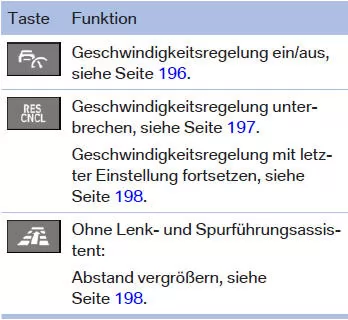
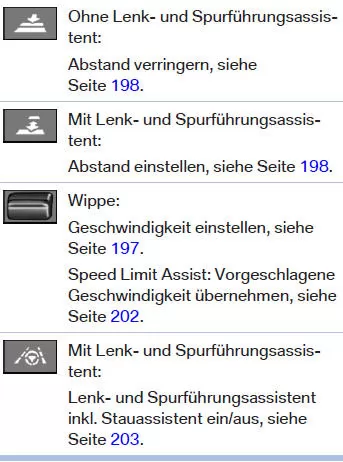
Radar sensor
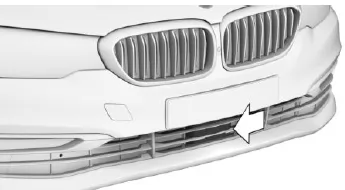
The radar sensor is located at the front of the bumper.
Keep the radar sensor clean and clear.
Camera
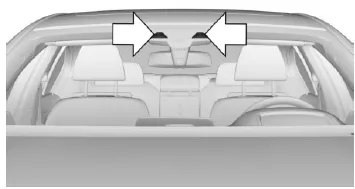
The camera is located in the area of the interior rearview mirror.
Keep the windshield in the area in front of the interior rearview mirror clean and free of obstructions.
Operating range
The optimal operating range is on well-developed roads.
The minimum adjustable speed is 30 km/h.
The maximum adjustable speed is 210 km/h.
After switching to cruise control without distance control, higher set speeds can also be selected.
The system can also be activated when the vehicle is stationary.
Switching cruise control on/off and interrupting it
Switching on
 Press button on steering wheel.
The indicator lamps in the instrument cluster light up and the marker in the speedometer is set to the current speed.
Cruise control is active. The current vehicle speed is held and stored as the set speed.
DSC is switched on if necessary.
Switching off
To switch off while stationary, press the brake at the same time.
 Press button on steering wheel.
The indicators go out. The stored set speed is deleted.
Interrupting manually
 When activated, press the button on the steering wheel.
To interrupt while stationary, press the brake at the same time.
Interrupting automatically
The system automatically interrupts in the following situations:
- When the driver brakes.
- When the selector lever is moved out of position D.
- When DTC is activated or DSC is deactivated.
- When DSC is intervening.
- When the vehicle is stationary and the seat belt is unbuckled and the driver's door is opened.
- If the system detects no objects for an extended period, e.g. on little-used roads without roadside boundaries.
- If the radar's detection range is impaired, e.g. by dirt or heavy precipitation.
- After a longer standstill, when the vehicle has been braked to a standstill by the system.
Setting the speed
Holding and storing the speed
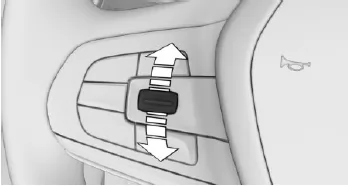
Press the rocker switch in the interrupted state.
When the system is switched on, the current speed is maintained and stored as the set speed.
The stored speed is shown in the speedometer and briefly in the instrument cluster.
DSC is switched on if necessary.
Changing the speed
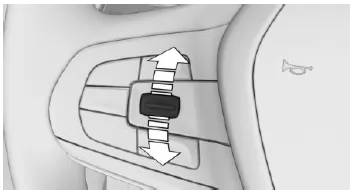
Press the rocker switch up or down repeatedly until the set speed is reached.
In the active state, the displayed speed is stored and reached on a clear road.
- Each tap of the rocker switch up to the pressure point increases or decreases the set speed by 1 km/h.
- Each press of the rocker switch beyond the pressure point increases or decreases the set speed to the next tens value on the km/h display in the speedometer.
Hold the rocker switch in position to repeat the action.
Setting the distance
General
The distance setting is saved for the driver profile currently in use.
Safety information WARNING The system does not relieve you of your own responsibility. Due to system limitations, braking may occur late.
There is a risk of accident or property damage. Always observe traffic closely. Adjust the distance to traffic and weather conditions and maintain the required safety distance by braking if necessary.
Without steering and lane control assistant: reduce distance
 Press the button repeatedly until the desired distance is set.
The selected distance is shown in the instrument cluster.
Without steering and lane control assistant: increase distance
 Press the button repeatedly until the desired distance is set.
The selected distance is shown in the instrument cluster.
With steering and lane control assistant: set distance
 Press the button repeatedly until the desired distance is set.
Resuming cruise control
An interrupted cruise control can be resumed by recalling the stored speed.
Before recalling the stored speed, make sure the difference between the current speed and the stored speed is not too large. Otherwise, unintended braking or acceleration may occur.
 When the system is interrupted, press the button.
Cruise control resumes with the stored values.
The stored speed value is deleted and can no longer be recalled in the following cases:
- When the system is switched off.
- When the vehicle is switched off to ready state off.
Active Cruise Control with Stop&Go function in the BMW 5 Series G30/G31 combines comfort and safety at the highest level. It not only maintains a set speed but also automatically adjusts the distance to the vehicle ahead. This makes city traffic and long motorway journeys considerably more relaxed.
The combination of camera and radar sensor ensures precise surroundings monitoring. Pulling away after a brief standstill is also supported within the system limits. All relevant information is clearly displayed in the cockpit and optionally in the Head-Up Display, so the driver always keeps an overview.
With this technology, the BMW 5 Series G30/G31 sets the standard for driver assistance and reliably supports the driver without taking control away from them.
Test yourself
A quick BMW 5 quiz: every answer comes with an explanation and a link to the manual page.