Without Surround View: reversing camera
The reversing camera without Surround View in the BMW 5 VII generation provides a clear view of the rear area. It activates automatically when reverse gear is engaged and delivers a high-resolution image with dynamic guide lines. PDC markings and a zoom on the trailer hitch expand the assistance options. The camera is located in the trunk handle strip and should be cleaned regularly to maintain image quality. The camera can also be started manually using the Park Assist button. Drivers benefit from additional safety when maneuvering, even with restricted visibility. The system integrates seamlessly into the on-board comfort features and improves precision when reversing.
Principle
The reversing camera assists with reversing into parking spaces and maneuvering. The area behind the vehicle is shown on the Control Display for this purpose.
Safety information
WARNING The system does not relieve you of your own responsibility to correctly assess the traffic situation. There is a risk of an accident.
Adapt your driving style to the traffic conditions.
Additionally monitor the traffic situation and the vehicle surroundings by looking directly, and intervene actively in the relevant situations.
Overview
Button in vehicle
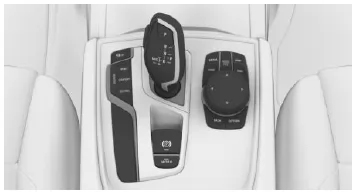
 Parking Assistant button
Camera
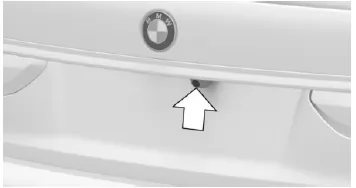
The camera lens is located in the handle strip of the trunk lid.
Dirt can impair image quality. Clean the camera lens if necessary.
Switching on/off
Switch on automatically
The system switches on automatically when reverse (R) is selected with the engine running.
Automatic switch-off when driving forward
The system switches off when a certain distance or speed is exceeded.
If necessary, switch the system on again.
Switch on/off manually
 Press the Parking Assistant button.
- On: LED lights up.
- Off: LED goes out.
PDC is shown on the Control Display.
If reverse gear is engaged when the Parking Assistant button is pressed, the image from the rear view camera is displayed.
Changing the view via iDrive
When PDC is activated: "Rear view camera" The rear view camera image is displayed.
Prerequisites for operation
- Rear view camera is switched on.
- Tailgate is fully closed.
- Keep the camera's detection area clear.
Assistance functions
General
Several assistance functions can be active at the same time.
The assistance functions can be activated manually.
 "Parking guide lines" Track lines and turning circle lines are displayed.
 "Obstacle marking" Obstacles detected by PDC are shown by markings.
 "Trailer hitch zoom" Zoomed view of the trailer hitch is displayed.
Parking guide lines
Track lines
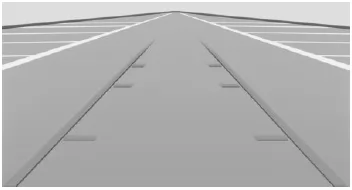
The track lines help you estimate the space required when parking and maneuvering on level ground.
The track lines depend on the steering angle and are continuously adjusted when the steering wheel moves.
Turning circle lines
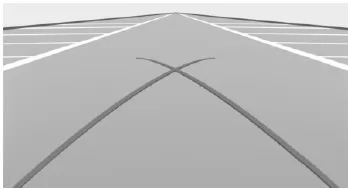
The turning circle lines can only be shown in the camera image together with the track lines.
The turning circle lines show the path of the smallest possible turning circle on level ground.
Above a certain steering angle, only one turning circle line is displayed.
Parking with track lines and turning circle lines
- Position the vehicle so that the red turning circle line leads into the boundary of the parking space.
- Turn the steering wheel so that the green track line covers the corresponding turning circle line.
Obstacle marking
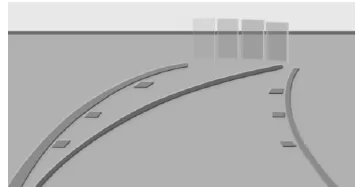
Obstacles behind the vehicle are detected by the PDC sensors.
Obstacle markings can be shown in the rear view camera image.
The color coding of the obstacle markings corresponds to the PDC markings.
Trailer hitch zoom
To make it easier to attach a trailer, the image area of the trailer hitch can be shown enlarged.
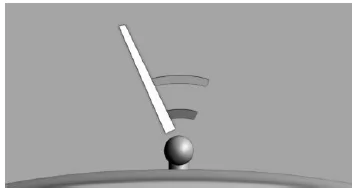
The distance of the trailer to the trailer hitch can be estimated using two static circle segments.
A coupling guide line that depends on the steering angle helps you align the trailer with the trailer hitch.
Setting brightness and contrast via iDrive
When the rear view camera is switched on:
- Tilt the controller to the left.
- -
 "Brightness"
- "Contrast"
- Set the desired value.
System limitations
Deactivated camera
If the camera is deactivated, e.g. when the tailgate is open, the camera image is shown hatched in grey.
Object detection
Very low obstacles as well as higher, protruding objects, e.g. wall protrusions, may not be detected by the system.
Assistance functions also take PDC data into account.
Observe the notes in the chapter Park Distance Control PDC.
Objects shown on the Control Display may be closer than they appear. Do not estimate the distance to objects from the display.
The rear view camera of the BMW 5 Series G30/G31 assists the driver when reversing, parking and maneuvering by providing a clear image of the area around the vehicle on the Control Display. Supplemented by track lines and turning circle lines, the system allows a precise assessment of the available space and makes maneuvering considerably easier.
The functionality is extended by obstacle markings and a zoomed view of the trailer hitch, so trailers can be coupled easily and safely. Operation is simple, and the display adapts dynamically to the steering angle, providing additional support.
FAQQuestion 1: Can the brightness and contrast of the camera image be adjusted?
Answer: Yes, brightness and contrast can be adjusted individually via iDrive to optimize the display.
Question 2: Is the camera image switched off automatically?
Answer: Yes, when driving forward, the system switches off automatically after a certain distance or speed has been exceeded.
Test yourself
A quick BMW 5 quiz: every answer comes with an explanation and a link to the manual page.