Displays in the instrument cluster
The Parking Assistant system of the BMW 5 G30 enables semi-automatic parking into parallel or perpendicular parking spaces. Using ultrasonic sensors, the vehicle detects suitable parking spaces and takes over steering, while the driver controls the accelerator and brake. The function increases parking precision and minimizes the risk of scratches and collisions. Instructions and visualizations are shown in the display, so the parking process remains traceable at all times. Parking-out is also supported, which is particularly helpful in tight parking spaces or when visibility is poor. The Parking Assistant is a reliable aid for a comfortable parking experience.
Display in the speedometer

- Green marking: System is active, the marking shows the set speed.
- Orange/white marking: System is interrupted, the marking shows the stored speed.
- No marker: system is switched off.
Status display
The selected set speed fades out after a short time.
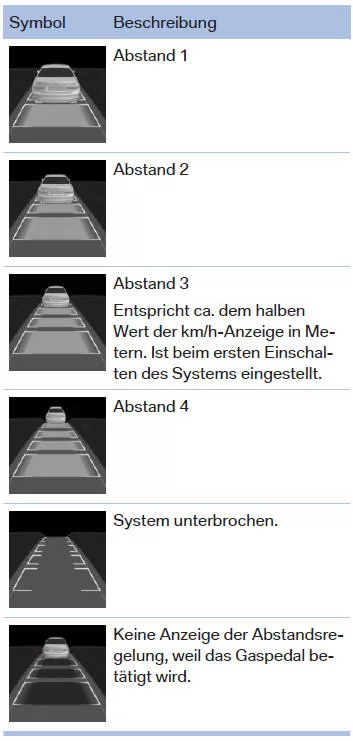
Vehicle distance
The selected distance to the vehicle ahead is displayed.
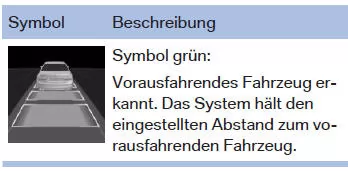
Detected vehicle
As soon as the detected vehicle has started moving, the vehicle symbol in the distance display moves away.
To accelerate, activate ACC, e.g. by briefly pressing the accelerator pedal or the rocker switch.
Indicator and warning lights
Displays in the Head-Up Display
Set speed
Some system information can also be shown in the Head-Up Display.
 The symbol is displayed when the set speed is reached.
Distance information
 This symbol is displayed when the distance to the vehicle ahead is too short.
Distance information is active in the following situations:
- Active cruise control switched off.
- Display in head-up display selected.
- Distance too short.
- Speed above approx. 70 km/h.
System limitations
Detection range
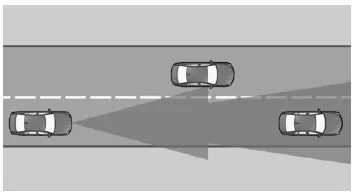
The detection capability of the system and its automatic braking capability are limited.
E.g., two-wheelers may not be detected.
Deceleration
The system does not decelerate in the following situations:
- For pedestrians or other similarly slow road users.
- At red traffic lights.
- For cross traffic.
- For oncoming traffic.
Vehicles cutting in
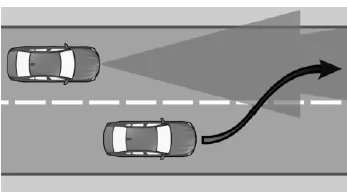
A vehicle ahead is only detected once it is fully in your own lane.
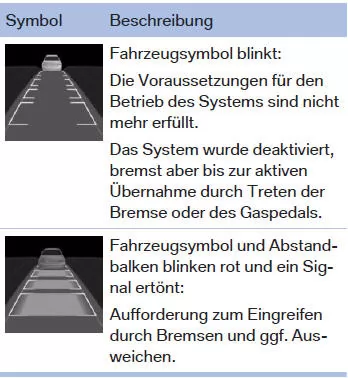
If a vehicle ahead suddenly cuts into your lane, the system may not be able to restore the selected distance automatically. This also applies to large speed differences relative to vehicles ahead, e.g. when rapidly approaching a truck. When a vehicle ahead is reliably detected, the system prompts the driver to intervene by braking and, if necessary, steering around it.
Cornering
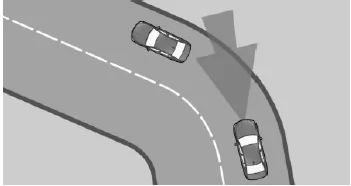
If the set speed is too high for a curve, the speed is slightly reduced in the curve. However, curves are not detected in advance. Therefore, enter curves at an appropriate speed.
In tight curves, the limited detection range of the system may mean that a vehicle ahead is no longer detected, or is detected significantly late.
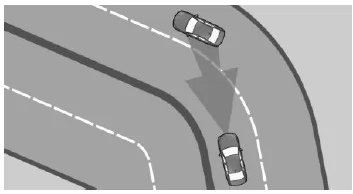
When approaching a curve, the system may briefly react to vehicles in the adjacent lane due to the curvature of the road. Any deceleration of the vehicle by the system can be compensated by briefly accelerating. After releasing the accelerator pedal, the system is active again and controls the speed independently.
Pulling away
For example, the vehicle cannot pull away automatically in the following situations:
- On steep inclines.
- Before bumps in the road surface.
- With a heavy trailer.
In these cases, press the accelerator pedal.
Weather conditions
In adverse weather or lighting conditions, e.g. rain, snowfall, slush, fog or backlight, vehicle detection may deteriorate, and detected vehicles may be briefly lost. Drive attentively and react yourself to the current traffic situation.
Intervene actively if necessary, e.g. by braking, steering or swerving.
Engine output
The set speed is also maintained on downhill gradients. On uphill gradients, the speed may fall below the set value if the engine output is insufficient.
In driving mode ECO PRO, the fuel-saving driving style may in some situations cause a deliberate exceeding or falling below of the set speed, e.g. on downhill or uphill gradients.
Malfunction
The system cannot be activated if the radar sensor is not correctly aligned, e.g. due to a parking damage.
A Check Control message is displayed if the system has failed.
Have the system checked by a manufacturer service partner, another qualified service partner, or a specialist workshop.
The function for detecting and reacting to approaching stationary vehicles may be restricted in the following situations:
- During the camera calibration process immediately after vehicle delivery.
- If the camera has failed or is dirty.
The displays in the instrument cluster of the BMW 5 G30/G31 give the driver clear and intuitive feedback on the activated assistance systems. Whether set speed, selected vehicle distance or detected vehicles, all relevant information can be seen at a glance. This makes it considerably easier to monitor and adjust the vehicle while driving.
The interaction with the head-up display in particular ensures that your eyes stay on the road. Important warnings, such as a distance that is too short or exceeding the speed limit, are shown clearly. The system thus contributes significantly to safety and supports the driver in everyday driving.
The BMW 5 G30/G31 thus demonstrates how modern technology and practical benefits are harmoniously combined to optimize the driving experience.
Test yourself
A quick BMW 5 quiz: every answer comes with an explanation and a link to the manual page.