Speed Limit Assist
The reversing camera in the BMW 5 VII Gen extends the view when reversing with a clear display of the area behind the vehicle. Guide lines and obstacle markings help with orientation and support precise maneuvering. The system is particularly useful in tight parking garages or with low bollards. The camera image adapts automatically to lighting conditions, so visibility remains clear in darkness or direct sunlight. Combined with PDC (Park Distance Control), it creates a complete picture of the vehicle surroundings. The reversing camera makes parking not only safer but also considerably more comfortable.
Principle
If the vehicle systems, e.g. Speed Limit Info, detect a change in the speed limit on the road, this new speed value is proposed for Active Cruise Control, ACC, as a new set speed to be accepted, if cruise control is activated.
If the Manual Speed Limiter is activated, the new speed value is proposed as the speed limit to be accepted.
Safety notes
WARNING The system does not relieve you of your own responsibility to correctly assess the traffic situation. Due to system limitations, the system cannot always respond appropriately on its own in all traffic situations.
There is a risk of accident. Adapt your driving style to the traffic conditions. Observe traffic and actively intervene in the relevant situations. WARNING The set speed may be accidentally set incorrectly or retrieved.
There is a risk of accident. Adapt the set speed to traffic conditions. Observe traffic and actively intervene in the relevant situations.
Overview
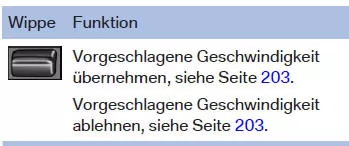
Rocker switch on steering wheel
Switching on/off
Via iDrive:
- "My Vehicle"
- "Vehicle settings"
- "Speed Limit Assist"
- "Speed Limit Assist"
Displays in the instrument cluster
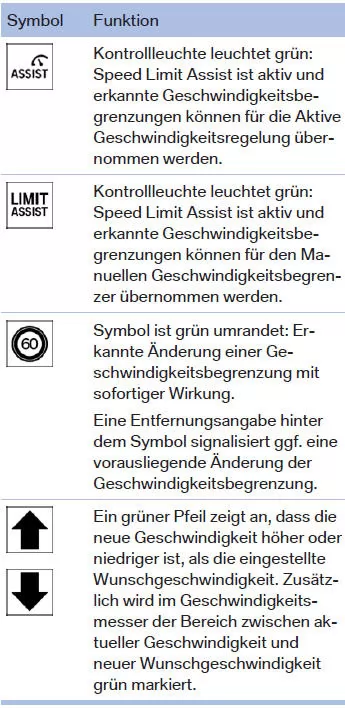
A message is shown in the instrument cluster when the system and cruise control are activated.
Accept proposed speed
Briefly press the left rocker switch on the steering wheel up or down, in the direction of the green arrow. The new speed is accepted. The green marking in the speedometer goes out.
Reject proposed speed
Briefly press the rocker switch against the direction of the green arrow.
Setting speed adjustment
You can set whether the speed limit is accepted exactly or with a tolerance of –15 km/h to +15 km/h.
Via iDrive:
- "My Vehicle"
- "Vehicle settings"
- "Speed Limit Assist"
- "Adjust suggestion:"
- Make the desired setting.
System limitations
Speed Limit Assist is based on the Speed Limit Info system, so also observe the system limits of Speed Limit Info.
Depending on the country, upcoming speed limits may not be available for acceptance, or only to a limited extent, e.g. for speed information from the navigation system.
The Speed Limit Assist of the BMW 5 G30/G31 helps the driver comply with applicable speed limits. It detects changes in the permitted speed and offers to accept them automatically as a new set speed or speed limit. This increases safety and reduces the risk of speeding violations.
The system can be conveniently operated via iDrive and the rocker switch on the steering wheel. Individual adjustments, such as a tolerance to the limit, are possible and are saved in the driver profile. This allows the driver to optimally adapt the system to their driving style.
FAQQuestion 1: Is a tolerance above the limit also proposed?
Answer: Yes, in iDrive a tolerance between -15 km/h and +15 km/h can be set relative to the detected limit.
Question 2: Does Speed Limit Assist work the same in all countries?
Answer: No, in some countries not all speed information is available for acceptance, e.g. for information based purely on navigation data.
Test yourself
A quick BMW 5 quiz: every answer comes with an explanation and a link to the manual page.