Charging the traction battery (Plug-in hybrid)
For a full charge, follow the charging procedure without interruption until it stops automatically. Charging can start immediately (default) or be delayed.
 Delayed charging is set via the touchscreen or the MyCitroën App.
When the vehicle is connected, the following information is shown in the instrument panel:
- Traction battery state of charge (%).
- Remaining range (km or miles).
- Estimated charging time (the calculation may take a few seconds).
- Charging speed (km or miles gained per hour).
After the instrument panel goes into standby, this information can be displayed again by unlocking the vehicle or opening a door.
Charging progress can also be monitored via the MyCitroën App.
For more information on the remote functions available, refer to the corresponding section.
Low charge / Driving
Driving when the traction battery charge level is too low may cause the vehicle to stop and lead to accidents or serious injury.
ALWAYS make sure the traction battery charge level is sufficient.
Low charge / Parking
If the outside temperature is below zero, it is recommended not to park the vehicle outdoors for several hours with a low charge level (below 20%).
Vehicle not used for more than 1 month
If the vehicle is not used for a long period (more than 4 weeks) without the possibility of recharging at restart, automatic discharge may make restarting impossible if the traction battery charge level is low or very low, especially at negative ambient temperatures.
ALWAYS make sure the traction battery charge is between 20 and 40% if the vehicle is not going to be used for several weeks.
Do not connect the charging cable.
Always park the vehicle in a place with temperatures between -10°C and 30°C (parking in extreme temperatures may damage the traction battery).
Refer to the Auxiliary batteries (Plug-in hybrid) section for the battery disconnection procedure.
Precautions
Plug-in hybrid vehicles have been developed in compliance with the maximum electromagnetic field exposure limits set by ICNIRP (International Commission on Non-Ionizing Radiation Protection - 1998 Guidelines).
 Pacemaker wearers or users of an equivalent implanted device should consult their doctor on the precautions to take, or the manufacturer of the implanted medical device, to confirm that its operation is guaranteed in an environment complying with ICNIRP recommendations.
If in doubt, during charging, do not stay inside or near the vehicle, the charging cable or the charging unit, even for a short time.
Before charging
Depending on the situation:
► Have a professional check that the electrical installation to be used complies with standards and is compatible with the vehicle.
► Have a professional install a dedicated domestic socket or a fast charging unit compatible with the vehicle.
Use the charging cable supplied with the vehicle.
For more information, contact a CITROËN dealer or a qualified workshop.
During charging
For safety, the engine will not start if the charging cable is connected to the vehicle connector. A warning is displayed in the instrument panel.
While charging, unlocking the vehicle stops charging.
If no action is taken on any opening (door or boot) or on the charging gun, the vehicle locks again after 30 seconds and charging resumes automatically.
Never work under the bonnet:
- Some areas remain very hot even 1 hour after charging has ended - risk of burns! - The fan may start at any time - risk of cuts or entrapment!
After charging
Check that the charging flap is closed.
Do not leave the cable connected to the domestic socket - risk of short circuit or electric shock if in contact with or immersed in water!
Charging procedure
Connection
► Before charging, check that the gear selector is in P and the ignition is off, otherwise charging is not possible.
► Press the rear of the charging flap to open it, and make sure there is no foreign object on the vehicle's charging socket.
The light guides in the flap light up white.
Domestic charging (mode 2)
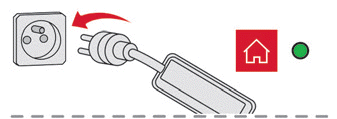
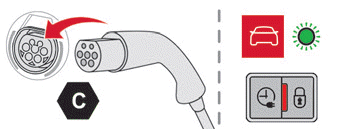
► First connect the charging cable, box end, to the domestic power socket.
When connected, all the indicator lights on the control box come on, then only the POWER light stays on green.
► Remove the protective cover from the charging gun.
► Insert the charging gun into the vehicle's charging socket.
The start of charging is confirmed by the green light guides in the flap flashing and the green CHARGE light on the control box flashing.
If this is not the case, charging has not started. Repeat the procedure and check that all connections are correct.
The red light in the flap coming on indicates that the charging gun is locked.
Accelerated charging (mode 3)
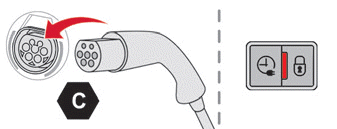
► Follow the operating instructions for the accelerated charging unit (Wallbox).
► Remove the protective cover from the charging gun.
► Insert the charging gun into the vehicle's charging socket.
The start of charging is confirmed by the green light guides in the flap flashing.
If this is not the case, charging has not started. Repeat the procedure and check that all connections are correct.
The red light in the flap coming on indicates that the charging gun is locked.
Delayed charging
By default, the delayed charging start time is set to midnight.
Depending on equipment, this time can be changed.
Settings
With CITROËN Connect Nav
 ► In the Energy menu on the touchscreen, select the Charge page.
► Set the charging start time.
► Press OK.
The setting is saved in the system.
With CITROËN Connect Radio or CITROËN Connect Nav
 Delayed charging can also be set at any time from a smartphone using the MyCitroën App.
For more information on the remote functions available, refer to the corresponding section.
Activation
► After setting the delayed charging, connect the vehicle to the required charging equipment.
 ► Within one minute, press this button in the flap to activate delayed charging (confirmed by the light guides coming on blue).
Disconnecting
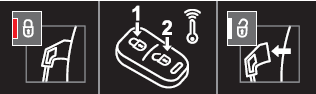
Before disconnecting the charging gun from the charging socket:
► If the vehicle is locked, unlock it.
► If the vehicle is unlocked, lock it, then unlock it.
If selective door unlocking is activated, press the unlock button on the remote control twice to disconnect the charging gun.
The red light in the flap going off confirms that the charging gun is unlocked.
► Within 30 seconds, remove the charging gun.
Domestic charging (mode 2)
The end of charging is indicated by the green CHARGE light on the control box coming on steady and by the green light guides in the flap coming on steady.
► After disconnecting, replace the protective cover on the charging gun and close the charging flap.
► Disconnect the charging cable, box end, from the domestic power socket.
Accelerated charging (mode 3)
The end of charging is indicated by the accelerated charging unit (Wallbox) and by the green light guides in the flap coming on steady.
► After disconnecting, hang the charging gun back on the charging unit and close the charging flap.
Test yourself
A quick Citroen C5 Aircross quiz: every answer comes with an explanation and a link to the manual page.