Head-Up Display
The Head-Up Display in the Citroën C6 (I Gen) projects important information directly into the driver's field of view, from speed and navigation prompts to warning symbols. This chapter describes in detail how the system is switched on and off, adjusted for height and brightness, and personalised. Besides convenient use, it also covers storing personal settings for different drivers. Technical notes and recommendations ensure optimal legibility, even in difficult lighting conditions or with certain eyeglasses. A prime example of innovative technology in the upper-class segment.
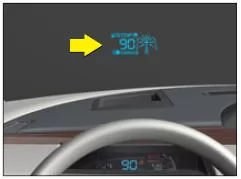
The head-up display system projects a range of important information into the driver's field of view. This way, the driver does not need to take their eyes off the road.
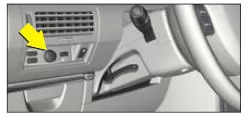
The head-up display controls are located below the ventilation outlet on the driver's side.
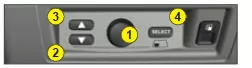
Activation/deactivation
To activate/deactivate the Head-Up Display: after switching on the ignition, press control 1.
The on/off state set when the engine is switched off is retained when restarting.
Head-up display settings
Height adjustment
To adjust the height of the Head-Up Display, press controls 2 and 3.
It is recommended to set the display height as low as possible.
Brightness adjustment
The Head-Up Display system has a brightness sensor that ensures optimal visibility of the information regardless of ambient brightness.
In addition, the display brightness can be adjusted by turning control 1.
Note:
- In certain extreme weather conditions (rain and/or snow, strong sunlight), the Head-Up Display may be temporarily disturbed or unreadable.
- After leaving a tunnel, the system needs a short moment to adjust the display brightness to the ambient brightness.
Note: With some eyeglasses, the Head-Up Display may be difficult to read.
Storing the driver's seat and Head-Up Display positions
The Head-Up Display settings are taken into account when the driving position is stored (see "Memory") and concern:
- Display height.
- Brightness.
- Information selection.
If the Head-Up Display is not readable, it is recommended to check the height settings (controls 2 and 3) and the activation (control 1).
Head-up display contents
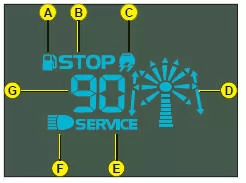
A Warning "Minimum fuel level"
B "STOP" indicator light
C "ESP" indicator light
D Navigation prompts
E "SERVICE" indicator light
F High-beam indicator light
G Vehicle speed
For the meaning of the projected information, see "Warning lights".
Note: During route guidance, the navigation prompt to be followed (arrows) flashes. See the NaviDrive chapter.
To hide a displayed piece of information:
- Press control 4.
- Turn control 1 to select the information to be hidden.
- Press control 1.
The information flashes; it is no longer displayed.
To exit selection mode, press control 4.
Note: The vehicle speed information, the "STOP" indicator light and the "ESP" indicator light cannot be hidden.
To show hidden information again:
- Press control 4.
- Turn the rotary control to select the flashing information that should be displayed again.
- Press control 1.
The information no longer flashes; it is displayed.
To exit selection mode, press control 4.
Note: All settings and selections made before switching off the engine are retained when it is restarted. When changing drivers, check that these settings are suitable and change them if necessary.
Recommendation
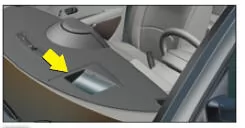
- The fitted windscreen ensures correct operation of the head-up display. It is recommended that it be replaced by a CITROËN dealer or a qualified workshop.
- Do not place any objects in or on the recess at the upper part of the dashboard between the windscreen and the rear part of the instrument panel.
- Clean the screen with a non-scratch cloth.
It is recommended that these controls are only operated when the vehicle is stationary.
Test yourself
A quick Citroen C6 quiz: every answer comes with an explanation and a link to the manual page.