Multifunction displays. NaviDrive colour display. Operation
The NaviDrive colour display in the Citroën C6 provides an extended control centre for navigation, telephone, climate control and vehicle data. Central functions such as the address book, audio settings or on-board computer warnings can be reached with just a few clicks. Personal preferences can also be configured individually, such as display colours, language or daytime running lights. The menu structure is clearly organised and easy to access via the control buttons. Thanks to the intuitive interface, every journey becomes a digitally supported experience, another example of the well-thought-out interior concept of the C6.
NaviDrive colour display
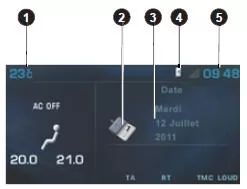
- Outside temperature.
- Address book.
- Date.
- Telephone.
- Time.
When the outside temperature is between +3 °C and -3 °C, the temperature display flashes (risk of black ice).
Note: The displayed outside temperature may be higher than the actual temperature if the vehicle is parked in direct sunlight.
The driver is advised not to operate the following controls while driving.
Controls
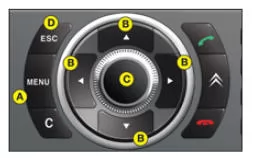
A Access the display's "Main menu".
B Scroll through the display menus.
C Select the chosen function or the changed value in the menus.
Scrolling through the display menus.
D Cancel the operation or return to the previous display.
Main menu
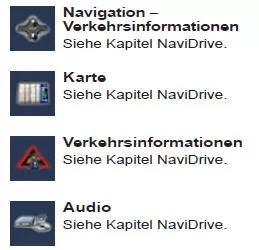
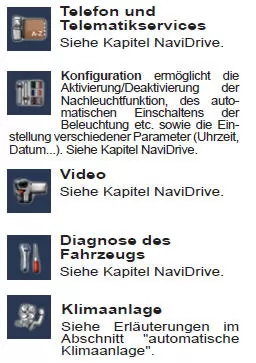
Press A to display the "Main menu" of the multifunction display. This menu provides access to the following functions:
Test yourself
A quick Citroen C6 quiz: every answer comes with an explanation and a link to the manual page.