Cruise control
The cruise control in the Citroën C6 allows constant-speed driving without using the accelerator pedal. Drivers can conveniently set the speed, increase it, decrease it or temporarily exceed it. All functions are logically controlled via steering wheel buttons and can be read on the instrument cluster. A speed limit can also be programmed, including temporary override via the kickdown pedal. Clear feedback helps drivers keep within speed limits and optimize their driving, a real comfort advantage on long journeys.
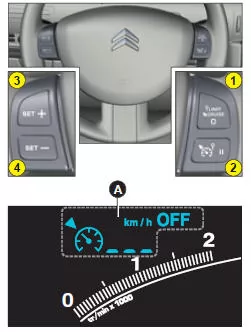
This driver assistance system allows driving at a preselected speed without having to operate the accelerator pedal.
Cruise control is active in the highest gears of the transmission; the selected speed must be above 40 km/h.
Note: Information relating to cruise control is shown in area A of the instrument cluster.
Selecting cruise control
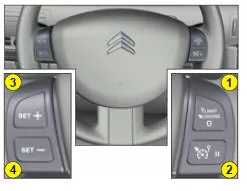
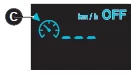 To activate cruise control, press control 1 as many times as necessary until the C symbol for cruise control appears in area A of the instrument cluster.
Selecting a driving speed
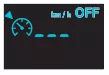 No driving speed is stored when cruise control is selected.
Once the desired speed has been reached using the accelerator pedal, briefly press control 3 or 4.
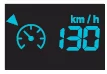 The driving speed is now stored. It is shown in area A of the instrument cluster.
The accelerator pedal can now be released. The vehicle automatically maintains the selected speed.
Note: The vehicle speed may differ slightly from the selected driving speed.
Temporarily exceeding the driving speed
During regulation, it is possible at any time to exceed the driving speed by pressing the accelerator pedal (e.g. for overtaking). The displayed speed flashes. To return to the desired driving speed, simply release the accelerator pedal again.
Note: If the system cannot hold the stored speed during regulation (steep downhill gradient), the displayed speed flashes. If necessary, adjust your driving speed.
Adjusting the set speed during cruise control
The speed shown in area A can be adjusted by pressing the following switches:
- Switch 3 to increase the speed, or
- switch 4 to decrease the speed.
Note: Pressing briefly and repeatedly changes the speed in steps of 1 km/h. Pressing and holding changes the speed in steps of 5 km/h.
Deactivating cruise control
Cruise control can be deactivated:
- Either by pressing the brake pedal or the clutch pedal.
- When the ESP or ASR systems intervene.
- By pressing switch 2.
Note: Cruise control is deactivated when the gear selector is in neutral (position N).
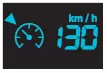 Under these conditions, the message "OFF" appears in the instrument cluster.
These actions do not erase the set speed, which remains shown on the instrument panel.
Reactivating cruise control
- By recalling the stored speed:
To do this, press switch 2.
The vehicle automatically returns to the stored speed, which is shown in the instrument cluster.
Note: If the previously stored speed is much higher than the current speed, the vehicle accelerates strongly until the stored speed is reached.
- By selecting the current speed: Briefly press switch 3 or 4 when the desired speed is reached.
Switching off cruise control
- Press and hold switch 1.
- By switching off the engine.
In the event of a fault, the stored speed flashes or the bars "- - -" flash, and the "OFF" warning light illuminates on the dashboard.
Contact a CITROËN dealer or a qualified workshop.
Use cruise control only when conditions allow driving at a constant speed.
Do not use cruise control in heavy traffic, on road surfaces with poor grip, or in other difficult conditions.
The driver's attention and control of the vehicle must not be impaired.
It is recommended to keep your feet near the pedals.
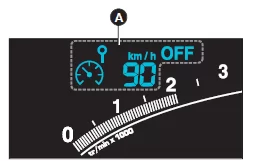
This driver assistance system allows you to select a maximum speed that cannot be exceeded. This must be set above approximately 30 km/h.
Note: Speed limiter information is shown in area A of the instrument cluster.
Selecting the speed limiter
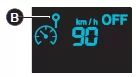 To select the speed limiter, press switch 1 until symbol B for the speed limiter appears in area A of the instrument cluster.
The last stored speed is displayed.
Setting the maximum speed
To select the maximum speed with the engine running, press the following switches briefly or hold them down:
- Switch 3 to increase the value, or
- switch 4 to decrease the value.
Note:
Pressing briefly and repeatedly changes the speed in steps of 1 km/h. Pressing and holding changes the speed in steps of 5 km/h.
Activating the maximum speed
When the desired maximum speed is displayed, press switch 2 to activate the speed limiter.
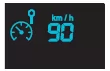 The "OFF" message in the instrument cluster goes out.
When the function is active, you can exceed the programmed speed by pressing the accelerator pedal only if the pedal is fully depressed beyond the detent point. See "Temporarily exceeding the maximum speed".
Note: The vehicle speed may be slightly above the stored speed under certain conditions.
Deactivation
To deactivate the maximum speed, press switch 2.
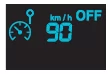 After this setting, the message "OFF" appears in the instrument cluster.
This setting does not erase the stored speed, which remains shown on the instrument panel.
Temporarily exceeding the maximum speed
The accelerator pedal is fitted with a limit switch. Fully depressing the accelerator pedal actuates it, allowing you to exceed the stored maximum speed at any time.
While the stored speed is being exceeded, the displayed maximum speed flashes.
To return below the maximum speed, simply release the accelerator pedal; the function is active again.
Note: If the system cannot hold the stored speed during speed limitation (mainly on steep downhill gradients or when kickdown is applied), the speed flashes. If necessary, adjust your driving speed.
The function is reactivated as soon as the vehicle speed drops back below the set speed limit.
SWITCHING OFF THE FUNCTION
- Press and hold switch 1.
- By switching off the engine.
The previously selected speed is stored. The information in the instrument cluster goes out.
In the event of a fault, the stored speed flashes and the "OFF" warning light illuminates on the dashboard.
Contact a CITROËN dealer or a qualified workshop.
With a carpet that is not recommended by CITROËN, there is a risk that it may slide under the accelerator pedal and prevent temporary exceeding of the maximum speed. In this case, the set speed can only be exceeded by changing the setting of the steering wheel switches.
The driver's attention and control of the vehicle must not be impaired.
The cruise control of the Citroën C6 1st generation makes long-distance driving easier and provides a relaxed driving experience. Its simple operation allows you to set and maintain a desired speed precisely. This confirms the Citroën C6 2005-2012 as a comfortable touring saloon.
The combination of cruise control and speed limiter increases safety and helps prevent unintentional speeding. The Citroën C6 1st generation thus offers intelligent support for a relaxed and safe journey.
Frequently Asked Questions
From what speed does the cruise control work in the Citroën C6 1st generation?
The system is active from a speed of 40 km/h and helps the driver maintain a constant speed.
Can the speed limit be adjusted while driving?
Yes, the maximum speed can be easily changed while driving using the controls on the steering wheel.
Test yourself
A quick Citroen C6 quiz: every answer comes with an explanation and a link to the manual page.