Multifunction displays. Colour display C. Controls. Air conditioning
The multifunction displays are the information centre of the Citroën C6. This chapter covers colour display C, which allows the driver to adjust climate, audio, driving assistance, language and lighting settings. Access to the trip computer, user menu and vehicle settings is intuitive via the control buttons. Functions such as switching on Bi-Xenon headlamps, setting the follow-me-home duration or activating daytime running lights can be configured easily. Units and date/time can also be adjusted. The menu structure is logical and offers maximum control over comfort and technology in the vehicle: digital, clear and user-friendly.
Colour display C
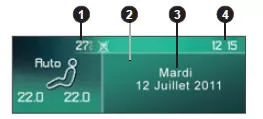
- - Outside temperature
- - Display range
- - Date
- - Time
When the outside temperature is between +3 °C and -3 °C, the temperature display flashes (risk of black ice).
Note: The displayed outside temperature may be higher than the actual temperature if the vehicle is parked in direct sunlight.
The driver is advised not to operate the following controls while driving.
Controls
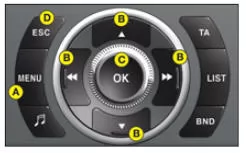
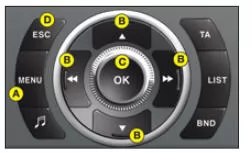
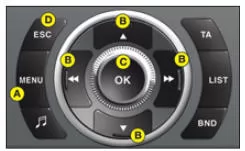
A Access the display's "Main menu".
B Scroll through the display menus.
C Select the chosen function or the changed value in the menus.
D Cancel the operation or return to the previous display.
Main menu
Press A to display the "Main menu" of the multifunction display. This menu provides access to the following functions:
 Radio Mono CD
See chapter "CD RDS audio system".
 On-board computer
Allows:
- Entry of the distance to the destination.
- Access to the warning message log (repeat of previously displayed warnings).
- Access to the status of functions, such as
 User settings/ Configuration
Allows:
- Activation/deactivation of the following functions:
- Automatic lighting activation.
- Follow-me-home function with selection of the function duration.
- Daytime running lights.
- Cornering Bi-Xenon headlamps.
- Automatic entry lighting.
- As well as the selection of:
- Display brightness and colour, time, date and units.
- Display language.
 Air conditioning
Allows:
- Switching off the air conditioning.
- Deactivation/activation of the independent air conditioning control for driver and passenger sides.
 Bluetooth hands-free kit
See chapter "CD RDS audio system".
TRIP COMPUTER
To enter the distance to be travelled in the trip computer:
- Press A.
- Use B to select the "Trip computer" symbol, then confirm by pressing C.
- Select the distance entry using B. Confirm the selection by pressing C.
- To select the distance, use B to select the digit to be changed and confirm by pressing C.
- Use B to set the value, then confirm by pressing C.
- Confirm the display with "OK".
To access the trip computer warning message log:
- Press A.
- Use B to select the "Trip computer" symbol, then confirm by pressing C.
- Select the warning message log.
- After the list is displayed, scroll through it using B.
- Press D, then return to the permanent display.
To access the status of functions: proceed in the same way.
USER SETTINGS/ CONFIGURATION
To activate/deactivate the follow-me-home function:
- Press A.
- Use B to select the "User settings/Configuration" symbol, then confirm the selection by pressing C.
- Then select the vehicle settings submenu. Confirm the selection by pressing C.
- Use B to select Lighting and signalling.
After activation, select the function duration: press C, then use B to select the duration and press C.
To activate/deactivate automatic lighting activation:
Repeat steps 1 to 4 described above.
5. Press C to activate/deactivate automatic lighting activation.
Note: This function is activated immediately, whereas deactivation requires the ignition to be switched off.
To activate/deactivate the daytime running lights:
Repeat steps 1 to 4 described above.
5. Press C to activate/deactivate the daytime running lights.
When the daytime running lights are activated, this function switches on when the lighting lever is in position 0 and the headlamps are switched off.
The side lights are also switched on together with the daytime running lights (depending on the country of sale).
To activate/deactivate the cornering Bi-Xenon headlamps:
Repeat steps 1 to 3 described above.
4. Use B to select driving assistance. Confirm the selection by pressing C.
5. Press C to activate/deactivate the cornering Bi-Xenon headlamps.
To activate/deactivate the reception menu
Repeat steps 1 to 3 described above.
4. Use B to select driving assistance.
Confirm the selection by pressing C.
5. Press C to activate/deactivate the reception menu.
To adjust the display brightness:
- Press A.
- Use B to select the "User settings/Configuration" symbol, then confirm the selection by pressing C.
- Use B to select the display configuration.
Confirm the selection by pressing C.
To select the display colour: Proceed in the same way.
To set the date and time:
- Press A.
- Use B to select the "User settings/Configuration" symbol, then confirm the selection by pressing C.
- Use B to select the display configuration. Confirm the selection by pressing C.
- Use B to select the date and time setting, then confirm by pressing C.
- Use B to select the values to be changed.
To select the units (temperature, consumption...):
- Press A.
- Use B to select the "User settings/Configuration" symbol, then confirm the selection by pressing C.
- Use B to select the display configuration. Confirm the selection by pressing C.
- Then select the units submenu. Confirm the selection by pressing C.
- Use B to select the unit to be changed, and confirm by pressing C.
- Confirm the display with "OK".
To select the language:
- Press A.
- Use B to select the "User settings/Configuration" symbol, then confirm the selection by pressing C.
- Select the language using B.
- Use B to select the desired language, and confirm the selection by pressing C.
- Confirm the display with "OK".
Air conditioning
To activate/deactivate the air conditioning:
- Press A.
- Use B to select the air conditioning symbol, then confirm the selection by pressing C.
- Use B to select the option that changes the air conditioning status, and confirm the selection by pressing C.
To activate/deactivate the separate left/right climate control of the air conditioning:
- Press A.
- Use B to select the air conditioning symbol, then confirm the selection by pressing C.
- Use B to select the option that changes the status of the separate climate control, and confirm the selection by pressing C.
Test yourself
A quick Citroen C6 quiz: every answer comes with an explanation and a link to the manual page.