Dynamic Radar Cruise Control with Full-Speed Range Following Distance Control
The Dynamic Radar Cruise Control on the Lexus GS (4th generation, L10, 2016–2020) provides maximum driving comfort and safety on long journeys. It automatically adjusts speed and distance to the vehicle ahead, supporting the driver in many driving situations. This chapter explains in detail how the system works, its modes, operation and optimal conditions for use. Important safety warnings and system limitations are emphasized. Tips on correct use on highways and in changing traffic conditions help ensure that the Lexus GS remains a reliable partner.
Summary of Functions
In distance control mode, the vehicle automatically accelerates, brakes and stops to match its speed to changes in the speed of the vehicle ahead, even when the accelerator pedal is not pressed. In constant speed control mode, the vehicle travels at a set speed.
Use Dynamic Radar Cruise Control with full-speed range distance control on motorways and expressways.
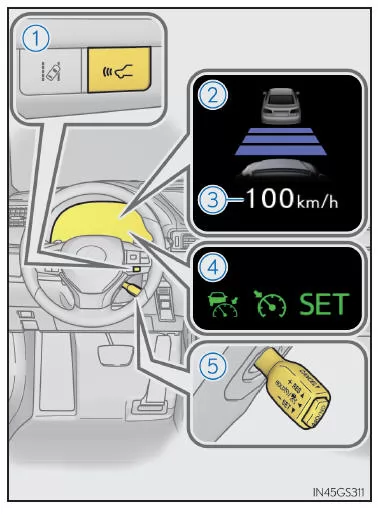
- Distance control mode
- Constant speed control mode
- Distance control system button
- Display
- Set speed
- Warning lights
- Cruise control switch
WARNING
Before using Dynamic Radar Cruise Control with full-speed range distance control
As the driver, you alone are responsible for safely operating your vehicle. Do not rely solely on the system. Drive carefully and always keep a close watch on your surroundings.
Dynamic Radar Cruise Control with full-speed range distance control assists the driver while driving to reduce their workload.
However, the assistance the system can provide is limited.
Even when the system is operating normally, it may assess the condition of the vehicle ahead differently than you do. For this reason, you must always remain attentive as the driver, judge the hazards of every situation yourself and drive cautiously.
If you rely solely on this system or assume that the system guarantees driving safety, an accident resulting in death or serious injury may occur.
Precautions regarding the driver assistance systems
Because the assistance provided by the system has its limits, observe the following precautions.
Otherwise, an accident resulting in death or serious injury may occur.
- Assistance in judging the distance to the vehicle ahead.
Dynamic Radar Cruise Control with full-speed range distance control is intended solely to help the driver judge the distance between their own vehicle and a directly preceding vehicle. It is not a device that permits careless or inattentive driving, and the system cannot assist the driver in situations with limited visibility. The driver must always keep the road and the vehicle's surroundings in constant view. - Assistance for the driver in judging an appropriate following distance.
Dynamic Radar Cruise Control with full-speed range distance control checks whether the distance between your vehicle and a directly preceding vehicle is within a set range. It cannot assess anything else. The driver must therefore remain attentive at all times and decide for themselves whether a hazard exists in a given situation. - Assistance in operating the vehicle.
Dynamic Radar Cruise Control with full-speed range distance control is only able to prevent a collision with a vehicle ahead to a limited extent. The driver must therefore react immediately and appropriately in the event of a hazard to ensure the safety of everyone involved.
How to avoid unintentional activation of Dynamic Radar Cruise Control with full-speed range distance control
When the system is not in use, turn Dynamic Radar Cruise Control with full-speed range distance control off using the "ON/OFF" button.
WARNING
■ Situations in which full-speed range dynamic radar cruise control is not suitable
Do not use full-speed range dynamic radar cruise control in the following situations.
Otherwise, the vehicle speed may not be controlled appropriately for the situation, which may result in an accident causing death or serious injury.
- On roads where pedestrians, cyclists, etc. may be present
- In heavy traffic
- On roads with sharp curves
- On winding roads
- On slippery road surfaces, such as in rain, ice or snow
- On roads with steep downhill grades, or roads with frequently changing steep uphill and downhill sections. The actual speed may exceed the set speed when driving steeply downhill.
- At expressway or freeway entrances
- In weather conditions so poor that the sensors may be prevented from detecting correctly (fog, snow, sandstorms, heavy rain, etc.)
- When water, snow, etc. is on the front surface of the radar sensor or camera sensor
- When traffic conditions require frequent acceleration and deceleration
- When towing a trailer or towing another vehicle
- When the distance warning buzzer sounds frequently
Driving in distance control mode
In this mode, the radar sensor detects vehicles ahead at distances of up to approx. 120 m (394 ft.). The current distance to the vehicle ahead is determined, and an appropriate following distance is maintained.
Note that the vehicle-to-vehicle distance decreases during long downhill driving.

- Example of driving at a constant speed.
When there are no vehicles ahead of you.
The vehicle travels at the speed set by the driver. The desired vehicle-to-vehicle distance can also be set by pressing the distance control system button.
- Example of decelerating and following.
When a vehicle ahead is detected traveling slower than the set speed
- Example of accelerating.
When there are no longer any vehicles ahead traveling slower than the set speed.
The system accelerates the vehicle to the set speed. The system then returns to constant speed driving.
Setting the speed (distance control mode)
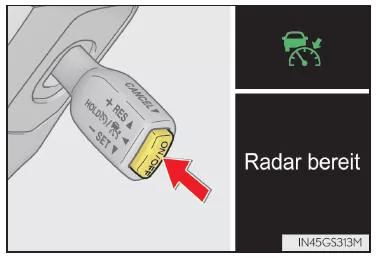
- Press the "ON/OFF" button to turn on the cruise control.
The radar cruise control indicator light illuminates and a message is shown on the multi-information display.
Press the button again to turn off the cruise control.
If you press and hold the "ON/OFF" button for at least 1.5 seconds, the system switches to constant speed control mode.
- Accelerate or decelerate to the desired speed using the accelerator pedal (more than approx. 50 km/h), then push the lever down to set the speed.
The "SET" indicator light for the cruise control then illuminates.
Control is set to the speed you are driving at when you release the lever.
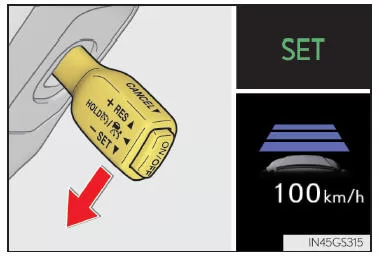
If the lever is operated while the speed is less than approx. 50 km/h and a vehicle is ahead of your vehicle, the speed is set to approx. 50 km/h.
Changing the Set Speed
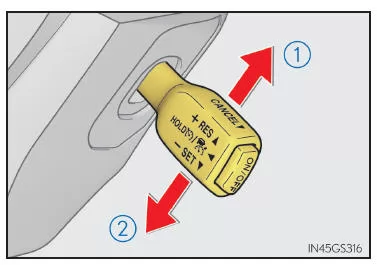
Operate the lever until the desired speed is displayed.
- To increase speed (except when the vehicle has been stopped by the system control in distance control mode)
- To decrease speed. Fine adjustment: Move the lever briefly in the desired direction.
Coarse adjustment: Move the lever up or down and hold it until the desired speed is reached.
In distance control mode, the set speed is increased or decreased as follows:
- Europe
Fine adjustment: Each lever operation changes the speed by 5 km/h*1 or 8 km/h*2. Coarse adjustment: Increases or decreases in steps of 5 km/h*1 or 8 km/h*2 while the lever is held.
- Except Europe
Fine adjustment: Each lever operation changes the speed by 1 km/h*1 or 1.6 km/h*2. Coarse adjustment: Increases or decreases in steps of 5 km/h*1 or 8 km/h*2 while the lever is held.
In constant speed control mode, the set speed is increased or decreased as follows: Fine adjustment: Each lever operation changes the speed by 1 km/h*1 or 1.6 km/h*2. Coarse adjustment: The speed changes while the lever is held.
*1: When the set speed is displayed in "km/h"
*2: When the set speed is displayed in "MPH"
Changing the vehicle-to-vehicle distance (distance control mode)

Press the button to change the vehicle-to-vehicle distance as follows:
- Long
- Medium
- Short
The vehicle-to-vehicle distance is automatically set to "Long" when the ignition switch is turned to IGNITION ON mode.
If a vehicle is ahead of you, the vehicle ahead indicator is also displayed.
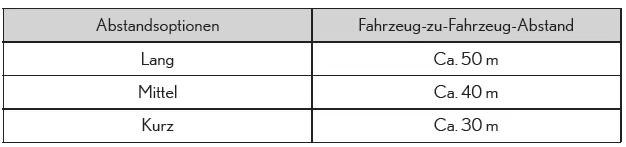
Vehicle-to-Vehicle Distance Settings (Distance Control Mode)
Select a distance from the table below. Note that the distances shown are based on a speed of 80 km/h.
The vehicle-to-vehicle distance increases or decreases depending on the speed. When the vehicle is stopped by the system control, the vehicle-to-vehicle distance is approximately 3 m to 5 m regardless of the vehicle-to-vehicle distance setting.
Resuming Following When the Vehicle Has Been Stopped by the System Control (Distance Control Mode)
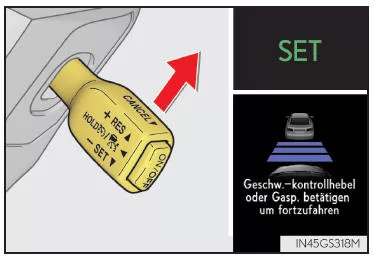
After the vehicle ahead starts moving, push the lever up.
Your vehicle will also resume following when you depress the accelerator pedal after the vehicle ahead starts moving.
Canceling and Resuming Cruise Control
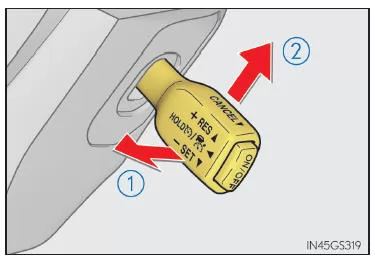
- Pull the lever toward you to cancel cruise control.
Cruise control is also canceled when the brake pedal is depressed. (When the vehicle has been stopped by the system control, the setting is not canceled by depressing the brake pedal.)
- Push the lever up to resume cruise control. The previously set speed will be resumed.
However, if no vehicle ahead is detected, cruise control will not resume when the speed is approximately 40 km/h or less.
Distance Warning (Distance Control Mode)
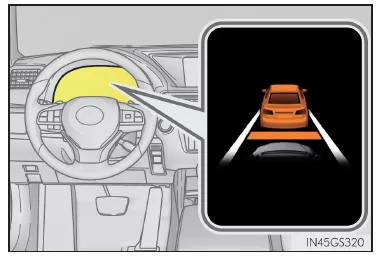
If your vehicle is too close to the vehicle ahead and sufficient automatic braking cannot be achieved by cruise control, the indicator will flash and a warning buzzer will sound to alert you.
An example of this is when another vehicle cuts in between your vehicle and the vehicle ahead.
Depress the brake pedal to ensure an adequate vehicle-to-vehicle distance.
■ Conditions Under Which Warnings May Not Be Issued
In the following situations, a warning may not be issued even though the vehicle-to-vehicle distance is short.
- When the vehicle ahead is traveling at the same speed as or faster than you
- When the vehicle ahead is traveling extremely slowly
- Immediately after setting the cruise control set speed
- When the accelerator pedal is depressed
Selecting Constant Speed Control Mode
When you select constant speed control mode, the vehicle maintains the set speed without controlling the vehicle-to-vehicle distance. Select this mode only when distance control mode is not functioning properly due to contamination of the radar sensor, etc.
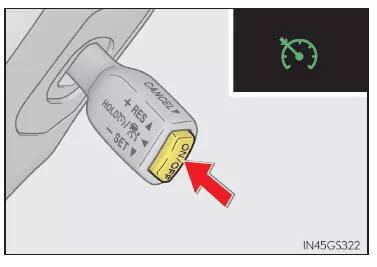
- While cruise control is off, press and hold the "ON/OFF" switch for at least 1.5 seconds.
Immediately after pressing the "ON/OFF" switch, the radar cruise control indicator light comes on.
Then, this light turns off and the cruise control indicator light comes on.
Switching to constant speed control mode by operating the lever is only possible when cruise control is off.
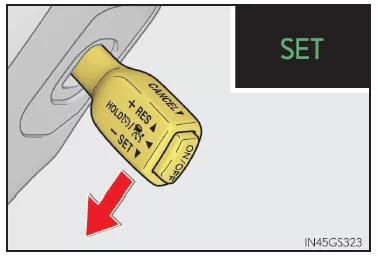
- Accelerate or decelerate to the desired speed using the accelerator pedal (more than approx. 50 km/h), then push the lever down to set the speed.
The "SET" indicator light for the cruise control then illuminates.
Control is set to the speed you are driving at when you release the lever.
■ Requirements for Turning On Full-Speed Range Dynamic Radar Cruise Control with Distance Control
- The shift lever is in "D".
- The gear selector switch has been used to select a range of "4" or higher from "D".
- The speed is above approx. 50 km/h.
However, if a vehicle ahead is detected, full-speed range dynamic radar cruise control with distance control can be turned on even when the speed is at or below approximately 50 km/h.
■ Accelerating After the Speed Has Been Set
The vehicle can be accelerated by depressing the accelerator pedal. After accelerating, the set speed will be resumed. However, when distance control mode is active, the speed may drop below the set speed in order to maintain the distance to the vehicle ahead.
■ Automatic Cancellation of Distance Control Mode
Distance control mode is automatically canceled in the following situations.
- The actual speed drops below approximately 40 km/h while there are no vehicles ahead of your vehicle.
- The vehicle ahead leaves the lane while you are following it at a speed of less than approximately 40 km/h. In this case, the sensor may not be able to detect the vehicle properly.
- VSC is activated.
- TRC is activated for a certain period of time.
- The VSC or TRC system is turned off by pressing the VSC OFF switch.
- SNOW mode is selected.
- The sensor's detection capability is impaired because it is obstructed.
- The Pre-Collision System is activated.
- The parking brake is applied.
- The vehicle is stopped by the system control on a steep hill.
- The following conditions apply when the vehicle has been stopped by the system control:
If distance control mode is automatically canceled for any other reason, a malfunction of the system may exist. Contact your Lexus dealer or repairer, or another qualified and properly equipped repair facility.
■ Automatic Cancellation of Constant Speed Control Mode
Constant speed control mode is automatically canceled in the following situations:
- The actual speed is more than approximately 16 km/h below the set speed.
- The actual speed drops below approximately 40 km/h.
- VSC is activated.
- TRC is activated for a certain period of time.
- The VSC or TRC system is turned off by pressing the VSC OFF switch.
- The Pre-Collision System is activated.
If the constant speed control mode is canceled automatically for any other reason, there may be a malfunction in the system. Contact a Lexus dealer or authorized repairer, or another qualified and properly equipped repair facility.
■Warning messages and warning buzzer for Dynamic Radar Cruise Control with Full-Speed Range Dynamic Radar Cruise Control with Full-Speed Range
Warning messages and warning buzzers indicate a malfunction in the system or alert the driver that extra caution is required while driving. If a warning message appears on the multi-information display, read it and follow the instructions.
■If the sensor may not correctly detect the vehicle ahead of you
In the following situations, you may need to depress the brake pedal if the braking provided by the system is not sufficient, or depress the accelerator pedal if acceleration is required.
Because the sensor may not be able to detect these vehicles correctly, the distance warning may not activate.
- Vehicles that suddenly cut in
- Vehicles traveling slowly
- Vehicles that are not in the same lane
- Vehicles with a small rear surface area (unloaded trailers, etc.)
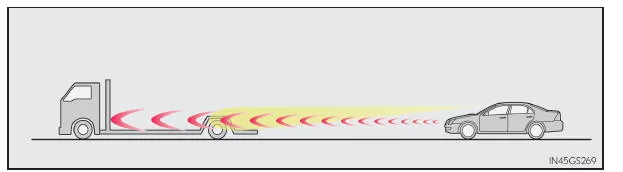
- Motorcycles traveling in the same lane
- When detection by the sensor is obstructed by water or snow thrown up by other vehicles
- When your vehicle is tilted upward (due to a heavy load in the luggage compartment, etc.)
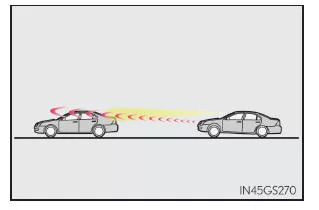
- The vehicle ahead has extremely high ground clearance
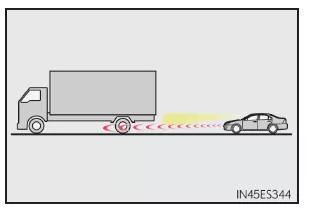
■ Conditions under which the distance control mode may not operate correctly
In the following situations, depress the brake pedal (or the accelerator pedal, depending on the circumstances) as needed.
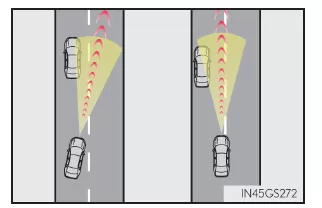
Because the sensor may not be able to correctly detect vehicles ahead of your vehicle, the system may not operate properly.
- When the road is winding or the lanes are narrow
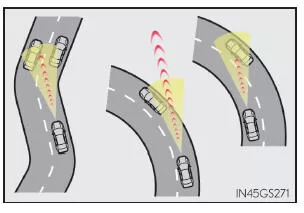
- When your steering inputs or your position in the lane are not stable
- When the vehicle ahead suddenly decelerates
Dynamic Radar Cruise Control on the Lexus GS GRL1 provides the driver with advanced support on motorways and expressways. The system automatically adjusts speed and distance to the vehicle ahead, enhancing driving comfort. Responsibility always remains with the driver, as the numerous safety warnings emphasize.
With a wide range of setting options, from vehicle-to-vehicle distance to fine speed adjustment, the Lexus GS 4th generation demonstrates its commitment to the highest precision. The intelligent technology helps make trips in the Lexus GS 2016–2020 more relaxed and safer.
These features emphasize the premium character of the sport sedan and make it a reliable partner for modern road traffic.
Test yourself
A quick Lexus GS quiz: every answer comes with an explanation and a link to the manual page.