Initialization Not Completed (C2177/77)
DESCRIPTION
Initialization is necessary when one of the following situations occurs:
- The tire pressure warning ECU and receiver are replaced.
- A tire pressure valve and transmitter are replaced.
- Tires with different standard pressures are installed.
- The tires are rotated.
- A new vehicle is delivered.
Tire pressure warning initialization is performed by operating the steering wheel switch assembly with the ignition switch in the ON position, selecting "TPMS" on the multi-information display, and pressing and holding the "ENTER" switch (steering wheel switch assembly).
After receiving the initialization command signal, the tire pressure warning ECU and receiver flash the low tire pressure warning light on the combination meter 3 times and register the tire pressure sent by the tire pressure valve and transmitter.
DTC No. | Detection Item | DTC Detection Condition | Suspected Area | Note |
|---|---|---|---|---|
C2177/77 |
Initialization Not Completed |
All of the following conditions are met:
|
|
- |
WIRING DIAGRAM
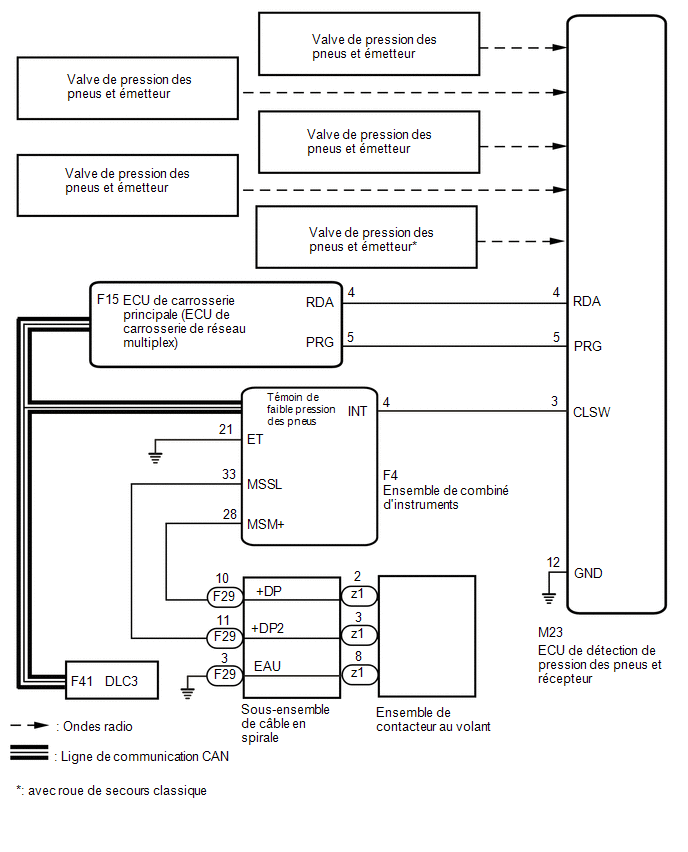
PRECAUTION / NOTICE / HINT
NOTICE:
- When replacing the tire pressure warning ECU and receiver, record the IDs stored in the ECU using the Techstream and note them down before removal.
Click here

- Initialization must be performedafter registeringthe transmitter IDs in the tire pressure ECU if the ECU and/or any of the valves and transmitters have been replaced.
PROCEDURE
CHECK FREQUENCY RECEPTION CONDITION
(a) Make sure that the following conditions are not present:
(1) Equipment or devices using similar radio frequencies are located near the vehicle.
HINT:
If the vehicle is located in one of the areas described above, the low tire pressure warning light may turn on after flashing for 1 minute, only in a specific area, due to radio frequency interference.
(2) Devices using similar radio frequencies are used in the vehicle.
OK:
Equipment or devices using similar radio frequencies are not located near the vehicle.
HINT:
Radio transmissions may be interrupted due to the environment or devices installed by the user.
| NG |  |
CHECK WHETHER THE USER HAS INSTALLED DEVICES |
|

PERFORM INITIALIZATION
(a) Adjust the tire pressure to the specified value.
Click here
(b) Perform initialization.
Click here
|
CONFIRM TIRE PRESSURE (DATA LIST)
(a) Turn the ignition switch OFF.
(b) Connect the Techstream to the DLC3.
(c) Turn the ignition switch to ON.
(d) Turn on the Techstream.
(e) Select the following menu items: Chassis / Tire Pressure Monitor / Data List.
(f) Check the values by referring to the table below.
Chassis > Tire Pressure Monitor > Data ListTester display | Item | Range | Normal Condition | Diagnostic Note |
|---|---|---|---|---|
ID 1 Tire Inflation Pressure |
ID 1 Tire Inflation Pressure |
min.: Absolute pressure (abs) / 0 kPa (0 kgf/cm2, 0 lb/in2), gauge pressure / 0 kPa (0 kgf/cm2, 0 lb/in2) max.: Absolute pressure (abs) / 480 kPa (4.9 kgf/cm2, 70 psi), gauge pressure / 380 kPa (3.9 kgf/cm2, 55 psi) |
Actual Tire Inflation Pressure |
If N/A is displayed, data has not been received.*1 |
ID 2 Tire Inflation Pressure |
Tire Inflation Pressure ID2 |
min.: Absolute pressure (abs) / 0 kPa (0 kgf/cm2, 0 lb/in2), gauge pressure / 0 kPa (0 kgf/cm2, 0 lb/in2) max.: Absolute pressure (abs) / 480 kPa (4.9 kgf/cm2, 70 psi), gauge pressure / 380 kPa (3.9 kgf/cm2, 55 psi) |
Actual Tire Inflation Pressure |
If N/A is displayed, data has not been received.*1 |
ID 3 Tire Inflation Pressure |
Tire Inflation Pressure ID 3 |
min.: Absolute pressure (abs) / 0 kPa (0 kgf/cm2, 0 lb/in2), gauge pressure / 0 kPa (0 kgf/cm2, 0 lb/in2) max.: Absolute pressure (abs) / 480 kPa (4.9 kgf/cm2, 70 psi), gauge pressure / 380 kPa (3.9 kgf/cm2, 55 psi) |
Actual Tire Inflation Pressure |
If N/A is displayed, data has not been received.*1 |
ID 4 Tire Inflation Pressure |
Tire Inflation Pressure ID 4 |
min.: Absolute pressure (abs) / 0 kPa (0 kgf/cm2, 0 lb/in2), gauge pressure / 0 kPa (0 kgf/cm2, 0 lb/in2) max.: Absolute pressure (abs) / 480 kPa (4.9 kgf/cm2, 70 psi), gauge pressure / 380 kPa (3.9 kgf/cm2, 55 psi) |
Actual Tire Inflation Pressure |
If N/A is displayed, data has not been received.*1 |
ID 5 Tire Inflation Pressure |
Tire Inflation Pressure ID5 |
min.: Absolute pressure (abs) / 0 kPa (0 kgf/cm2, 0 lb/in2), gauge pressure / 0 kPa (0 kgf/cm2, 0 lb/in2) max.: Absolute pressure (abs) / 480 kPa (4.9 kgf/cm2, 70 psi), gauge pressure / 380 kPa (3.9 kgf/cm2, 55 psi) |
Actual Tire Inflation Pressure |
|
HINT:
- *1: It may take a few minutes for the values to be displayed.
- The wheel positions of ID1 to ID4 (ID5: With conventional spare tire) cannot be determined on the Data List.
- If an "ID Tire Inflation Pressure" value has not changed, adjust the tire pressure to the appropriate specified value and rotate the tire 90 to 270 degrees. Then quickly reduce the tire pressure and check the value again.
- *2: With conventional spare tire
Tester display |
|---|
ID 1 Tire Inflation Pressure |
ID 2 Tire Inflation Pressure |
ID 3 Tire Inflation Pressure |
ID 4 Tire Inflation Pressure |
ID 5 Tire Inflation Pressure |
Result:
Result | Proceed to |
|---|---|
All recorded tire pressure values are equal to the specified values. |
A |
Tire pressure values are not displayed. |
B |
| A | |
END |
| B | |
GO TO DTC (C2121/21 TO C2125/25) |