Smart key (if equipped)
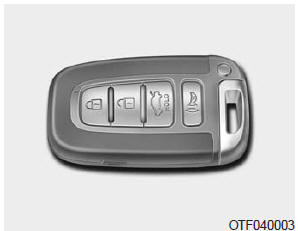
The smart key allows you to lock or unlock a door and even start the vehicle without inserting the key into the ignition switch.
The smart key buttons function in the same way as the remote keyless entry (see the "Remote keyless entry" section).
Smart key functions
With the smart key on your person, you can lock and unlock the vehicle doors and start the engine. Read the following to learn how.
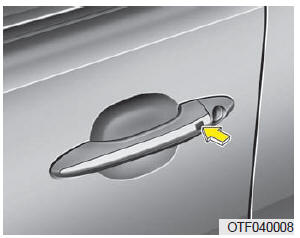
Locking
Pressing the buttons on the front outside door handles when all doors are closed and any door is unlocked will lock all doors. The hazard lights flash and the chime sounds once to confirm that all doors are locked. The button only works when the smart key is within 0.7 to 1 m (28 to 40 in) of the outside door handle. To confirm whether a door is locked, check the door lock button inside the vehicle or pull the outside door handle.
Even if you press the buttons, the doors will not lock and the chime will sound for 3 seconds in the following cases:
- the smart key is inside the vehicle;
- the ignition switch is in the ACC or ON position;
- any door is open, except the trunk.
Unlocking
Pressing the button on the outside handle of the driver's door when all doors are closed and locked unlocks the driver's door. The hazard lights flash and the chime sounds twice to indicate that the driver's door is unlocked.
Pressing the button on the outside handle of the front passenger door when all doors are closed and locked unlocks all doors. The hazard lights flash and the chime sounds twice to indicate that all doors are unlocked.
The button only works when the smart key is within 0.7 to 1 m (28 to 40 in) of the outside door handle.
Starting
You can start the engine without inserting the key. For detailed information, see "Starting the engine with the smart key" in Chapter 5.
Smart key precautions
NOTICE
- If you lose your smart key for any reason, you will not be able to start the engine. Have the vehicle towed if necessary and contact an authorized Kia dealer.
- A maximum of 2 Smart Keys can be registered to a single vehicle. If you lose a Smart Key, immediately take your vehicle and your key to an authorized Kia dealer to protect your vehicle against possible theft.
- The Smart Key will not work in the following cases:
- The Smart Key is near a radio transmitter, such as a broadcasting station or airport, which may cause interference with normal operation of the Smart Key.
- The Smart Key is near a two-way radio or cellular phone.
- The Smart Key of another vehicle is used near your vehicle.
If the Smart Key does not work properly, open and close the door using the mechanical key.
If you experience any problem with the Smart Key, please contact an authorized Kia dealer.
CAUTIONKeep the Smart Key away from water and other liquids. If the remote keyless entry system malfunctions due to exposure to water or other liquids, it will not be covered by your vehicle's manufacturer warranty.
This device complies with Industry Canada RSS-210. Operation is subject to the following two conditions:
- this device may not cause harmful interference; and
- this device must accept any interference received, including interference that may cause undesired operation.
Any changes or modifications not expressly approved by the party responsible for compliance may void the user's authority to operate the equipment. If the remote keyless entry does not work due to changes or modifications not approved by the party responsible for compliance, it will not be covered by the manufacturer's warranty.
Test yourself
A quick Kia Optima DL3 quiz: every answer comes with an explanation and a link to the manual page.