Instrument cluster
Type A
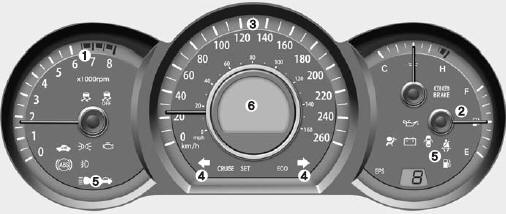
- Tachometer
- Fuel gauge
- Speedometer
- Turn Signal Indicators
- Warning and Indicator Lights
- Odometer/Trip Odometer*
* : if equipped
Type B
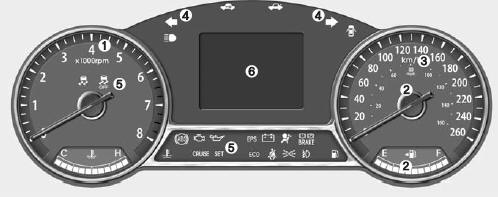
* The vehicle's instrument cluster may differ from the illustration.
See the "Instruments" section on the following pages for more information.
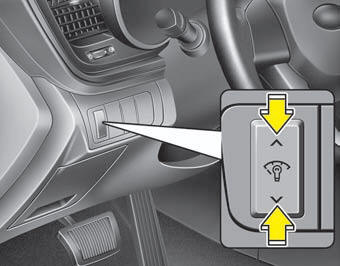
Instrument Panel Illumination
The instrument panel brightness can be adjusted by pressing the dimmer switch while the ignition switch is in ON.
The LCD in the instrument cluster displays the brightness level.
Type A
Type B
Instrument cluster
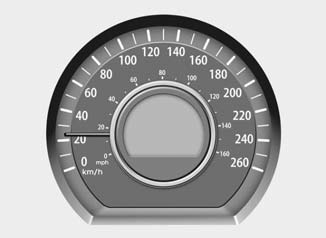
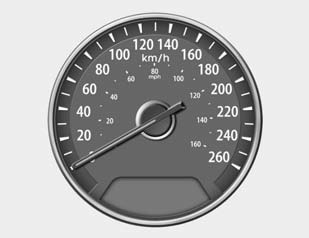
Speedometer
The speedometer shows the speed at which the vehicle is traveling in forward motion.
The speedometer displays readings in both kilometers per hour and miles per hour.
Type A
Type B
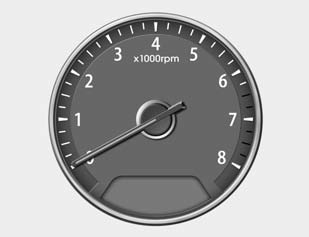
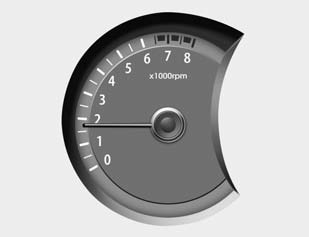
Tachometer
The tachometer provides an approximate indication of engine speed (revolutions per minute (rpm)).
Use the tachometer to judge the proper time to shift gears and to prevent the engine from stalling or over-revving.
The tachometer needle may move slightly when you turn the ignition key to ACC or ON with the engine off. This is normal and does not affect tachometer accuracy once the engine is running.
CAUTIONDo not operate the engine in the RED zone.
You could cause serious engine damage.
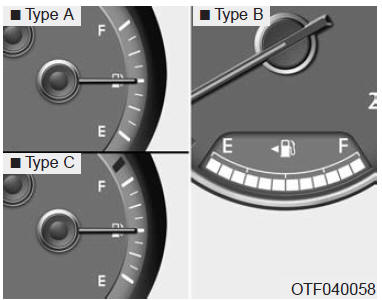
Fuel Level Gauge
The fuel gauge shows the approximate amount of fuel in the tank. The fuel tank capacity is given in section 8. The fuel gauge has a low fuel warning light that comes on when the fuel tank is nearly empty.
On slopes or in corners, the fuel gauge needle may move, or the low fuel warning light may come on earlier than normal, due to fuel movement in the tank.
WARNING - Fuel Level IndicatorRunning out of fuel exposes the vehicle occupants to certain dangers.
Stop and refuel as soon as possible when the low fuel warning light comes on or when the gauge needle approaches "E".
CAUTIONAvoid driving with very little fuel in the tank. Running out of fuel may cause engine misfires and damage the catalytic converter.
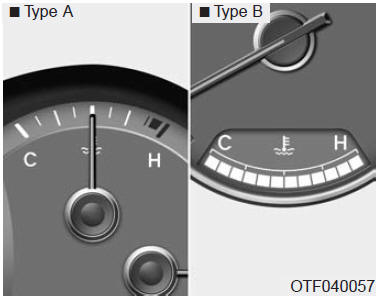
Coolant Temperature Gauge
This gauge shows the engine coolant temperature when the ignition switch is in ON.
Stop driving if the engine overheats.
In this case, read "IF the engine overheats" in section 6.
CAUTIONIf the gauge needle moves beyond the normal range, toward "H", this indicates overheating, which may damage the engine.
Trip Computer
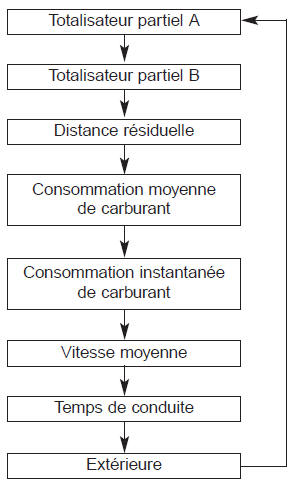
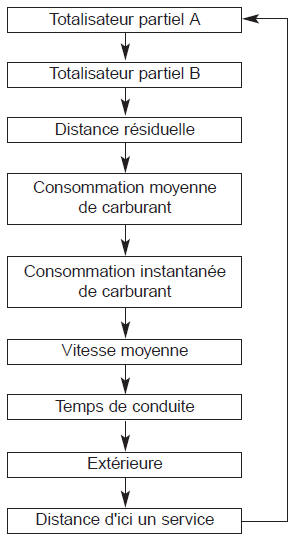
The trip computer is a microcomputer-based information system that shows driving-related information on the display when the ignition switch is in ON.
All stored information (except the odometer) is reset if the battery is disconnected.
Type A
* : If equipped
Type B
* : If equipped
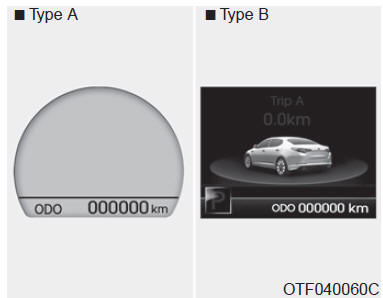
Odometer (km or mi.)
The odometer shows the total distance the vehicle has traveled.
The odometer is useful for knowing when to have regular maintenance performed.
The odometer is always displayed until the display is turned off.
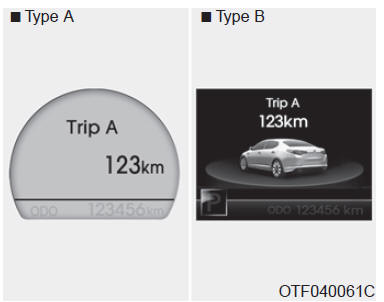
Trip Odometer (km or mi.)
TRIP A: Trip odometer A TRIP B: Trip odometer B This mode shows the distance of each trip since the trip odometer was last reset.
The trip odometer range extends from 0.0 to 9999.9 km.
Press and hold the RESET button for more than one second while the trip odometer (A or B) is displayed to reset it to (0.0).
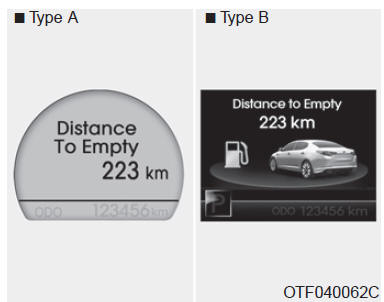
Distance to Empty (km or mi.)
This mode shows the approximate distance you can drive based on the fuel in the tank and the fuel supplied to the engine. If the distance to empty is less than 50 km, a "---" symbol will flash on the display.
The display's operating range extends from 50 to 990 km.
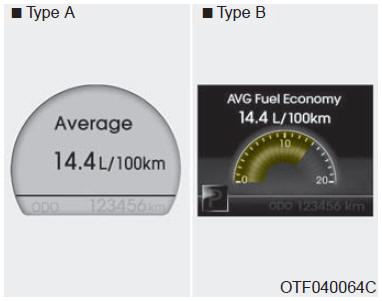
Average Fuel Consumption (l/100 km or MPG) (if equipped)
This mode calculates the average fuel consumption based on the amount of fuel used and the distance driven since the consumption was last reset. The total amount of fuel used is calculated from the consumption. For an accurate calculation, you should drive at least 50 m.
Press and hold RESET for more than one second while the average consumption is displayed to reset the average consumption (---).
If the vehicle speed exceeds 1 km/h after refueling more than 6 l (1.6 gal), the average consumption resets (---).
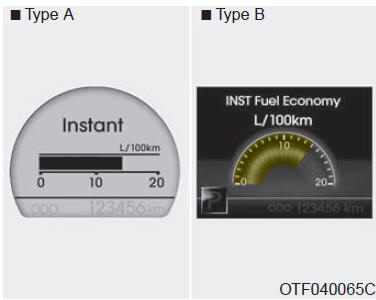
Instantaneous Fuel Consumption (l/100 km or MPG)
This mode calculates the instantaneous fuel consumption every 2 seconds.
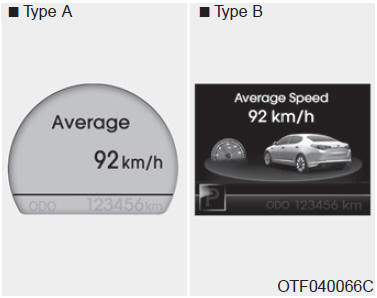
Average Speed (km/h or MPH)
This mode calculates the average vehicle speed since the trip computer was last reset.
Even when the vehicle is not moving, the average speed continues to be calculated as long as the engine is running.
Press and hold RESET for more than one second while the average speed is displayed to reset the average speed (- --).
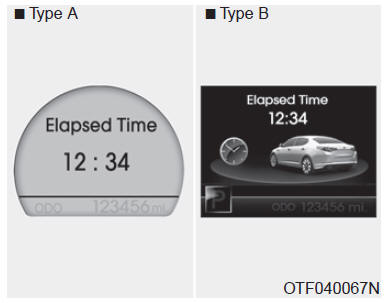
Driving Time
This mode shows the total driving time since the last reset.
Even when the vehicle is not moving, the driving time continues to run as long as the engine is running.
The timer range extends from 0:00 to 99:59.
Press and hold RESET for more than one second while the driving time is displayed to reset the driving time (0:00).
NOTICE
- If the vehicle is not level or if battery power is disconnected, the distance to empty function will not work correctly.
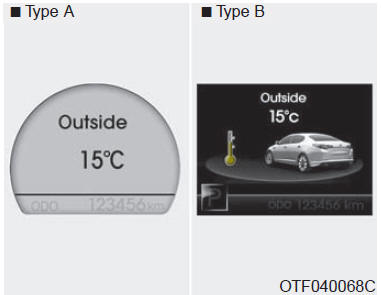
Outside Temperature Display
The outside temperature is displayed in 1C (1F) increments. The temperature range extends from -40C to 60C (-40F to 140F).
- The displayed outside temperature may not change immediately as it would with an ordinary thermometer, so as not to distract the driver.
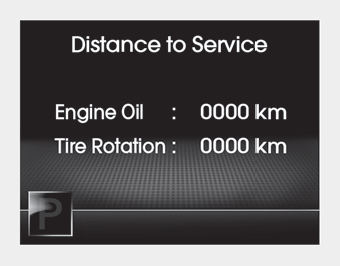
Distance to Service
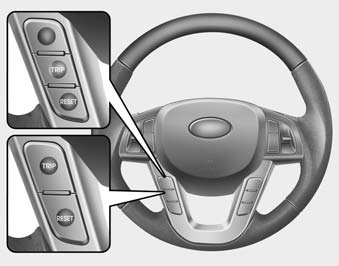
To switch to the "Distance to Service" mode, press TRIP for less than one second.
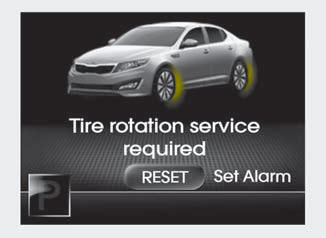
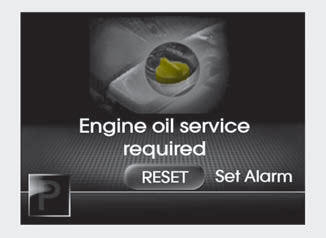
Oil change (tire rotation) required
- The message will be displayed if service is required.
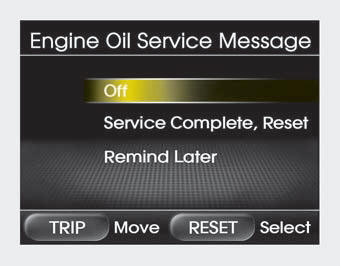
- If you want to reset or disable the maintenance system, press and hold RESET for more than one second. The display will switch to the "Engine Oil Service Message" mode.
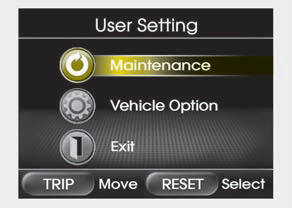
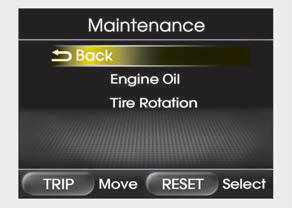
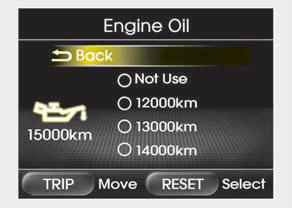
Maintenance
- With the vehicle stopped, press and hold the TRIP button for more than 2 seconds while the ENGINE START/STOP button is in ON or the engine is running. The instrument cluster LCD will switch to the "User Setting" mode. You can scroll through the items by pressing TRIP and select the displayed item by pressing RESET.
- In the "User Setting" mode, select "Maintenance."
- Select the desired maintenance schedule.
- When you have finished, you can exit the maintenance mode by pressing TRIP for more than 2 seconds.
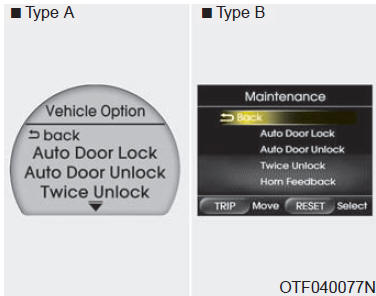
Vehicle Options (if equipped)
- With the vehicle stopped, press and hold the TRIP button for more than 2 seconds while the ENGINE START/STOP button is in ON or the engine is running. The instrument cluster LCD will switch to the "User Setting" mode. You can scroll through the items by pressing TRIP and select the displayed item by pressing RESET.
- In "User Setting" mode, select "Vehicle Option".
- Scroll to the desired item (TRIP button) and select it (RESET button).
Auto Door Lock
Off - Auto door lock is cancelled.
Speed - All doors lock automatically when the vehicle speed exceeds 15 km/h.
Shift Lever - All doors lock automatically when the shift lever moves from P (Park) to R (Reverse), N (Neutral) or D (Drive).
Auto Door Unlock
Off - Auto door unlock is cancelled.
Key Out - All doors unlock automatically when the ignition key is removed from the ignition switch (or the SmartKey is removed from the key holder).
Shift Lever - All doors unlock automatically when the shift lever is placed in P (Park).
Double Unlock
On - The driver's door unlocks if the door is unlocked. If you unlock it again within 4 seconds, all doors unlock.
Off - Double unlock is disabled. All doors unlock when you unlock the door.
❈ Except the central door lock switch.
Easy Access (vehicle with driver's seat memory only)
On - The driver's seat moves forward or backward automatically to make it easier for the driver to get in and out.
Off - The function is disabled.
Headlamp Welcome/Follow-me
On - The headlamp welcome and follow-me function is enabled.
Off - The headlamp welcome and follow-me function is disabled.
Welcome Lamp (if equipped)
On - The welcome lamp function is enabled.
Off - The welcome lamp function is disabled.
Welcome Sound
On - The welcome sound function is enabled.
Off - The welcome sound function is disabled.
Automatic Triple Turn Signal (one-touch signalling)
On - The turn signal flashes 3 times when you lightly press the turn signal lever.
Off - Automatic triple turn signal is disabled.
Horn Chirp
On - The hazard warning lights flash and the horn sounds when the doors are locked or unlocked using the transmitter or SmartKey.
Off - The hazard warning lights flash but the horn does not sound when the doors are locked or unlocked using the transmitter or SmartKey.
Average Fuel Economy
Auto Reset - The average fuel economy resets automatically after refueling.
Manual Reset - The average fuel economy does not reset automatically after refueling.
Warning Lights and Indicators
All warning lights are checked when you turn the ignition key to ON (without starting the engine). Any warning light that stays off should be checked by an authorized Kia dealer.
After starting the engine, make sure all warning lights turn off. If any remain on, this means you need to pay attention to it. When you release the parking brake, its warning light should turn off. The fuel level warning light will stay on if the fuel level is low.
 Airbag
Warning Light
This light comes on for about 6 seconds each time you turn the ignition key to ON.
The light stays on if the SRS (Supplemental Restraint System) is not working properly. If the AIRBAG light does not come on, stays on for more than 6 seconds after turning the ignition key to ON or starting the engine, or comes on while driving, have the SRS system checked by an authorized Kia dealer.
 Anti-lock Braking System (ABS) Warning Light (if equipped)
This light comes on when you turn the ignition key to ON and goes off after about 3 seconds if the system is operating normally.
If the ABS warning light stays on, comes on while driving, or does not come on when you turn the ignition key to ON, there is a problem with the ABS.
In this case, have the vehicle checked by an authorized Kia dealer as soon as possible. The brakes will continue to work, but without the anti-lock function.
 Electronic Brake Force Distribution (EBD)
Warning Light
If both lights come on at the same time while driving, there may be a problem with the ABS and EBD system.
In this case, the ABS and normal brakes may not operate properly. Have the vehicle checked by an authorized Kia dealer as soon as possible.
WARNINGIf the ABS and brake warning lights both come on and stay on, the vehicle's braking system will not operate normally during sudden braking. In this case, avoid driving at high speed and avoid sudden braking.
Have your vehicle checked by an authorized Kia dealer as soon as possible.
NOTICE
If the ABS or EBD warning light comes on and stays on, the speedometer or odometer/trip meter may not operate. In this case, have your vehicle checked by an authorized Kia dealer as soon as possible.
 Seat Belt
Reminder
As a driver reminder, the seat belt warning light will flash for about 6 seconds each time you turn the ignition switch to ON, whether or not the seat belt is fastened.
If the driver's seat belt is not fastened when the ignition switch is turned to ON, the seat belt warning light and chime operate for about 6 seconds. If the belt is fastened within 6 seconds, the light will flash for 6 seconds, but the chime will stop immediately.
If the driver's seat belt is unfastened after the ignition switch is turned to ON, the seat belt warning light will flash for about 6 seconds.
If it is fastened within 6 seconds, the light will go off immediately. If the driver's seat belt is not fastened while the vehicle is driven at more than 10 km/h, the seat belt warning light and chime operate about 11 times, in 6-second cycles with 24-second pauses, until the belt is fastened or the vehicle speed drops below 5 km/h.
 Turn signal
indicators
The green flashing arrows correspond to the direction shown by the turn signals. If the arrow lights up without flashing, flashes faster than normal, or does not light up at all, this indicates a fault in the signal system. You should consult an authorized Kia dealer, who will carry out the necessary repairs.
This indicator flashes when the hazard warning lights are on.
 High-beam
indicator
This indicator comes on when you turn on the high beams or pull the turn signal lever to signal your intention to pass.
 Oil pressure
warning light
This warning light comes on to indicate that the oil pressure is low.
If the warning light comes on while driving:
- Stop carefully at the side of the road.
- With the engine off, check the oil level. If it is low, add the required amount of oil.
If the warning light stays on after adding oil, or if you have no oil, contact an authorized Kia dealer.
CAUTIONIf you do not stop the engine immediately after the oil pressure warning light comes on, you risk causing serious engine damage.
CAUTIONIf the oil pressure warning light stays on while the engine is running, you could cause serious damage. The oil pressure warning light comes on as soon as the oil pressure is insufficient. In normal operation, it should come on when you turn the ignition key to ON and go off once the engine has started. If the oil pressure warning light stays on while the engine is running, it may indicate a serious problem.
In this case, stop the vehicle as soon as you can do so safely, turn off the engine, and check the oil level. If the level is low, add oil to bring it back to the normal level, then start the engine. If the light stays on while the engine is running, stop the engine immediately. Regardless of the circumstances, if the oil pressure warning light stays on while the engine is running, have the engine checked by an authorized Kia dealer before driving the vehicle again.
 Parking brake and
brake fluid warning light
Parking brake warning light
This warning light comes on for 3 seconds after the ignition key is turned to ON, then goes off.
The light also comes on when the parking brake is applied while the ignition key is in START or ON. The light goes off as soon as the parking brake is released.
Low brake fluid warning light
If the light stays on, it may indicate a low brake fluid level in the reservoir.
If the light stays on:
- Drive carefully to a safe place and stop the vehicle.
- With the engine off, check the brake fluid level immediately and add fluid as needed. Then check for leaks at the brake components.
- Do not drive if you find a leak, if the warning light stays on, or if the brakes do not work properly. Have the vehicle towed to an authorized Kia dealer, who will inspect the brakes and carry out the necessary repairs.
Your vehicle is equipped with a dual diagonal brake system. This means you can still brake with two wheels even if one of the paired systems fails. When only one system is working, you will need to press the brake pedal harder to stop the vehicle. In addition, the vehicle will take longer to stop than normal. If you experience a brake failure while driving, downshift to use the engine as a brake and stop the vehicle as soon as you can do so safely.
To check the bulb, see whether the parking brake and brake fluid warning light comes on when the ignition key is turned to ON.
WARNINGIt is dangerous to drive when a warning light is on. If the brake warning light stays on, have the vehicle's brakes checked and repaired by an authorized Kia dealer.
 Fog light
indicator (if equipped)
This indicator comes on when the fog lights are on.
 Gear position
indicators (if equipped)
This indicator shows which automatic transmission gear is engaged.
 Charging
warning light
This warning light indicates a malfunction in either the alternator or the charging system.
If the light comes on while driving:
- Stop in a safe place.
- With the engine off, check the condition and tension of the alternator drive belt.
- If the belt is properly tensioned, there is a problem somewhere in the charging system. Have the problem corrected as soon as possible by an authorized Kia dealer.
 Trunk open
warning light
This warning light comes on when the trunk lid is not properly closed and the ignition key is in the switch.
 Door open
warning light
This warning light comes on when a door is not properly closed and the ignition key is in the switch.
 Tail light
indicator*
This indicator lights up when the tail lights are on.
 Immobilizer
indicator (if equipped)
Without smart key system
This indicator comes on when you insert the key with immobilizer into the ignition switch and turn it to ON to start the engine.
You can then start the engine. The indicator goes off as soon as the engine is running. If the indicator flashes when the ignition switch is in the ON position, have the system checked by an authorized Kia dealer.
With smart key system (if equipped)
If one of the following conditions occurs in a vehicle equipped with the smart key, the immobilizer indicator comes on, flashes or goes off.
- When the smart key is inside the vehicle and the engine start/stop button is turned to ON, the indicator stays on until the engine starts. However, if the smart key is not inside the vehicle, turning the engine start/stop button will make the indicator flash for a few minutes, indicating that the engine cannot be started.
- If the ignition switch is in the ON position and the indicator goes off after 2 seconds, the system needs to be repaired. Have the vehicle checked by an authorized Kia dealer.
- If the battery is low, turning the engine start/stop button will make the indicator flash, indicating that the engine cannot be started. However, you may be able to start the engine by inserting the Smart Key into the ignition.
 Low fuel
level indicator
This indicator comes on when the fuel tank is almost empty. When it comes on, you should refuel as soon as possible. Driving with the indicator on or the fuel gauge below "E" may cause misfiring and damage the catalytic converter. (if equipped)
 Check engine
warning light
This indicator is part of the engine control system, which monitors various components of the emission control system. If the indicator comes on while you are driving, this indicates a possible problem somewhere in the emission control system.
The indicator also comes on when you turn the ignition key to ON and goes off a few seconds after the engine starts. If it comes on while you are driving, or if it does not come on when you turn the ignition key to ON, have the system checked by an authorized Kia dealer.
In general, the vehicle can be driven, but have the system checked by an authorized Kia dealer.
CAUTION- Driving for a long period with the check engine warning light on may damage the emission control system; this will affect drivability and fuel economy.
- If the check engine warning light comes on, the catalytic converter may be damaged, resulting in loss of power. Have the emission control system inspected as soon as possible by an authorized Kia dealer.
 ESC (Electronic Stability
Control) warning light
The ESC warning light comes on when you turn the ignition key to ON and should go off about 3 seconds later. When the light is off, the ESC monitors driving conditions and, under normal conditions, remains inactive. If slipping or low-traction conditions are detected, the ESC activates and the light flashes to indicate that the ESC is operating.
The ESC warning light stays on if the ESC malfunctions. Take your vehicle to an authorized Kia dealer and have the system checked.
 ESC OFF indicator
The ESC OFF indicator comes on when you turn the ignition key to ON and should go off about 3 seconds later. To switch to ESC OFF mode, press the ESC OFF switch. The ESC OFF indicator comes on, indicating that the ESC is turned off.
If the indicator stays on when ESC OFF has not been selected, the ESC may not be functioning properly. Have your vehicle checked by an authorized Kia dealer.
 Cruise control
indicator (if equipped)
CRUISE indicator
The indicator comes on when the automatic cruise control is engaged.
The cruise control indicator on the instrument cluster comes on when you press the cruise control ON/OFF switch on the steering wheel.
The indicator goes off when you press the ON/OFF switch again.
For more information on the "Cruise Control", refer to chapter 5.
 Cruise control
SET indicator
The indicator comes on when the cruise control switch (SET- or RES+) is on.
The SET indicator on the instrument cluster comes on when you press the cruise control switch (SET- or RES+). The SET indicator will not come on if you press the (CANCEL) switch or if cruise control is not engaged.
Ignition key reminder chime
Without smart key system
If you open the driver's door while the ignition key is in the ignition switch (ACC or LOCK position), the key reminder chime will sound. This reminder prevents you from locking the vehicle with the keys inside. The chime continues to sound until you remove the key from the ignition switch or close the driver's door.
With smart key system
If the driver's door is opened while the smart key is inside the vehicle and the engine start/stop button is in ACC, or the smart key is in its holder and the engine start/stop button is in OFF, the key reminder chime sounds.
The chime sounds until the smart key is removed from its holder or the driver's door is closed.
 Electronic Power
Steering (EPS) warning light (if equipped)
This indicator comes on after the ignition key is turned to ON, and goes off when the engine is started.
This indicator also comes on if there is a fault in the EPS. If this indicator comes on while the vehicle is being driven, have the vehicle inspected by an authorised Kia dealer.
 Active ECO
system
The ECO indicator turns green when Active ECO is engaged. For more information on Active ECO, refer to chapter 5.
LCD warnings (if equipped)
Key is not in vehicle
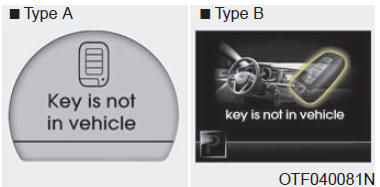
If the smart key is not in the vehicle and a door is opened or closed while the ENGINE START/STOP button is in ACC, ON or START, the warning appears on the LCD. In addition, the chime sounds for 5 seconds if the smart key is not in the vehicle and the door is closed.
Always keep the smart key with you.
Key is not detected
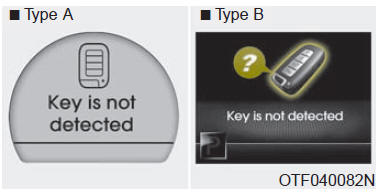
If the smart key is not in the vehicle or is not detected and you press the ENGINE START/STOP button, the warning appears on the LCD for 10 seconds. In addition, the immobiliser and key holder indicators flash for 10 seconds.
Low key battery
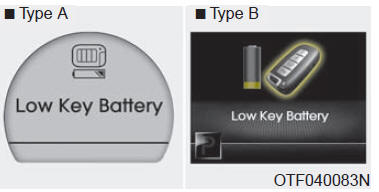
If the ENGINE START/STOP button is in OFF when the smart key battery in the vehicle becomes discharged, the warning appears on the LCD for approximately 10 minutes.
Replace the battery with a new one.
Press brake pedal to start engine
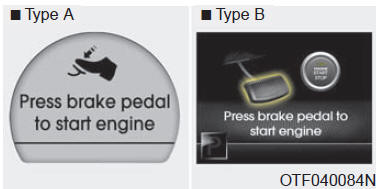
If you press the ENGINE START/STOP button twice while it is in ACC without depressing the brake pedal, an indicator appears on the LCD for approximately 10 seconds, indicating that you must depress the brake pedal to start the engine.
Shift to "P" position
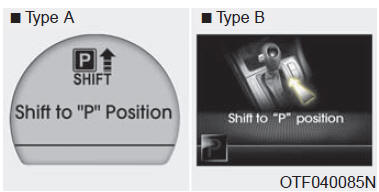
If you try to turn off the engine without shifting the gear lever to P, the ENGINE START/STOP button will move to ACC. If you press the button once more, it will move to ON. The warning appears on the LCD for approximately 10 seconds, indicating that you must press the ENGINE START/STOP button with the gear lever in P (Park).
Remove key
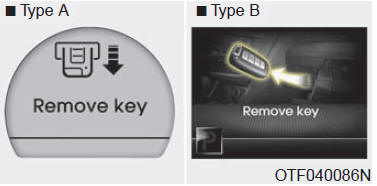
When you turn off the engine while the smart key is in the key holder, the warning appears on the LCD for approximately 10 seconds. The key holder indicator also flashes for approximately 10 seconds. To remove the key, push it into the key holder, then pull it out.
Insert key
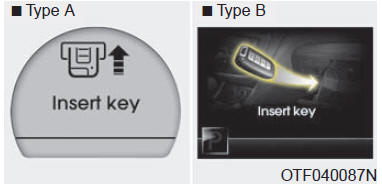
If you press the ENGINE START/STOP button while "Key is not detected" is displayed on the LCD, the "Insert Key" warning appears for approximately 10 seconds.
In addition, the immobiliser indicator and key holder indicator flash for approximately 10 seconds.
Press start button again
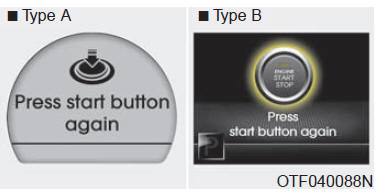
If you cannot use the ENGINE START/STOP button because of a fault in the ENGINE START/STOP button system, the warning appears for 10 seconds and the chime sounds continuously, indicating that you can start the engine by pressing the ENGINE START/STOP button once more.
The chime stops if the ENGINE START/STOP button system is operating normally.
If the warning appears every time you press the ENGINE START/STOP button, have the system checked by an authorised Kia dealer.
Shift to "P" or "N" to start the engine
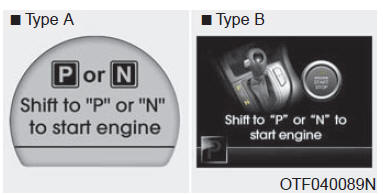
If you try to start the engine while the gear lever is not in "P" or "N", the warning appears on the LCD for approximately 10 seconds.
You can also start the engine with the lever in N (Neutral), but for your safety, shift the gear lever to "P".
Press clutch pedal to start engine
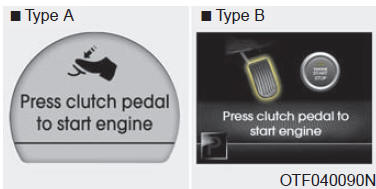
If you press the ENGINE START/STOP button without depressing the clutch pedal, the warning lights up on the LCD for approximately 10 seconds, indicating that you must depress the clutch pedal to start the engine.
Check stop lamp fuse
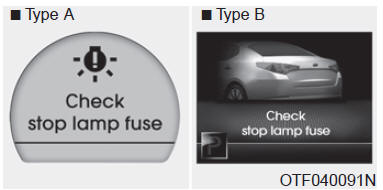
If the stop lamp fuse is blown, the warning appears on the LCD for 10 seconds. Replace the fuse with a new one. If this is not possible, you can start the engine by pressing the ENGINE START/STOP button for 10 seconds with the button turned to ACC.
Align steering wheel
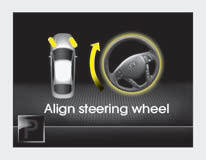
If you start the engine while the steering wheel is turned 90 degrees to the left, "Align steering wheel" appears on the LCD for 5 seconds after a short time.
Turn the steering wheel to the right and then to the left by less than 30 degrees.
Align steering wheel
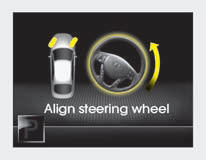
If you start the engine while the steering wheel is turned 90 degrees to the right, "Align steering wheel" appears on the LCD for 5 seconds after a short time.
Turn the steering wheel to the left and then to the right by less than 30 degrees.
Align steering wheel
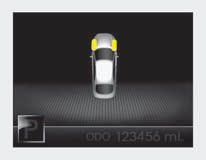
If you straighten the steering wheel within 5 seconds of "Align steering wheel" appearing, the indicator will be displayed as shown above.
Door open
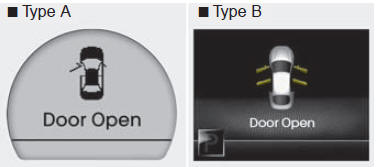
This indicator shows which door is open.
Trunk open
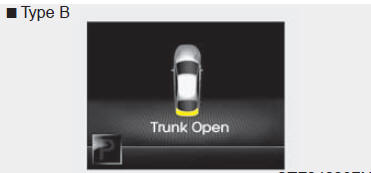
This indicator comes on if the trunk lid is not properly closed.
Illumination
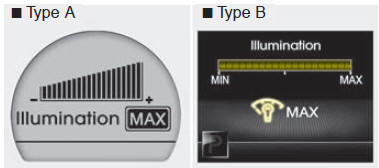
The instrument panel illumination level is displayed when you adjust it using the illumination control switch.
Parking assist warning indicator
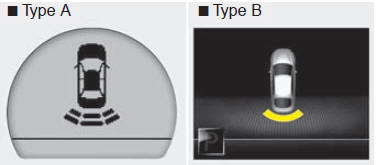
The indicator shows the area where an obstacle is detected when reversing.
Low washer fluid
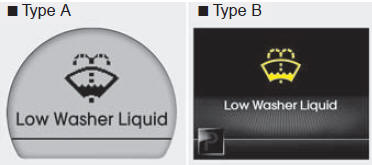
The warning light illuminates for 12 seconds when the windshield washer fluid reservoir is nearly empty. To turn off the warning light immediately, press and hold RESET for more than one second. Refill the windshield washer fluid reservoir as soon as possible.
Test yourself
A quick Kia Optima DL3 quiz: every answer comes with an explanation and a link to the manual page.