Phone List
The names of up to 5 paired phones will be displayed.
A [ is displayed in front of the currently connected phone. ].
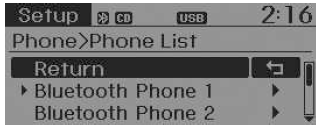
Select the desired name to configure the selected phone.
- Connecting a Phone
Select [Phone List] Select
the phone using the knob TUNE
 Select [Connect Phone]
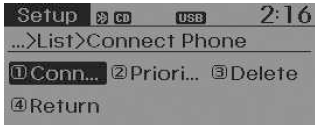
- Select a phone that is not currently connected.
- Connect the selected phone.
- "Connection completion" is displayed.
❈ If a phone is already connected, disconnect the currently connected phone and select the new phone to connect.
- Disconnecting a Connected Phone
Select [Phone List] Select
the phone using the knob TUNE
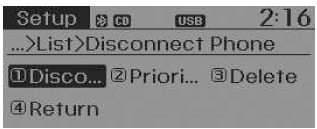
 Select [Disconnect Phone]
- Select the currently connected phone.
- Disconnect the selected phone.
- "Disconnection completion" is displayed.
- Changing the Connection Order (Priority)
paired phones.
Select [Phone List] Select
[Priority] using the knob TUNE
 Select the
Priority No. 1 phone
- Select [Priority].
- From the paired phones, select the desired phone for Priority No. 1.
- The changed priority order is displayed.
❈ As soon as the connection order (Priority) is changed, the new phone with Priority No. 1 will be connected.
- If the phone with Priority No. 1 cannot connect, an attempt will automatically be made to connect to the last connected phone.
- If connection to the last connected phone is not possible, connection attempts are made in the order the paired phones are listed.
- The connected phone will automatically have its priority changed to No. 1.
- Delete
Select [Phone List] Select
the phone using the knob
TUNE Select [Delete]
- Select the desired phone.
- Delete the selected phone.
- "Deletion completion" is displayed.
❈ When deleting the currently connected phone, the phone is disconnected first.
CAUTION- When you delete a phone, the phone's contacts will also be deleted.
- To ensure stable Bluetooth Wireless Technology communication, delete the phone from the audio system and delete the audio system from the phone.
Test yourself
A quick Kia Rio YB quiz: every answer comes with an explanation and a link to the manual page.