Advanced Park guidance screens
Guidance screens are displayed on the multimedia display.
Guidance screen (When assistance starts)
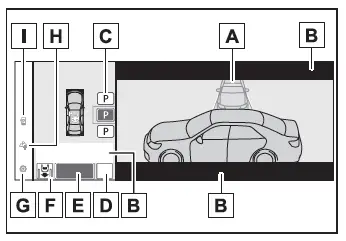
- Target parking space box (blue)
- Advice display
- Parking type change button
If multiple buttons are displayed, depending on the condition of the button its function differs as follows.
 or
 : Change the target to another parking space.
 or
 : Select the current target parking space.
 : Select to change to the parallel parking function
 : Change the perpendicular parking (forward/reverse) function
- "MODE" button
Select to change between the memory function and the perpendicular parking (forward/reverse) function and parallel parking function.
- "Start" button
Select to start parking assistance.
- Perpendicular parking direction change button
Select to change between the parking (forward) function and parking (reverse) function
 : Change the perpendicular parking (forward) function
 : Change the perpendicular parking (reverse) function
- Customize setting button
Select to display the Advanced Park setting screen.
- Registration button
Select to begin registering a parking space.
- Remote control function start button
Select to start parking assistance operation on the smartphone display.
Guidance screen (When reversing)
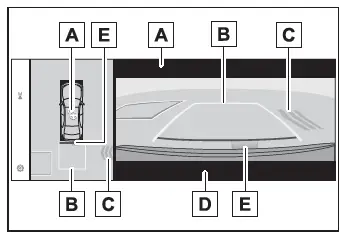
- Operation icon
Displayed when the Advanced Park is operating.
- Guide lines (yellow and red)
Display points from the center of the edge of the front or rear bumper to the target stopping position (yellow)* and approximately 0.3 m (1 ft.) (red) from the vehicle.
- Moving object warning icon
- Emergency support brake control operation display
"BRAKE!" is displayed.
- Toyota parking assist-sensor display
*: The yellow lateral line is not displayed when the target stopping position is approximately 2.5 m (8.2 ft.) or more away from the vehicle.
■Toyota parking assist-sensor popup display
Regardless of whether the Toyota parking assist-sensor is off or on, if an object is detected by the Toyota parking assist-sensor when the Advanced Park is operating, the Toyota parking assist-sensor pop up display will automatically be displayed over the guidance display.
■Brake control operation when Advanced Park is operating
While the Advanced Park is operating, if the system determines that the possibility of collision with detected moving or stationary object is high, the hybrid system output restriction control and brake control will operate.
If brake control operates, Advanced Park operation will be suspended and a message will be displayed on the multi-information display.
■Buzzer
Depending on surrounding sounds or sounds from other systems, it may be difficult to hear the buzzer of this system.
■If a black screen is displayed on the multimedia display when the Advanced Park is operating
The system is being affected by radio waves or may be malfunctioning. If a radio antenna is installed near a camera, move it to a location as far from the cameras as possible. If a radio antenna is not installed near a camera, and the screen does not return to normal after turning the power switch off and then starting the hybrid system again, have the vehicle inspected by any authorized Toyota retailer or Toyota authorized repairer, or any reliable repairer.