Opening/closing the back door (vehicles with power back door)
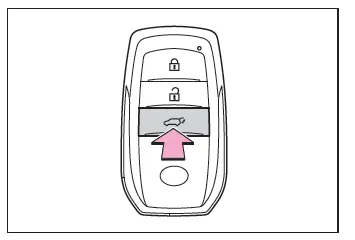
■ Using the wireless remote control
Press and hold the switch.
A buzzer sounds and the power back door automatically opens/closes.
Pressing the switch while the power back door is opening/closing stops the operation. When the switch is pressed and held again during the halted operation, the back door will perform the reverse operation.
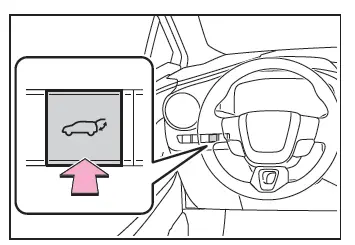
■ Opening/closing the back door from the inside
Press and hold the switch.
A buzzer sounds and the power back door automatically opens/closes.
Unlock the back door before operating.
Pressing the switch while the power back door is opening/closing stops the operation. When the switch is pressed and held again during the halted operation, the back door will perform the reverse operation.
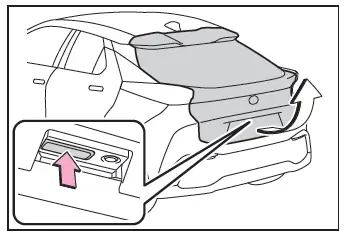
■ Opening/closing the back door from the outside
- Open
When the back door is unlocked: Press the back door opener switch.
When the back door is locked: While carrying the electronic key on your person, press the back door opener switch.
A buzzer sounds and the power back door automatically opens.
Pressing the switch while the power back door is opening/closing stops the operation.
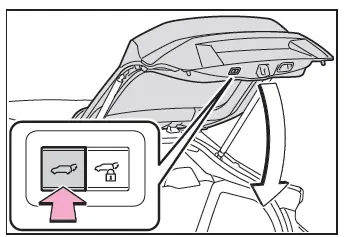
- Close
Press the switch.
A buzzer sounds and the power back door automatically closes.
Pressing the switch while the power back door is operating will stop the operation. When the switch is pressed again during the halted operation, the back door will perform the reverse operation.
- Close the back door and lock all doors (close & lock function)
Press the close & lock switch.
The power back door will close and all of the doors will be locked at the same time.
A different buzzer than the normal one will sound and the power back door will begin closing automatically.
When the power back door is closed, all of the doors will lock simultaneously and operation signals will indicate that all of the doors have been locked.
If the close & lock switch is pressed while the power back door is closing, the operation will stop.
Pressing the switch again will open the power back door automatically.
Vehicles with Double locking system: The double locking system will not operate at this time.
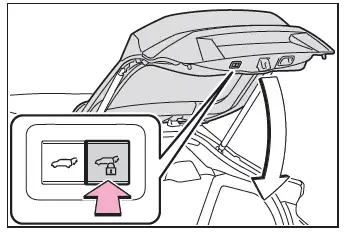
- Close the back door and lock all doors after moving away from the back door (close & lock [Walk-Away] function)*
*: This setting must be customized at any authorized Toyota retailer or Toyota authorized repairer, or any reliable repairer.
1. Close all of the doors except the back door, carrying an electronic key and press the close & lock switch on the lower part of the back door.
A different buzzer than the normal one will sound and the close & lock (Walk- Away) function will go into standby.
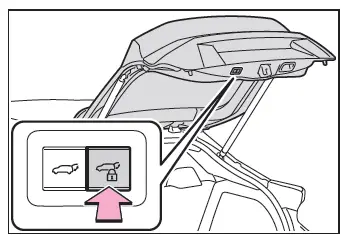
2. While the buzzer is sounding, move away from the back door.
When the sensor detects that you are away from the back door, the buzzer will sound and the emergency flashers will flash. Depending on the direction of moving away from the back door, the location and how to hold the electronic key or circumstances, it may not be detected properly.
All the doors other than the back door will be locked, and after the back door is closed, the back door will also be locked. When all the doors have been closed and locked, the buzzer will sound and the emergency flashers will flash. The standby state is canceled if you do not move away from the back door for 30 seconds. To operate the function again, perform the procedure again from the beginning.
If you approach the back door carrying the electronic key, the back door operation will stop, all the doors will be unlocked, and the buzzer will sound and the emergency flashers will flash.
If the close & lock switch is pressed after the back door operation has stopped, the close & lock (Walk-Away) function will go into standby again.
■ Using the back door handles
Lower the back door using the back door handle, then a buzzer sounds and the back door automatically closes.
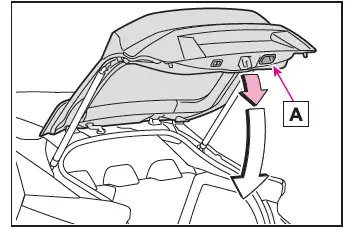
- Back door handle
■Luggage compartment light
- The luggage compartment light turns on when the back door is opened.
- If the luggage compartment light is left on when the power switch is turned off, the light will go off automatically after 20 minutes.
■Back door closer
In the event that the back door is left slightly open, the back door closer will automatically close it to the fully closed position.
Whatever the state of the power switch, the back door closer operates.
■Power back door operating conditions
The power back door can automatically open and close under the following conditions:
- When the power back door system is enabled.
- When the back door is unlocked.
However, if the back door opener switch is pressed while carrying the electronic key on your person, the power back door will be operated even if the back door is locked.
- When the power switch is in ON, in addition to the above for the opening operations, the back door operates for any of the following conditions:
- Parking brake is engaged
- The brake pedal is depressed
- The shift position is in P.
■Operation of the power back door
- When the power back door system is disabled, the power back door does not operate but it can be opened and closed by hand.
- When the power back door automatically opens, if an abnormality due to people or objects is detected, operation will stop.
■Jam protection function
Sensors are equipped on both sides of the power back door. If anything obstructs the power back door while it is closing, the back door will automatically operate in the opposite direction or stop.
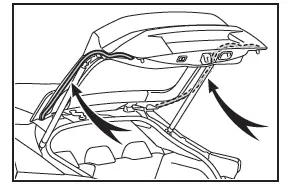
■Back door reserve lock function
This function is a function which reserves locking of all doors, beforehand, when the power back door is open.
When the following procedure is performed, all the doors except the power back door are locked and then power back door will also be locked at the same time it is closed.
1. Close all doors, except the back door.
2. During the power back door closing operation, lock the doors using the smart entry & start system from the front doors or the wireless remote control.
The emergency flashers flash to indicate that all the doors have been closed and locked.
- If the electronic key is placed inside the vehicle after starting a close operation via the door reserve lock function, the electronic key may become locked inside the vehicle.
- If the power back door does not fully close due to the operation of the jam protection function, etc., while the back door is automatically closing after a door reserve lock operation is performed, the door reserve lock function is canceled and all the doors will unlock.
- Before leaving the vehicle, make sure that all the doors are closed and locked.
■Close & lock function operating conditions
This function can be operated when all of the following conditions are met:
- An electronic key is not detected within the vehicle.
- All of the doors other than the power back door are closed.
- The power switch is off.
■Situations in which the close & lock function may not operate properly
In the following situations, the close & lock function may not operate properly:
- If the close & lock switch on the lower part of the power back door is pressed by a hand which is holding an electronic key
- If the close & lock switch on the lower part of the power back door is pressed when the electronic key is in a bag, etc. that is placed on the ground
- If the close & lock switch on the lower part of the power back door is pressed with the electronic key not near the vehicle.
■Close & lock (Walk-Away) function* operating conditions
This function can be operated when all of the following conditions are met:
- Close & lock (Walk-Away) function is enabled.
- An electronic key is not detected within the vehicle.
- All of the doors other than the back door are closed.
- The power switch is in OFF.
- The electronic key is within the effective range (detection areas).
*: This setting must be customized at any authorized Toyota retailer or Toyota authorized repairer, or any reliable repairer.
■Situations in which the close & lock (Walk-Away) function* may not operate properly
In the following situations, the function may not operate properly:
- When the smart entry & start system does not operate properly.
- When the close & lock function does not operate properly.
- When moving away from the back door while the close & lock (Walk- Away) function is in the standby state.
- When the number of electronic keys registered in the vehicle increases.
*: This setting must be customized at any authorized Toyota retailer or Toyota authorized repairer, or any reliable repairer.
■When reconnecting the 12-volt battery
To enable the power back door to operate properly, close the back door manually.
■If the back door opener is inoperative
The back door can be unlocked from the inside.
1. Remove the cover.
To prevent damage, cover the tip of the screwdriver with a rag.
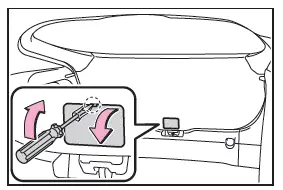
2. Loosen the screw.
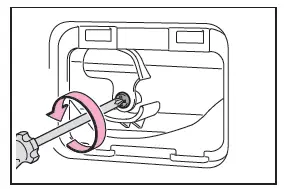
3. Turn the cover.
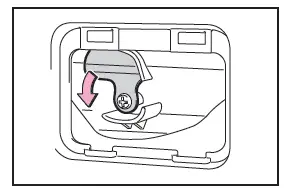
4. Move the lever.

5. When installing, reverse the steps listed.
■Customization
Some functions can be customized.
WARNING
■Back door closer
- In the event that the back door is left slightly open, the back door closer will automatically close it to the fully closed position. It takes several seconds before the back door closer begins to operate. Be careful not to catch fingers or anything else in the back door, as this may cause bone fractures or other serious injuries.
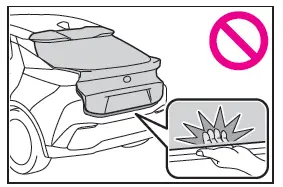
- Use caution when using the back door closer as it still operates when the power back door system is canceled.
■Power back door
Observe the following precautions when operating the power back door.
Failure to do so may cause death or serious injury.
- Check the safety of the surrounding area to make sure there are no obstacles or anything that could cause any of your belongings to get caught.
- If anyone is in the vicinity, make sure they are safe and let them know that the back door is about to open or close.
- If the power back door system is turned off while the back door is operating automatically, the automatic operation is stopped. The back door then has to be operated manually. Take extra care when on an incline, as the back door may open or close unexpectedly.
- If the operating conditions of the power back door are no longer met, a buzzer may sound and the back door may stop opening or closing.
The back door then has to be operated manually. Take extra care when on an incline, as the back door may open or close abruptly.
- On an incline, the back door may suddenly shut after it opens. Make sure the back door is fully open and secure.
- In the following situations, the power back door may detect an abnormality and automatic operation may be stopped. In this case, the back door has to be operated manually. Take extra care when on an incline, as the back door may open or close abruptly.
- When the back door contacts an obstacle
- When the 12-volt battery voltage suddenly drops, such as when the power switch is turned to ON or the hybrid system is started during automatic operation
- If a bicycle carrier or similar heavy object is attached to the back door, it may suddenly shut again after being opened, causing someone's hands, head or neck to be caught and injured. When installing an accessory part to the back door, using a genuine Toyota part is recommended.
■Jam protection function
Observe the following precautions.
Failure to do so may cause death or serious injury.
- Never use any part of your body to intentionally activate the jam protection function.
- The jam protection function may not work if something gets caught just before the back door fully closes.
Be careful not to catch fingers or anything else.
- The jam protection function may not work depending on the shape of the object that is caught. Be careful not to catch fingers or anything else.
■Close & lock (Walk-Away) function*
The back door starts to close automatically when leaving the back door.
Check the safety of the surrounding area to make sure there are no obstacles or anything that could cause any of your belongings to get caught.
*: This setting must be customized at any authorized Toyota retailer or Toyota authorized repairer, or any reliable repairer.
NOTICE
■Back door spindles
The back door is equipped with spindles that hold the back door in place.
Observe the following precautions.
Failure to do so may cause damage to the back door spindle, resulting in malfunction.
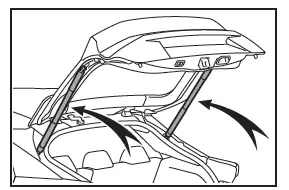
- Do not attach any foreign objects, such as stickers, plastic sheets, or adhesives to the spindle rod.
- Do not touch the spindle rod with gloves or other fabric items.
- Do not attach heavy accessories to the back door. When attaching, ask any authorized Toyota retailer or Toyota authorized repairer, or any reliable repairer for details.
- Do not place your hand on the spindle or apply lateral forces to it.
■To prevent back door closer malfunction
Do not apply excessive force to the back door while the back door closer is operating. Applying excessive force may cause the back door closer to malfunction.
■To prevent damage to the power back door
- Make sure that there is no ice between the back door and frame that would prevent movement of the back door. Operating the power back door when excessive load is present on the back door may cause a malfunction.
- Do not apply excessive force to the back door while the power back door is operating.
- Take care not to damage the sensors (installed on the right and left edges of the power back door) with a knife or other sharp object. If the sensor is disconnected, the power back door will not close automatically.
■Close & lock and close & lock (Walk-Away) function*
When closing the power back door using the close & lock function, a different buzzer than the normal one will sound before the operation begins. To check that the operation has started correctly, check that a different buzzer than the normal one has sounded.
Additionally, when the power back door is fully closed and locked, operation signals will indicate that all of the doors have been locked. Before leaving the vehicle, make sure that the operation signals have operated and that all of the doors are locked.
*: This setting must be customized at any authorized Toyota retailer or Toyota authorized repairer, or any reliable repairer.