Keys

In this manual: Keys
Main Owner's Manual — 1Event data recorder — 1Exterior — 1Instrument panel (left-hand drive vehicles) — 1Switches (left-hand drive vehicles) — 1Interior (left-hand drive vehicles) — 1Instrument panel (right-hand drive vehicles) — 1Switches (right-hand drive vehicles) — 1Interior (right-hand drive vehicles) — 1For safe use — 1Before driving — 1For safe driving — 1Seat belts — 1Correct use of the seat belts — 1SRS airbags — 1Exhaust gas precautions — 1Child safety — 1Airbag manual on-off system — 1Riding with children — 1Child restraint systems — 1Child restraint system compatibility for each seating position — 1Child restraint system installation method — 1Child restraint system fixed with an ISOFIX lower anchorage — 1Emergency assistance — 1Hybrid system — 1Hybrid system features — 1Acoustic vehicle alerting system — 1Hybrid system precautions — 1Hybrid battery (traction battery) air intake vent — 1Theft deterrent system — 1Immobilizer system — 1Double locking system — 1Alarm — 1Warning lights and indicators — 1Warning lights — 1Indicators — 1Gauges and meters (7-inch display) — 1Meter display — 1Adjusting the clock — 1Gauges and meters (12.3-inch display) — 1Meter display — 1Adjusting the clock — 1Multi-information display(7-inch display) — 1Display contents — 1Changing the meter display — 1Driving support system information display — 1Settings display — 1Multi-information display(12.3-inch display) — 1Display contents — 1Changing the meter display — 1Fuel Economy — 1EV drive time ratio — 1Settings display — 1Head-up display — 1System components — 1Using the head-up display — 1Pop-up display — 1Energy monitor/consumption screen — 1Key information — 1Keys — 1Digital key — 1Opening, closing and lockingthe doors — 1Side doors — 1Unlocking and locking the doors from the inside — 1Back door — 1Unlocking and locking the back door from the outside — 1Opening/closing the back door (vehicles with power back door) — 1Changing settings of the power back door system (vehicles with power back door) — 1Smart entry & start system — 1Adjusting the seats — 1Front seats — 1Rear seats — 1Head restraints — 1Adjusting the steering wheeland mirrors — 1Steering wheel — 1Inside rear view mirror — 1Digital Rear-view Mirror — 1Adjusting the mirror — 1Cleaning the Digital Rear-view Mirror — 1Outside rear view mirrors — 1Opening and closing the windows — 1Favorite settings — 1Driving position memory — 1Registering/canceling/recalling a driving position to an electronic key (memory recall function) — 1My Settings — 1Before driving — 1Driving the vehicle — 1Cargo and luggage — 1Trailer towing — 1Driving procedures — 1Power (ignition) switch — 1EV drive mode — 1Transmission — 1Turn signal lever — 1Parking brake — 1Brake Hold — 1Operating the lights and wipers — 1Headlight switch — 1AHS (Adaptive High-beam System) — 1AHB (Automatic High Beam) — 1Fog light switch — 1Windshield wipers and washer — 1Refueling — 1Using the driving supportsystems — 1Toyota Safety Sense software update — 1Toyota Safety Sense — 1Sensors used by Toyota Safety Sense — 1Situations in which the sensors may not operate properly — 1Driver monitor — 1PCS (Pre-Collision System) — 1Operating conditions of each function of the pre-collision system — 1Situations in which the system may not operate properly — 1LTA (Lane Tracing Assist) — 1Enabling/disabling the system — 1LCA (Lane Change Assist) — 1Operating the LCA — 1LDA (Lane Departure Alert) — 1Changing LDA settings — 1PDA (Proactive driving assist) — 1FCTA (Front crossing traffic alert) — 1RSA (Road Sign Assist) — 1Types of road signs supported — 1Dynamic radar cruise control — 1Using the dynamic radar cruise control — 1Approach warning — 1Cruise control — 1Speed limiter — 1Emergency Driving Stop System — 1BSM (Blind Spot Monitor) — 1Blind Spot Monitor operation — 1Automatic Rear Flashing Hazard Lights — 1Secondary Collision Brake (Rear Impacts while Stopped) — 1Safe Exit Assist — 1Safe exit assist operation — 1Toyota parking assist-sensor — 1Sensor detection display, object distance — 1Toyota parking assist-sensor object warning function (vehicles with Advanced Park) — 1RCTA (Rear Crossing Traffic Alert) function — 1RCTA function — 1RCD (Rear Camera Detection) — 1When a pedestrian is detected — 1PKSB (Parking Support Brake) — 1System overview — 1Parking Support Brake function (static objects front and rear of the vehicle/static objects around the vehicle) — 1Types of sensors — 1Parking Support Brake function (moving vehicles rear of the vehicle) — 1Parking Support Brake function (pedestrians rear of the vehicle) — 1Toyota Teammate Advanced Park — 1Types of cameras and sensors used for the Advanced Park — 1Advanced Park guidance screens — 1Perpendicular parking (forward/reverse) function — 1Advanced Park perpendicular exiting (forward/reverse) function — 1Advanced Park Parallel parking function — 1Advanced Park parallel exiting function — 1Advanced Park memory function — 1Remote control function (if equipped) — 1Advanced Park cancelation/ suspension — 1Changing the Advanced Park settings — 1Driving mode select switch — 1GPF (Gasoline Particulate Filter) system — 1Driving assist systems — 1Driving tips — 1Hybrid electric vehicle driving tips — 1Winter driving tips — 1Selecting tire chains — 1Using the air conditioningsystem and defogger — 1Automatic air conditioning system — 1Air outlet layout and operations — 1Heated steering wheel/seat heaters — 1Using the interior lights — 1Using the storage features — 1List of storage features — 1Luggage compartment features — 1Other interior features — 1Power outlet — 1USB Type-C charging port — 1Wireless charger — 1Sun visors — 1Cleaning and protecting the vehicle exterior — 1Cleaning and protecting the vehicle interior — 1Maintenance requirements — 1Do-it-yourself service precautions — 1Hood — 1Positioning a floor jack — 1Engine compartment — 1Components — 1Checking the engine oil — 1Adding engine oil — 1Checking the coolant — 112-volt battery (2ZR-FXE engine) — 112-volt battery (M20A-FXS engine) — 1Tires — 1Checking tires — 1Tire rotation — 1Installing tire pressure warning valves and transmitters — 1Registering ID codes — 1Selecting wheel set — 1Tire inflation pressure — 1Wheels — 1Air conditioning filter — 1Cleaning the hybrid battery (traction battery) air intake vent — 1Electronic key battery — 1Checking and replacing fuses — 1Light bulbs — 1Essential information — 1Emergency flashers — 1If your vehicle has to be stopped in an emergency — 1If the vehicle is submerged or water on the road is rising — 1Steps to take in an emergency — 1If your vehicle needs to be towed — 1Emergency towing procedure — 1If you think something is wrong — 1If a warning light turns on or a warning buzzer sounds — 1If a warning message is displayed — 1If you have a flat tire (vehicles with an emergency tire puncture repair kit) — 1Location of the emergency tire puncture repair kit and tools — 1Taking out the emergency tire puncture repair kit — 1If you have a flat tire (vehicles with a spare tire) — 1Installing the spare tire — 1If the hybrid system will not start — 1If the electronic key does not operate properly — 1If the 12-volt battery is discharged — 1If your vehicle overheats — 1If the vehicle becomes stuck — 1Specifications — 1Maintenance data (fuel, oil level, etc.) — 1Fuel information — 1Customization — 1
8steps
~48min
2/5difficulty
Done 0 of 8

The keys

The following keys are provided with the vehicle.
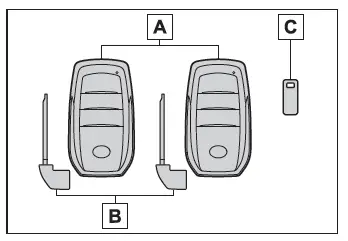
Toyota C-HR. Keys
  1. Electronic keys
    • Operating the smart entry & start system
    • Operating the wireless remote control function
  2. Mechanical keys
  3. Key number plate

■When riding in an aircraft

When bringing a key with wireless remote control function onto an aircraft, make sure you do not press any buttons on the key while inside the aircraft cabin.

If you are carrying the key in your bag, etc., ensure that the buttons are not likely to be pressed accidentally. Pressing a button may cause the key to emit radio waves that could interfere with the operation of the aircraft.

■Electronic key battery depletion

  • The standard battery life is 1 to 2 years.
  • If the battery becomes low, an alarm will sound in the cabin and a message will be shown on the multi-information display when the hybrid system is stopped.
  • To reduce key battery depletion when the electronic key is to not be used for long periods of time, set the electronic key to the battery-saving mode.
  • As the electronic key always receives radio waves, the battery will become depleted even if the electronic key is not used. The following symptoms indicate that the electronic key battery may be depleted. Replace the battery when necessary.
    • The smart entry & start system or the wireless remote control does not operate.
    • The detection area becomes smaller.
    • The LED indicator on the key surface does not turn on.

You can replace the battery by yourself. However, as there is a danger that the electronic key may be damaged, it is recommended that replacement is carried out by any authorized Toyota retailer or Toyota authorized repairer, or any reliable repairer.

  • To avoid serious deterioration, do not leave the electronic key within 1 m (3 ft.) of the following electrical appliances that produce a magnetic field:
    • TVs
    • Personal computers
    • Cellular phones, cordless phones and battery chargers
    • Recharging cellular phones or cordless phones
    • Table lamps
    • Induction cookers
  • If the electronic key is near the vehicle for longer than necessary, even if the smart entry & start system is not operated, the key battery may become depleted faster than normal.

    When not operating the smart entry & start system, it is recommended to not stay with the electronic key near the vehicle longer than necessary.

■If a message regarding the state of the electronic key or power switch mode, etc. is shown

To prevent trapping the electronic key inside the vehicle, leaving the vehicle carrying the electronic key on your person without turning the power switch to OFF or other passengers from unintentionally taking the key out of the vehicle, etc., a message that prompts the user to confirm the state of the electronic key or power switch mode may be shown on the multi-information display. In those cases, follow the instructions on the display immediately.

■If "Key battery low Replace key battery" is displayed on the multi-information display

The electronic key has a low battery.

Replace the electronic key battery.

■Confirmation of the registered key number

The number of keys already registered to the vehicle can be confirmed. Ask any authorized Toyota retailer or Toyota authorized repairer, or any reliable repairer for details.

■If "A New Key has been Registered Contact Your Dealer for Details" is shown on the multi-information display

This message will be displayed each time the driver's door is opened when the doors are unlocked from the outside for approximately 10 days after a new electronic key has been registered.

If this message is displayed but you have not had a new electronic key registered, ask any authorized Toyota retailer or Toyota authorized repairer, or any reliable repairer to check if an unknown electronic key (other than those in your possession) has been registered.

NOTICE

■To prevent key damage

  • Do not drop the keys, subject them to strong shocks, or bend them.
  • Do not expose the keys to high temperatures for long periods of time.
  • Do not get the keys wet or wash them in an ultrasonic washer, etc.
  • Do not attach metallic or magnetic materials to the keys or place the keys close to such materials.
  • Do not disassemble the keys.
  • Do not attach a sticker or anything else to the surface of the key.
  • Do not place the keys near objects that produce magnetic fields, such as TVs, audio systems and induction cookers.
  • Do not place the keys near medical electrical equipment such as lowfrequency therapy equipment or microwave therapy equipment, and do not receive medical attention with the keys on your person.

■Carrying the electronic key on your person

Carry the electronic key 10 cm (3.9 in.) or more away from electric appliances that are turned on. Radio waves emitted from electric appliances within 10 cm (3.9 in.) of the electronic key may interfere with the key, causing the key to not function properly.

Wireless remote control

The electronic keys are equipped with the following wireless remote control:
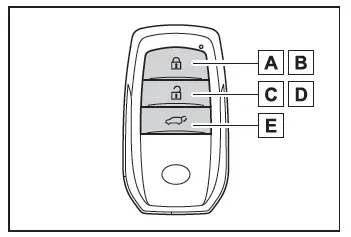
Toyota C-HR. Keys
  1. Locks the doors
  2. Closes the windows*1
  3. Unlocks the doors
  4. Opens the windows*1
  5. Opens and closes the power back door*2

*1: This setting must be customized at any authorized Toyota retailer or Toyota authorized repairer, or any reliable repairer.

*2: If equipped

Using the mechanical key

To take out the mechanical key, slide the release lever A and take the key out.

The mechanical key can only be inserted in one direction, as the key only has grooves on one side. If the key cannot be inserted in a lock cylinder, turn it over and re-attempt to insert it.

After using the mechanical key, store it in the electronic key. Carry the mechanical key together with the electronic key. If the electronic key battery is depleted or the entry function does not operate properly, you will need the mechanical key.
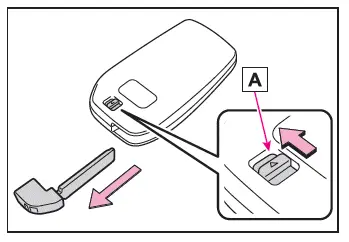
Toyota C-HR. Keys

■If a wrong key is used

The key cylinder rotates freely, isolated from the internal mechanism.