Remote control function (if equipped)
A smartphone can be used to remotely operate the parking functions and exit functions. Also, assistance can be provided to remotely move the vehicle forward or backward into a garage, etc.
■ Parking using Remote control function
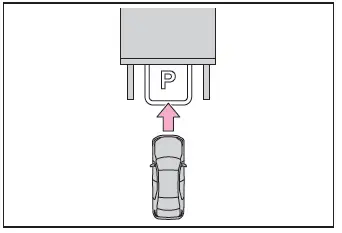
A smartphone can be used to remotely operate the parking function if the target parking space can be detected when the vehicle is stopped close and perpendicular to the center of the parking space.
Also, depending on the condition of the parking space, etc., if it is necessary to change the direction of travel of the vehicle, the shift position can be changed by assistance control.
1. Stop the vehicle with it aligned near the center of the target parking space.
2. Press the Advanced Park main switch and check that a possible parking space is displayed on the multimedia display.
3. Select the  button and then select "Perpendicular/parallel".
4. Select "OK" button.
5. Exit the vehicle while carrying the electronic key and smartphone, and then start the Remote Park app on the smartphone.
The detection area of the electronic key is within approximately 3 m (9.8 ft.) around the vehicle.
If there is an obstruction in the path of the vehicle, move it before parking the vehicle. A cone can also be moved after exit the vehicle.
6. From outside of the vehicle, confirm the parking space on the screen of the smartphone and then select the start button.
Start operation of Remote control function while standing approximately 50 cm (1.6 ft.) or more from the vehicle and out of the path of the vehicle.
7. Checking the safety of the area around the vehicle, trace the operation area on the screen of the smartphone. While continuously tracing the operation area, the vehicle will move and parking assistance will be performed.
If operation of the screen of the smartphone is stopped, assistance can be suspended and the vehicle can be stopped. When the operation of the screen of the smartphone is resumed to move the vehicle, the vehicle will be locked automatically before moving.
8. When the parking space is reached, after the vehicle is stopped by the parking brake, the shift position will be changed to P, the power switch will be turned off, and the doors will be locked.
A completion screen will be displayed on the smartphone.
■The parking function can be used even if obstructions exist if
- When using the parking functions at a parking space made of white lines, even if an obstruction exists in the parking space, the space can be set as the target parking space. This allows for assistance to continue after setting a parking space from inside the vehicle and then exiting the vehicle to move an obstruction, such as a traffic cone placed in a handicapped parking space.
- When perpendicular parking using Advanced Park, 3 parking spaces on each side of the vehicle (up to 6 total) can be detected. However, when using Remote control function, only 1 parking space on each side of the vehicle can be detected.
Moving the vehicle forward and backward using Remote control function
After the vehicle is stopped, assistance can be provided to move the vehicle into a garage, etc., by using the forward and backward movement function.
1. Stop the vehicle at the location you would like to start assistance.
2. Press the Advanced Park main switch.
3. Select  and then select "Forward/reverse".
4. Select "OK" button.
5. Exit the vehicle while carrying the electronic key and smartphone, and then start the Remote Park app on the smartphone.
The detection area of the electronic key is within approximately 3 m (9.8 ft.) around the vehicle.
6. From outside of the vehicle, confirm the direction of travel on the screen of the smartphone and then select the start button.
Start operation of Remote control function while standing approximately 50 cm (1.6 ft.) or more from the vehicle and out of the path of the vehicle. The detection area of the electronic key is within approximately 3 m (9.8 ft.) around the vehicle.
7. Checking the safety of the area around the vehicle, trace the operation area on the screen of the smartphone. While continuously tracing the operation area, the vehicle will move and forward and reverse movement assistance will be performed.
If operation of the screen of the smartphone is stopped, assistance can be suspended and the vehicle can be stopped. While assistance is being performed, it can be stopped part way or the direction of travel of the vehicle can be changed.
8. Select the power button on the screen of the smartphone. The power switch will then turn OFF and the doors will lock automatically.
■Changing the direction of travel
While assistance is being performed, the direction of travel of the vehicle can be changed by the forward and reverse movement function. When there is a wall behind the vehicle, etc., by operating the direction of travel changing button on the screen of the smartphone, the vehicle can be slightly moved forward to allow loading of items and then moved back to its original position.
Exiting using Remote control function
Assistance can be provided to exit from a perpendicular or parallel parking space when the power switch OFF. When forward and backward movement is selected, the maximum distance the vehicle can move is 7 m (23.0 ft.) from the starting point and possible to change the direction of travel.
1. While near the parked vehicle, unlock the doors using the electronic key, and then start the Remote Park app on the smartphone.
If the smartphone cannot connect to the vehicle, using the electronic key, unlock the doors again.
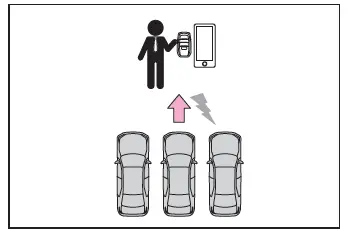
2. Select the start button on the screen of the smartphone.
The power switch will change to ON.
3. Check that a possible exit direction is displayed, select the exit direction.
4. Checking the safety of the area around the vehicle, trace the operation area on the screen of the smartphone. While continuously tracing the operation area, the vehicle will move and departure assistance will be performed.
If operation of the screen of the smartphone is stopped, assistance can be suspended and the vehicle can be stopped. While assistance is being performed, it can be stopped part way or the direction of travel of the vehicle can be changed.
5. Move the vehicle to the position where assistance ends and enter the vehicle while carrying the electronic key.
To stop assistance part way, stop operating the smartphone or enter the vehicle.
■Exit using the remote air conditioning
- Assistance can be provided to exit from a parking space, even when the remote air conditioning is operating.
- When Remote control function is started while the remote air conditioning is operating, if tracing operations are not performed on a smartphone, assistance can be canceled by entering the vehicle and depressing the brake pedal.
Parking using the Remote control function and memory function
A smartphone can be used to remotely operate the memory function if the target parking space can be detected when the vehicle is stopped close to a parking space which was previously registered to the memory function. Also, depending on the condition of the parking space, etc., if it is necessary to change the direction of travel of the vehicle, the shift position can be changed by assistance control.
1. Stop the vehicle with it aligned near the center of the target parking space.
2. Press the Advanced Park main switch and check that a possible parking space is displayed on the multimedia display.
3. Select the  button and then select "Perpendicular/parallel".
4. Select "OK" button.
If the "MODE" button is displayed, the button can be selected to change between the memory function, perpendicular parking (forward/reverse) function and parallel parking function.
5. Exit the vehicle while carrying the electronic key and smartphone, and then start the Remote Park app on the smartphone.
The detection area of the electronic key is within approximately 3 m (9.8 ft.) around the vehicle. If there is a cone or other obstruction in the path of the vehicle, move it after exiting the vehicle.
6. From outside of the vehicle, confirm the parking space on the screen of the smartphone and then select the start button.
Start operation of Remote control function while standing approximately 50 cm (1.6 ft.) or more from the vehicle and out of the path of the vehicle.
7. Checking the safety of the area around the vehicle, trace the operation area on the screen of the smartphone. While continuously tracing the operation area, the vehicle will move and parking assistance will be performed.
If operation of the screen of the smartphone is stopped, assistance can be suspended and the vehicle can be stopped. When the operation of the screen of the smartphone is resumed to move the vehicle, the vehicle will be locked automatically before moving.
8. When the parking space is reached, after the vehicle is stopped by the parking brake, the shift position will be changed to P, the power switch will be turned off, the doors will be locked.
A completion screen will then be displayed on the smartphone.
Preparation before using Remote control function
Preparation before using
Make sure to perform the following before using Remote control function:
1. Download the Remote Park app from the app store.
2. Turn the power switch to ON and register the smartphone as a Bluetooth device to the multimedia system. For details on registering a Bluetooth device, refer to the "Multimedia owner's manual".
3. Setup the Remote Park app and register the vehicle.
4. The registered vehicle will be displayed on the screen of the smartphone.
Select the vehicle.
The name and image of the vehicle can be changed on the new vehicle registration screen.
Vehicles can be added through the menu screen.
Remote control function on/off
1. Select  and then select "Advanced Park" on the multimedia display.
2. Select "Remote Park" to turn it on/off. (The default setting is on.)
3. Press the Advanced Park main switch.
If the switch is pressed while assistance is being performed, the assistance will be canceled.
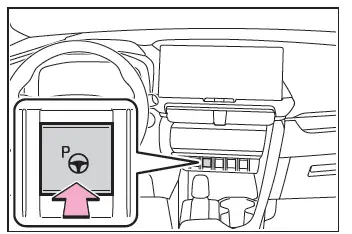
4. Select the  button displayed on the multimedia display.
NOTICE
■Remote control function
- When using Remote control function, make sure carry an electronic key in your pocket, etc.
- If an electronic key is held together with a smartphone, etc., the electronic key may not be able to be detected.
- Vehicles with a digital key: Remote control function cannot be used when carrying only a digital key.
The driver should always carry the electronic key.
- When entering the vehicle after using Remote control function, make sure that the electronic key is brought into the vehicle and all of the doors are closed.
- Vehicles with a power easy access system: After entering the vehicle and ending Remote control function operation, the seat return function will operate when the driver's seat seat belt is fastened or the brake pedal is depressed.
- If the power switch is turned off when Remote control function operation has finished or been canceled, the doors will be locked automatically. However, if a door is open, it may not be locked. Check the vehicle condition after Remote control function operation has finished.
- When the doors are locked after Remote control function operation has finished or been canceled, an alarm may sound if someone is detected inside the vehicle.
■Situations in which the function may not operate correctly
- When the functions of the smart entry & start system may not operate correctly
- When the vehicle is near fluorescent lights
■Electronic key battery consumption
- When Remote control function is being used, the electronic key battery will be used as the electronic key will continuously send and receive radio waves.
- If the electronic key battery is depleted.
■Situations in which the sensors may not operate properly
- When using Remote control function, visibility of the area around the vehicle may be limited. Make sure to check the following when using Remote control function.
- The vehicle and area around the vehicle are clearly visible
- There are no people, animals, or objects in the path of the vehicle
- An appropriate distance from the vehicle can be maintained and the safety of yourself and others can be ensured
- Caution for the area around the vehicle is always maintained and there is no potential for danger
- You can cancel Remote control function immediately if necessary