When a pedestrian is detected

In this manual: When a pedestrian is detected
Main Owner's Manual — 1Event data recorder — 1Exterior — 1Instrument panel (left-hand drive vehicles) — 1Switches (left-hand drive vehicles) — 1Interior (left-hand drive vehicles) — 1Instrument panel (right-hand drive vehicles) — 1Switches (right-hand drive vehicles) — 1Interior (right-hand drive vehicles) — 1For safe use — 1Before driving — 1For safe driving — 1Seat belts — 1Correct use of the seat belts — 1SRS airbags — 1Exhaust gas precautions — 1Child safety — 1Airbag manual on-off system — 1Riding with children — 1Child restraint systems — 1Child restraint system compatibility for each seating position — 1Child restraint system installation method — 1Child restraint system fixed with an ISOFIX lower anchorage — 1Emergency assistance — 1Hybrid system — 1Hybrid system features — 1Acoustic vehicle alerting system — 1Hybrid system precautions — 1Hybrid battery (traction battery) air intake vent — 1Theft deterrent system — 1Immobilizer system — 1Double locking system — 1Alarm — 1Warning lights and indicators — 1Warning lights — 1Indicators — 1Gauges and meters (7-inch display) — 1Meter display — 1Adjusting the clock — 1Gauges and meters (12.3-inch display) — 1Meter display — 1Adjusting the clock — 1Multi-information display(7-inch display) — 1Display contents — 1Changing the meter display — 1Driving support system information display — 1Settings display — 1Multi-information display(12.3-inch display) — 1Display contents — 1Changing the meter display — 1Fuel Economy — 1EV drive time ratio — 1Settings display — 1Head-up display — 1System components — 1Using the head-up display — 1Pop-up display — 1Energy monitor/consumption screen — 1Key information — 1Keys — 1Digital key — 1Opening, closing and lockingthe doors — 1Side doors — 1Unlocking and locking the doors from the inside — 1Back door — 1Unlocking and locking the back door from the outside — 1Opening/closing the back door (vehicles with power back door) — 1Changing settings of the power back door system (vehicles with power back door) — 1Smart entry & start system — 1Adjusting the seats — 1Front seats — 1Rear seats — 1Head restraints — 1Adjusting the steering wheeland mirrors — 1Steering wheel — 1Inside rear view mirror — 1Digital Rear-view Mirror — 1Adjusting the mirror — 1Cleaning the Digital Rear-view Mirror — 1Outside rear view mirrors — 1Opening and closing the windows — 1Favorite settings — 1Driving position memory — 1Registering/canceling/recalling a driving position to an electronic key (memory recall function) — 1My Settings — 1Before driving — 1Driving the vehicle — 1Cargo and luggage — 1Trailer towing — 1Driving procedures — 1Power (ignition) switch — 1EV drive mode — 1Transmission — 1Turn signal lever — 1Parking brake — 1Brake Hold — 1Operating the lights and wipers — 1Headlight switch — 1AHS (Adaptive High-beam System) — 1AHB (Automatic High Beam) — 1Fog light switch — 1Windshield wipers and washer — 1Refueling — 1Using the driving supportsystems — 1Toyota Safety Sense software update — 1Toyota Safety Sense — 1Sensors used by Toyota Safety Sense — 1Situations in which the sensors may not operate properly — 1Driver monitor — 1PCS (Pre-Collision System) — 1Operating conditions of each function of the pre-collision system — 1Situations in which the system may not operate properly — 1LTA (Lane Tracing Assist) — 1Enabling/disabling the system — 1LCA (Lane Change Assist) — 1Operating the LCA — 1LDA (Lane Departure Alert) — 1Changing LDA settings — 1PDA (Proactive driving assist) — 1FCTA (Front crossing traffic alert) — 1RSA (Road Sign Assist) — 1Types of road signs supported — 1Dynamic radar cruise control — 1Using the dynamic radar cruise control — 1Approach warning — 1Cruise control — 1Speed limiter — 1Emergency Driving Stop System — 1BSM (Blind Spot Monitor) — 1Blind Spot Monitor operation — 1Automatic Rear Flashing Hazard Lights — 1Secondary Collision Brake (Rear Impacts while Stopped) — 1Safe Exit Assist — 1Safe exit assist operation — 1Toyota parking assist-sensor — 1Sensor detection display, object distance — 1Toyota parking assist-sensor object warning function (vehicles with Advanced Park) — 1RCTA (Rear Crossing Traffic Alert) function — 1RCTA function — 1RCD (Rear Camera Detection) — 1When a pedestrian is detected — 1PKSB (Parking Support Brake) — 1System overview — 1Parking Support Brake function (static objects front and rear of the vehicle/static objects around the vehicle) — 1Types of sensors — 1Parking Support Brake function (moving vehicles rear of the vehicle) — 1Parking Support Brake function (pedestrians rear of the vehicle) — 1Toyota Teammate Advanced Park — 1Types of cameras and sensors used for the Advanced Park — 1Advanced Park guidance screens — 1Perpendicular parking (forward/reverse) function — 1Advanced Park perpendicular exiting (forward/reverse) function — 1Advanced Park Parallel parking function — 1Advanced Park parallel exiting function — 1Advanced Park memory function — 1Remote control function (if equipped) — 1Advanced Park cancelation/ suspension — 1Changing the Advanced Park settings — 1Driving mode select switch — 1GPF (Gasoline Particulate Filter) system — 1Driving assist systems — 1Driving tips — 1Hybrid electric vehicle driving tips — 1Winter driving tips — 1Selecting tire chains — 1Using the air conditioningsystem and defogger — 1Automatic air conditioning system — 1Air outlet layout and operations — 1Heated steering wheel/seat heaters — 1Using the interior lights — 1Using the storage features — 1List of storage features — 1Luggage compartment features — 1Other interior features — 1Power outlet — 1USB Type-C charging port — 1Wireless charger — 1Sun visors — 1Cleaning and protecting the vehicle exterior — 1Cleaning and protecting the vehicle interior — 1Maintenance requirements — 1Do-it-yourself service precautions — 1Hood — 1Positioning a floor jack — 1Engine compartment — 1Components — 1Checking the engine oil — 1Adding engine oil — 1Checking the coolant — 112-volt battery (2ZR-FXE engine) — 112-volt battery (M20A-FXS engine) — 1Tires — 1Checking tires — 1Tire rotation — 1Installing tire pressure warning valves and transmitters — 1Registering ID codes — 1Selecting wheel set — 1Tire inflation pressure — 1Wheels — 1Air conditioning filter — 1Cleaning the hybrid battery (traction battery) air intake vent — 1Electronic key battery — 1Checking and replacing fuses — 1Light bulbs — 1Essential information — 1Emergency flashers — 1If your vehicle has to be stopped in an emergency — 1If the vehicle is submerged or water on the road is rising — 1Steps to take in an emergency — 1If your vehicle needs to be towed — 1Emergency towing procedure — 1If you think something is wrong — 1If a warning light turns on or a warning buzzer sounds — 1If a warning message is displayed — 1If you have a flat tire (vehicles with an emergency tire puncture repair kit) — 1Location of the emergency tire puncture repair kit and tools — 1Taking out the emergency tire puncture repair kit — 1If you have a flat tire (vehicles with a spare tire) — 1Installing the spare tire — 1If the hybrid system will not start — 1If the electronic key does not operate properly — 1If the 12-volt battery is discharged — 1If your vehicle overheats — 1If the vehicle becomes stuck — 1Specifications — 1Maintenance data (fuel, oil level, etc.) — 1Fuel information — 1Customization — 1
3steps
~18min
2/5difficulty
Done 0 of 3

If a pedestrian is in the area behind the vehicle or if the rear camera detected that a pedestrian is approaching the vehicle from behind, the system urges caution from the driver by sounding the buzzer and displaying the detection of a pedestrian on the multimedia display as follows:
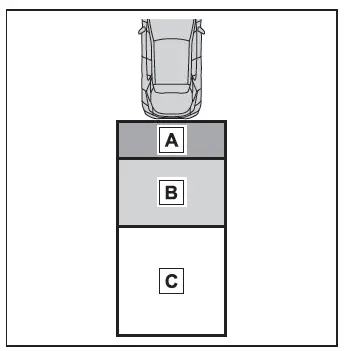
Toyota C-HR. RCD (Rear Camera Detection)
  1. If a pedestrian is detected in area A Buzzer: Sounds repeatedly Pedestrian detection icon: Blinks
  2. If a pedestrian is detected in area B Buzzer (When the vehicle is stationary): Sounds 3 times Buzzer (When the vehicle is backing up, when a pedestrian approaches the rear of the vehicle): Sounds repeatedly Pedestrian detection icon: Blinks
  3. If the system determines that your vehicle may collide with a pedestrian in area C Buzzer: Sounds repeatedly Pedestrian detection icon: Blinks

■The rear camera detection function is operational when

  • The power switch is in ON.
  • RCD function is on.
  • The shift position is in R.
  • Advanced Park is not operating.

■Setting the buzzer volume

The buzzer volume of the Toyota parking assist-sensor, RCTA, and RCD can all be changed at once from the customize settings.

■Muting a buzzer temporarily

When an object is detected, the temporary mute switch is displayed on the multimedia display system. Select the switch to mute a buzzer of the Toyota parking assist-sensor, RCTA, and RCD all together.

Mute will be canceled automatically in the following situations:

  • When the shift position is changed.
  • When the vehicle speed exceeds a certain speed.
  • When there is a malfunction in a sensor or the system is temporarily unavailable.
  • When the operating function is disabled manually.
  • When the power switch is turned off.

■Situations in which the system may not operate properly

  • Some pedestrians, such as the following, may not be detected by the rear camera detection function, preventing the function from operating properly:
    • Pedestrians who are bending forward or squatting
    • Pedestrians who are lying down
    • Pedestrians who are running
    • Pedestrians who suddenly appear from the shadow of the vehicle or a building
    • Pedestrians who are riding moving objects such as a bicycle or skateboard
    • Pedestrians wearing oversized clothing such as a rain coat, long skirt, etc., making their silhouette obscure
    • Pedestrians whose body is partially hidden by an object, such as a cart or umbrella
    • Pedestrians which are obscured by darkness, such as at night
  • In some situations, such as the following, pedestrians may not be detected by the rear camera detection function, preventing the function from operating properly:
    • When backing up in inclement weather (rain, snow, fog, etc.)
    • The lens is dirty (by dirt or snow-melting agent, etc.) or scratched
    • When a very bright light, such as the sun, or the headlights of another vehicle, shines directly into the rear camera
    • When backing up in a place where the surrounding brightness changes suddenly, such as at the entrance or exit of a garage or underground parking lot
    • When backing up in a dim environment such as during dusk or in an underground parking lot
    • When the camera position and direction are deviated
    • When a towing hook is attached
    • When water droplets are flowing on the camera lens
    • When the vehicle height is extremely changed (nose up, nose down, etc.)
    • When tire chains or an emergency tire puncture repair kit are used
    • When the suspension has been lowered or tires that have a different size than the genuine tires are installed
    • When an aftermarket electronic part (backlit license plate, fog light, etc.) is installed near the rear camera
    • If a bumper protector, such as an additional trim strip, is installed to the rear bumper
    • When towing with the vehicle

■Situations in which the system may operate unexpectedly

  • Even though there are no pedestrians in the detection area, some objects, such as the following, may be detected, possibly causing the rear camera detection function to operate.
    • Three dimensional objects, such as a pole, traffic cone, fence, or parked vehicle
    • Moving objects, such as a car or motorcycle
    • Objects moving toward your vehicle when backing up, such as flags or puddles (or airborne matter, such as smoke, steam, rain, or snow)
    • Cobblestone or gravel roads, tram rails, road repairs, white lines, pedestrian crossings or fallen leaves on the road
    • Metal covers (gratings), such as those used for drainage ditches
    • Objects reflected in a puddle or on a wet road surface
    • Shadows on the road
  • In some situations, such as the following, the rear camera detection function may operate even though there are no pedestrians in the detection area.
    • When backing up toward the roadside or a bump on the road
    • When backing up toward an incline/decline
    • When the vehicle height is extremely changed (nose up, nose down, etc.)
    • When an aftermarket electronic part (backlit license plate, fog light, etc.) is installed near the rear camera
    • If a bumper protector, such as an additional trim strip, is installed to the rear bumper
    • If the orientation of the rear camera has been changed due to a collision or other impact, or removal and installation
    • If a towing eyelet is installed to the rear of the vehicle
    • When water is flowing over the rear camera lens
    • The lens is dirty (by dirt or snow-melting agent, etc.)
    • If there is a flashing light in the detection area, such as the emergency flashers of another vehicle
    • When a tire chains or an emergency tire puncture repair kit are used
    • When towing with the vehicle
  • Situations in which the rear camera detection function may be difficult to notice
    • The buzzer may be difficult to hear if the surrounding area is noisy or the audio system volume is high.
    • If the temperature in the cabin is extremely high or low, the audio system screen may not operate correctly.