Approach warning

In this manual: Approach warning
Main Owner's Manual — 1Event data recorder — 1Exterior — 1Instrument panel (left-hand drive vehicles) — 1Switches (left-hand drive vehicles) — 1Interior (left-hand drive vehicles) — 1Instrument panel (right-hand drive vehicles) — 1Switches (right-hand drive vehicles) — 1Interior (right-hand drive vehicles) — 1For safe use — 1Before driving — 1For safe driving — 1Seat belts — 1Correct use of the seat belts — 1SRS airbags — 1Exhaust gas precautions — 1Child safety — 1Airbag manual on-off system — 1Riding with children — 1Child restraint systems — 1Child restraint system compatibility for each seating position — 1Child restraint system installation method — 1Child restraint system fixed with an ISOFIX lower anchorage — 1Emergency assistance — 1Hybrid system — 1Hybrid system features — 1Acoustic vehicle alerting system — 1Hybrid system precautions — 1Hybrid battery (traction battery) air intake vent — 1Theft deterrent system — 1Immobilizer system — 1Double locking system — 1Alarm — 1Warning lights and indicators — 1Warning lights — 1Indicators — 1Gauges and meters (7-inch display) — 1Meter display — 1Adjusting the clock — 1Gauges and meters (12.3-inch display) — 1Meter display — 1Adjusting the clock — 1Multi-information display(7-inch display) — 1Display contents — 1Changing the meter display — 1Driving support system information display — 1Settings display — 1Multi-information display(12.3-inch display) — 1Display contents — 1Changing the meter display — 1Fuel Economy — 1EV drive time ratio — 1Settings display — 1Head-up display — 1System components — 1Using the head-up display — 1Pop-up display — 1Energy monitor/consumption screen — 1Key information — 1Keys — 1Digital key — 1Opening, closing and lockingthe doors — 1Side doors — 1Unlocking and locking the doors from the inside — 1Back door — 1Unlocking and locking the back door from the outside — 1Opening/closing the back door (vehicles with power back door) — 1Changing settings of the power back door system (vehicles with power back door) — 1Smart entry & start system — 1Adjusting the seats — 1Front seats — 1Rear seats — 1Head restraints — 1Adjusting the steering wheeland mirrors — 1Steering wheel — 1Inside rear view mirror — 1Digital Rear-view Mirror — 1Adjusting the mirror — 1Cleaning the Digital Rear-view Mirror — 1Outside rear view mirrors — 1Opening and closing the windows — 1Favorite settings — 1Driving position memory — 1Registering/canceling/recalling a driving position to an electronic key (memory recall function) — 1My Settings — 1Before driving — 1Driving the vehicle — 1Cargo and luggage — 1Trailer towing — 1Driving procedures — 1Power (ignition) switch — 1EV drive mode — 1Transmission — 1Turn signal lever — 1Parking brake — 1Brake Hold — 1Operating the lights and wipers — 1Headlight switch — 1AHS (Adaptive High-beam System) — 1AHB (Automatic High Beam) — 1Fog light switch — 1Windshield wipers and washer — 1Refueling — 1Using the driving supportsystems — 1Toyota Safety Sense software update — 1Toyota Safety Sense — 1Sensors used by Toyota Safety Sense — 1Situations in which the sensors may not operate properly — 1Driver monitor — 1PCS (Pre-Collision System) — 1Operating conditions of each function of the pre-collision system — 1Situations in which the system may not operate properly — 1LTA (Lane Tracing Assist) — 1Enabling/disabling the system — 1LCA (Lane Change Assist) — 1Operating the LCA — 1LDA (Lane Departure Alert) — 1Changing LDA settings — 1PDA (Proactive driving assist) — 1FCTA (Front crossing traffic alert) — 1RSA (Road Sign Assist) — 1Types of road signs supported — 1Dynamic radar cruise control — 1Using the dynamic radar cruise control — 1Approach warning — 1Cruise control — 1Speed limiter — 1Emergency Driving Stop System — 1BSM (Blind Spot Monitor) — 1Blind Spot Monitor operation — 1Automatic Rear Flashing Hazard Lights — 1Secondary Collision Brake (Rear Impacts while Stopped) — 1Safe Exit Assist — 1Safe exit assist operation — 1Toyota parking assist-sensor — 1Sensor detection display, object distance — 1Toyota parking assist-sensor object warning function (vehicles with Advanced Park) — 1RCTA (Rear Crossing Traffic Alert) function — 1RCTA function — 1RCD (Rear Camera Detection) — 1When a pedestrian is detected — 1PKSB (Parking Support Brake) — 1System overview — 1Parking Support Brake function (static objects front and rear of the vehicle/static objects around the vehicle) — 1Types of sensors — 1Parking Support Brake function (moving vehicles rear of the vehicle) — 1Parking Support Brake function (pedestrians rear of the vehicle) — 1Toyota Teammate Advanced Park — 1Types of cameras and sensors used for the Advanced Park — 1Advanced Park guidance screens — 1Perpendicular parking (forward/reverse) function — 1Advanced Park perpendicular exiting (forward/reverse) function — 1Advanced Park Parallel parking function — 1Advanced Park parallel exiting function — 1Advanced Park memory function — 1Remote control function (if equipped) — 1Advanced Park cancelation/ suspension — 1Changing the Advanced Park settings — 1Driving mode select switch — 1GPF (Gasoline Particulate Filter) system — 1Driving assist systems — 1Driving tips — 1Hybrid electric vehicle driving tips — 1Winter driving tips — 1Selecting tire chains — 1Using the air conditioningsystem and defogger — 1Automatic air conditioning system — 1Air outlet layout and operations — 1Heated steering wheel/seat heaters — 1Using the interior lights — 1Using the storage features — 1List of storage features — 1Luggage compartment features — 1Other interior features — 1Power outlet — 1USB Type-C charging port — 1Wireless charger — 1Sun visors — 1Cleaning and protecting the vehicle exterior — 1Cleaning and protecting the vehicle interior — 1Maintenance requirements — 1Do-it-yourself service precautions — 1Hood — 1Positioning a floor jack — 1Engine compartment — 1Components — 1Checking the engine oil — 1Adding engine oil — 1Checking the coolant — 112-volt battery (2ZR-FXE engine) — 112-volt battery (M20A-FXS engine) — 1Tires — 1Checking tires — 1Tire rotation — 1Installing tire pressure warning valves and transmitters — 1Registering ID codes — 1Selecting wheel set — 1Tire inflation pressure — 1Wheels — 1Air conditioning filter — 1Cleaning the hybrid battery (traction battery) air intake vent — 1Electronic key battery — 1Checking and replacing fuses — 1Light bulbs — 1Essential information — 1Emergency flashers — 1If your vehicle has to be stopped in an emergency — 1If the vehicle is submerged or water on the road is rising — 1Steps to take in an emergency — 1If your vehicle needs to be towed — 1Emergency towing procedure — 1If you think something is wrong — 1If a warning light turns on or a warning buzzer sounds — 1If a warning message is displayed — 1If you have a flat tire (vehicles with an emergency tire puncture repair kit) — 1Location of the emergency tire puncture repair kit and tools — 1Taking out the emergency tire puncture repair kit — 1If you have a flat tire (vehicles with a spare tire) — 1Installing the spare tire — 1If the hybrid system will not start — 1If the electronic key does not operate properly — 1If the 12-volt battery is discharged — 1If your vehicle overheats — 1If the vehicle becomes stuck — 1Specifications — 1Maintenance data (fuel, oil level, etc.) — 1Fuel information — 1Customization — 1
~5min read

In situations where the vehicle approaches a preceding vehicle and the system cannot provide sufficient deceleration, such as if a vehicle cuts in front of the vehicle, a warning display will flash and a buzzer will sound to alert the driver.

Depress the brake pedal to ensure appropriate vehicle-to-vehicle distance.

■ Warnings may not occur when

In the following situations, the warning may not operate even though the vehicle-to-vehicle distance is short.

  • When the preceding vehicle is traveling at the same speed or faster than your vehicle
  • When the preceding vehicle is traveling at an extremely low speed
  • Immediately after the vehicle speed has been set
  • When the accelerator pedal is depressed

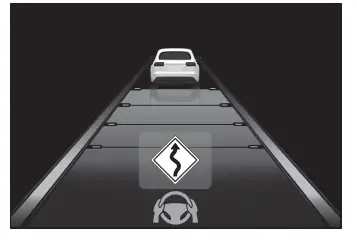
Curve speed reduction function

When a curve is detected, the vehicle speed will begin being reduced.

When the curve ends, the vehicle speed reduction will end.

Depending on the situation, the vehicle speed will then return to the set vehicle speed.

In situations where vehicle-to-vehicle distance control needs to operate, such as when a preceding vehicle cuts in front of your vehicle, the curve speed reduction function will be canceled.
Toyota C-HR. Dynamic radar cruise control

■Situations in which the curve speed reduction function may not operate

In situations such as the following, the curve speed reduction function may not operate:

  • When the vehicle is being driven around a gentle curve
  • When the accelerator pedal is being depressed
  • When the vehicle is being driven around an extremely short curve

Overtaking prevention function

If a detected vehicle in the passing lane is traveling slower than your vehicle, overtaking will be suppressed.

The overtaking prevention function will not operate if the passing lane is congested or vehicles are traveling at low speeds.

This function is not available for vehicles without a DCM.

Driver Monitor support function (if equipped)

While a warning of the driver monitor is being displayed, the vehicle acceleration will be restrained.

When the warning of the driver monitor disappears, the restrained acceleration control will end.

Support for lane change

If your vehicle is being driven at approximately 80 km/h or more and a lane change to the passing lane is performed, when the turn signal lever is operated and the lane is changed, the vehicle will accelerate up to the set speed to assist in overtaking.

For vehicles with a DCM: The system's recognition of which lane is the passing lane is determined by location information and the driving condition of surrounding vehicles. The support for lane change function and overtaking prevention function may not operate if it is difficult to obtain location information or there are few surrounding vehicles.

For vehicles without a DCM: The system's recognition of which lane is the passing lane may be based solely on the location of the steering wheel in the vehicle (left-hand drive/right-hand drive). If the vehicle is driven in a location where the passing lane is on the opposite side of that where the vehicle was originally sold, the vehicle may accelerate when the turn signal lever is operated away from the passing lane.

(e.g. The vehicle was manufactured for a right-hand traffic location, but is being driven in a left-hand traffic location. The vehicle may accelerate when the turn signal lever is operated to the right.) If your vehicle is being driven at approximately 80 km/h or more and the lane is changed to that with a vehicle traveling slower than your vehicle, when the turn signal lever is operated the vehicle will gradually decelerate to assist in changing lanes.

Dynamic Radar Cruise Control with Road Sign Assist (if equipped)

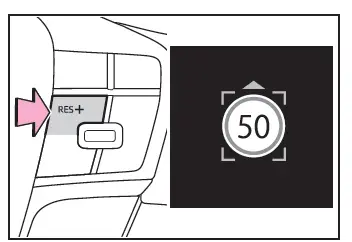
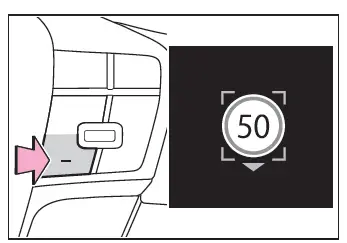
When RSA function is enabled and the dynamic radar cruise control system is operating, if a speed limit sign is detected, the detected speed limit will be displayed with an up/down arrow. The set speed can be increased/reduced to the detected speed limit by pressing and holding the "+" switch or "-" switch.

■ When the set speed is lower than the detected speed limit
Toyota C-HR. Dynamic radar cruise control

Press and hold the "+" switch.

■ When the set speed is higher than the detected speed limit
Toyota C-HR. Dynamic radar cruise control

Press and hold the "-" switch.

■The dynamic radar cruise control with road sign assist may not operate properly when (if equipped)

As the dynamic radar cruise control with road sign assist may not operate properly in situations where the RSA may not operate or cannot detect signs correctly, when using this function, make sure to confirm the actual speed limit.

In the following situations, the set speed may not change to the detected speed limit by pressing and holding the "+" switch or "-" switch:

  • When speed limit information is not available
  • When the detected speed limit is the same as the set speed
  • When the detected speed limit is outside of the speed range which the dynamic radar cruise control system can operate

Changing Dynamic radar cruise control settings

The settings of Dynamic radar cruise control can be changed through customize settings.

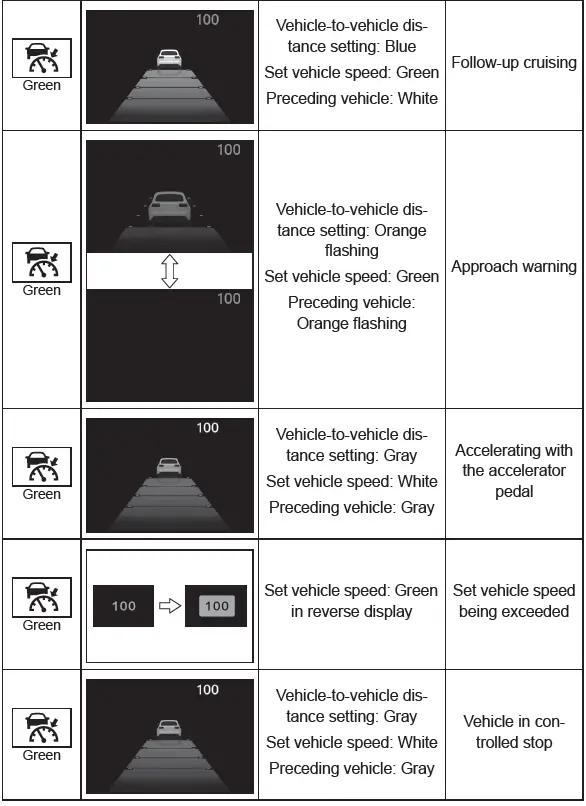
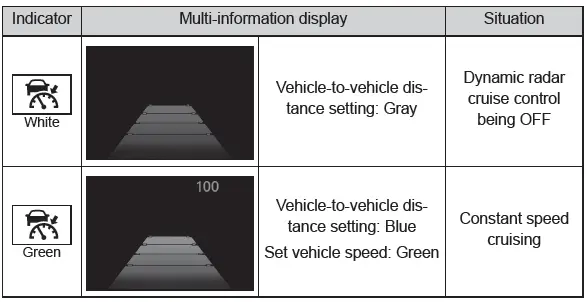
Display and system operation state

The operating state of Dynamic radar cruise control is indicated.
Toyota C-HR. Dynamic radar cruise control