EV drive time ratio
EV travel time ratio is displayed within the overall travel time.
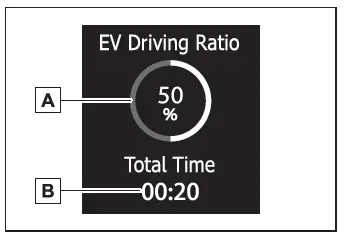
- EV driving ratio after starting
Displays the percentage of EV driving since the hybrid system was started.*
- Elapsed time after starting
Displays the elapsed time since hybrid system was started.*
*: It is reset each time the hybrid system stops.
Driving support system information display
Select to display the operational status of the following systems:
- LDA (Lane Departure Alert)
- LTA (Lane Tracing Assist)
- LCA (Lane Change Assist) (if equipped)
- Dynamic radar cruise control
- Cruise control
- Speed limiter (if equipped)
- PDA (Proactive driving assist) (if equipped)
- PCS (Pre-Collision System)
Map display (if equipped)
Displays the map data according to the navigation system.
Switches the displayed map size by pressing  .
Navigation system-linked display (if equipped)
Select to display the following navigation system-linked information:
- Route guidance to destination
- Compass display (heading-up display)
Audio system-linked display
The audio system-linked display displays the operating state of the audio system on the multi-information display.
Driving information display
■ Drive information
2 items that are selected using the "Drive Info. Items" setting (average speed, distance and total time) can be displayed vertically.
Use the displayed information as a reference only.
Following items will be displayed.
- "Average Speed": Displays the average vehicle speed since hybrid system start*
- "Distance": Displays the distance driven since hybrid system start*
- "Total Time": Displays the elapsed time since hybrid system start*
*: These items are reset each time the hybrid system stops.
■ Trip information
2 items that are selected using the "TRIP A Items" or "TRIP B Items" setting (average speed, distance and total time) can be displayed vertically.
Use the displayed information as a reference only.
- "Average Speed": Displays the average vehicle speed since the display was reset*
- "Distance": Displays the distance driven since the display was reset*
- "Total Time": Displays the elapsed time since the display was reset*
*: To reset, display the desired item and press and hold  .
Tire inflation pressure
Displays inflation pressure of each tire.
AWD/4WD system display (AWD/4WD models)
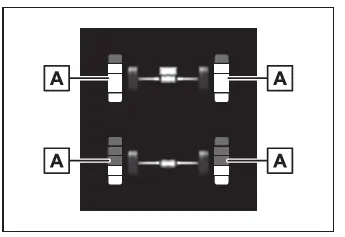
- Torque distribution display
Displays the drive status of each wheel in 6 steps from 0 to 5.
The illustration used is intended as an example, and may differ from the image that is actually displayed on the multi-information display.