Selecting wheel set
Your vehicle is equipped with tire pressure warning system with the function to have ID codes registered for a second wheel set, for example a winter set, by any authorized Toyota retailer or Toyota authorized repairer, or any reliable repairer.
After registration of a second wheel set, either of these two wheel sets can be selected for usage with the tire pressure warning system.
■ Operating conditions for the function
- This function will perform the change of wheel set only if a second wheel set has been registered.
If no second wheel set has been registered, the ID cannot be changed even if "Identifying Each Wheel & Position" is selected in the multi-information display and waiting for 2 minutes.
- Only a change between both registered wheel set is possible, mixing between these wheel sets is not supported.
■ How to change between wheel sets (with 7-inch display)
1. Have the vehicle fitted with the preferred wheel set.
2. Press  of the meter control switch to select
 .
3. Press  to select "Vehicle Settings" and then press
 .
4. Press  to select "TPWS Setting" and then press
 .
5. Press  to select "Identifying Each Wheel & Position".
Then press and hold  until the tire pressure warning light blinks slowly 3 times. Afterward, turns on after flashing for 1 minute.

After 2 minutes, registration of a second wheel set is being performed and the tire pressure warning light will turn off.
6. Initialize the tire pressure warning system. If the tire inflation pressure settings for the installed tire changes, initialization operations are required, but if the same tire inflation pressure, initialization is not required.
7. Drive straight (with occasional left and right turns) at approximately 40 km/h or more for approximately 10 to 30 minutes.
Registration of a second wheel set is complete when the tire pressure warning light turns off and the inflation pressure of each tire is displayed on the multi-information display.
■ How to change between wheel sets (with 12.3-inch display)
1. Have the vehicle fitted with the preferred wheel set.
2. Press and hold  to display the cursor on the content display area (center) of the multi-information display.
3. Press  of the meter control switches to select "
 Settings" and then press
 .
4. Press  of the meter control switches, select "Vehicle Settings" and then press and hold
 .
5. Press  of the meter control switches, select "TPWS setting" and then press
 .
6. Press  of the meter control switches, select the "Identifying Each Wheel & Position".
Then press and hold  until the tire pressure warning light blinks slowly 3times. Afterward, turns on after flashing for 1 minute.
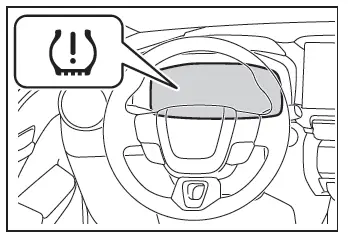
After 2minutes, registration of a second wheel set is being performed and the tire pressure warning light will turn off.
7. Initialize the pressure warning system.
If the tire inflation pressure settings for the installed tire changes, initialization operations are required, but if the same tire inflation pressure, initialization is not required.
8. Drive straight (with occasional left and right turns) at approximately 40 km/h or more for approximately 10 to 30 minutes.
Registration of a second wheel set is complete when the tire pressure warning light turns off and the inflation pressure of each tire is displayed on the multi-information display.