Automatic air conditioning system
Air outlets are automatically selected and fan speed is automatically adjusted according to the set temperature setting.
The illustrations below are for left-hand drive vehicles.
The button positions and shapes will differ for right-hand drive vehicles.
Also, the display and button positions will differ depending on the type of the system.
Air conditioning controls
Vehicles with the DUAL mode
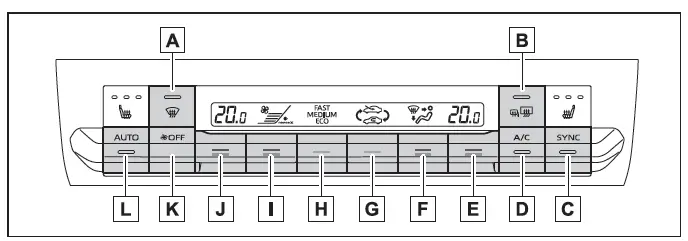
Vehicles without the DUAL mode

- Windshield defogger switch
- Rear window defogger and outside rear view mirror defoggers switch
- "SYNC" switch
- "A/C" switch
- Right-hand side temperature control switch
- Airflow mode control switch
- Outside/recirculated air mode switch
- "FAST/MEDIUM/ECO" switch
- Fan speed control switch
- Left-hand side temperature control switch
- "OFF" switch
- Automatic mode switch
■ Adjusting the temperature setting
Operate the temperature control switch upwards to increase the temperature and downwards to decrease the temperature.
If "A/C" switch is not pressed, the system will blow ambient temperature air or heated air.
■ Adjusting the fan speed setting
Operate the fan speed control switch upwards to increase the fan speed and downwards to decrease the fan speed.
Press the "OFF" switch to turn off the fan.
■ Change the airflow mode
Press the airflow mode control switch.
The airflow mode changes as follows each time the switch is pressed.
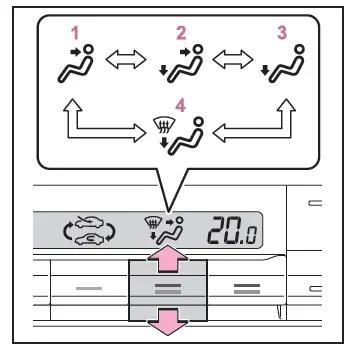
- Air flows to the upper body.
- Air flows to the upper body and feet.
- Air flows to the feet.
- Air flows to the feet and the windshield defogger operates.
■ Switching air modes
When it is desired to switch between inside air, outside air, and AUTO, press the recirculation setting switch.
The indicator illuminates on the outside recirculation setting switch.
■ Set cooling and dehumidification function
Press the "A/C" switch.
When the function is on, the indicator illuminates on the "A/C" switch.
■ Defogging the windshield
Defoggers are used to defog the windshield and front side windows.
Press the windshield defogger switch.
Set the outside/recirculated air mode switch to outside air mode if the recirculated air mode is used. (It may switch automatically.) To defog the windshield and the side windows quickly, turn the air flow and temperature up.
To return to the previous mode, press the windshield defogger switch again when the windshield is defogged.
When the windshield defogger switch is on, the indicator illuminates on the windshield defogger switch.
■ Defogging the rear window and outside rear view mirrors
Defoggers are used to defog the rear window, and to remove raindrops, dew and frost from the outside rear view mirrors.
Press the rear window and outside rear view mirror defoggers switch.
The defoggers will automatically turn off after a while.
When the rear window and outside rear view mirror defoggers switch is on, the indicator illuminates on the rear window and outside rear view mirror defoggers switch.
■ Using the Climate Preference
Press the "FAST/MEDIUM/ECO" switch.
Each time the "FAST/MEDIUM/ECO" switch is pressed, the fan speed setting mode toggles as follows.
"FAST"→ "MEDIUM" → "ECO"
- "FAST": Use when the effects of the air conditioning system want to be felt quickly
- "MEDIUM": Normal control
- "ECO": Use to enhance fuel economy during air conditioning system operation
■ nanoe X system *1, 2, 3 generator
This vehicle incorporates a biocidal product.
Ionized air generated by a device incorporated in the vehicle purifies the air in the cabin by suppressing certain types of bacteria, viruses and mould.
Active substance: Free radicals generated in situ from ambient air or water.
A nanoe X generator is installed in this air conditioning system. This provides clean and refreshing air through the front vent on the passenger side by emitting nanoe X particles*4
- When nanoe X is turned on, the nanoe X generator is automatically activated when the fan is turned on.
- The effects of nanoe X are maximized in the following conditions: The upper body, and upper body and feet vents are being used.
The passenger side vent is open.
- When nanoe X particles are generated, a small amount of ozone is emitted so a faint odour may be detectable. This is approximately the same as the amount that already exists in nature, such as in forests, and it has no effect on the human body.
- A slight noise may be detectable during operation. It may take some time for operation to begin.
A more noticeable noise may be detectable immediately upon the start of operation. This is not a malfunction.
*1: nanoe and the nanoe X marks are trademarks of Panasonic Holdings Corporation.
*2: nanoe X particles are nano-sized electrostatic atomised water particles that contain hydroxyl radicals, which have beneficial effects.
*3: If equipped
*4: According to temperature and humidity conditions, fan speed and direction of the air flow, the nanoe X generator may not operate at full capacity.
■Fogging up of the windows
- The windows will easily fog up when the humidity in the vehicle is high.
Turning "A/C" on will dehumidify the air from the outlets and defog the windshield effectively.
- If you turn "A/C" off, the windows may fog up more easily.
- The windows may fog up if the recirculated air mode is used.
■When driving on dusty roads
Close all windows. If dust thrown up by the vehicle is still drawn into the vehicle after closing the windows, it is recommended that the air intake mode be set to outside air mode and the fan speed to any setting except off.
■Outside/recirculated air mode
- Setting to the recirculated air mode temporarily is recommended in preventing dirty air from entering the vehicle interior and helping to cool the vehicle when the outside air temperature is high.
- Outside/recirculated air mode may automatically switch depending on the temperature setting or the inside temperature.
■Eco air conditioning mode
When Eco drive mode is selected using the driving mode select switch, eco air conditioning mode turns on.
When a drive mode other than Eco drive mode is selected, eco air conditioning mode may turn off.
■Operation of the air conditioning system in Eco drive mode
- In Eco drive mode, the air conditioning system is controlled as follows to prioritize fuel efficiency:
- Engine speed and compressor operation controlled to restrict heating/cooling capacity
- Fan speed restricted when automatic mode is selected
- To improve air conditioning performance, perform the following operations:
- Adjust the fan speed
- Turn off Eco drive mode
- Even when the drive mode is set to Eco drive mode, the air conditioning eco mode can be turned off by pressing the "FAST/MEDIUM/ECO" switch.
■When the outside temperature is low
The dehumidification function may not operate even when "A/C" is selected.
■Ventilation and air conditioning odors
- To let fresh air in, set the air conditioning system to the outside air mode.
- During use, various odors from inside and outside the vehicle may enter into and accumulate in the air conditioning system. This may then cause odor to be emitted from the vents.
- To reduce potential odors from occurring:
- It is recommended that the air conditioning system be set to outside air mode prior to turning the vehicle off.
- The start timing of the blower may be delayed for a short period of time immediately after the air conditioning system is started in automatic mode.
- When parking, the system automatically switches to outside air mode to encourage better air circulation throughout the vehicle, helping to reduce odors that occur when starting the vehicle.
■Customization
Some functions can be customized.
WARNING
■To prevent the windshield from fogging up
Do not use the windshield defogger switch during cool air operation in extremely humid weather. The difference between the temperature of the outside air and that of the windshield can cause the outer surface of the windshield to fog up, blocking your vision.
■When the outside rear view mirror defoggers are operating
Do not touch the outside rear view mirror surfaces, as they can become very hot and burn you.
■nanoe X generator (if equipped)
Do not disassemble or attempt to repair the nanoe X generator because it contains high voltage parts. Contact any Toyota retailer or Toyota authorized repairer, or any repairer if the generator needs repair.
NOTICE
■To prevent 12-volt battery discharge
Do not leave the air conditioning system on longer than necessary when the hybrid system is off.
■To prevent damage to the nanoe X generator (if equipped)
Do not insert anything into the front vent on the passenger side, attach anything to it, or use sprays around it.
These actions could cause the generator to malfunction.
Using automatic mode
1. Press the automatic mode switch.
2. Adjust the temperature setting.
3. To stop the operation, press the "OFF" switch.
If the fan speed setting or air flow modes are operated, the automatic mode indicator goes off. However, automatic mode for functions other than that operated is maintained.
■Using automatic mode
Fan speed is adjusted automatically according to the temperature setting and the ambient conditions.
Therefore, the fan may stop for a while until warm or cool air is ready to flow immediately after the automatic mode switch pressed.
Cool air may blow around the upper body even when the heater is on due to sunlight.
Adjusting the temperature for driver and front passenger seats simultaneously ("SYNC" mode) (if equipped)
To turn on the "SYNC" mode, press the "SYNC" switch.
The driver's side temperature control switch can be used to adjust the temperature for the driver's and passenger's side. To enter individual mode, operate the passenger's side temperature control switch or press the "SYNC" switch again.
The indicator comes on when the "SYNC" mode is on.
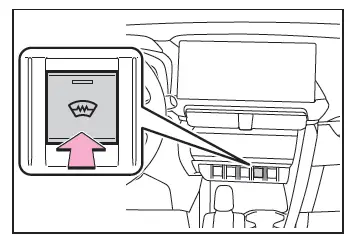
Windshield wiper de-icer (if equipped)
This feature is used to prevent ice from building up on the windshield and wiper blades.
Press the switch to turn the system on/off.
The indicator comes on when the system is on.
The windshield wiper de-icer will automatically turn off after approximately 15 minutes.
WARNING
■To prevent burns
Do not touch the glass at lower part of the windshield or to the side of the front pillars when the windshield wiper deicer is on.