Changing the meter display
The multi-information display is operated using the meter control switches.

 : Select menu icons
 : Change displayed content, scroll up/down the screen and move the cursor up/down
- Press: Enter/Set
Press and hold: Reset/Display customizable items - Return to the previous screen
- Call sending/receiving and history display
Linked with the hands-free system, sending or receiving call is displayed.
For details regarding the hands-free system, refer to the "Multimedia owner's manual".
Content of driving information
■ Display items
- Fuel economy
- ECO Accelerator Guidance/Eco score
- EV drive time ratio
■ Fuel economy
Use the displayed values as a reference only.
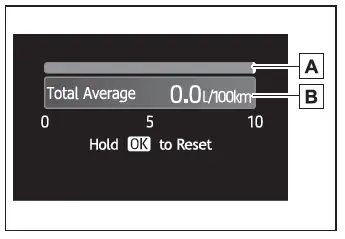
- Current fuel consumption
Displays instantaneous current fuel consumption.
- Average fuel economy (after reset)
To reset the average fuel economy display, press and hold the  meter control switch.
The average fuel economy display can be changed in  .
- Average fuel economy (after start)
Displays the average fuel consumption since hybrid system start.
- Average fuel economy (after refuel)
Displays the average fuel consumption since the vehicle was refueled.
■ ECO Accelerator Guidance/ Eco score
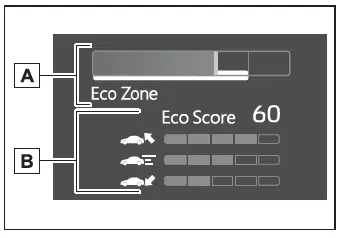
- ECO Accelerator Guidance
- Eco score
- ECO Accelerator Guidance
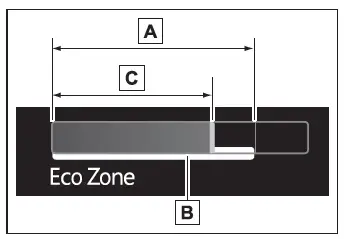
- Eco area
Shows that the vehicle is being driven in an Eco-friendly manner.
- Zone of Eco acceleration
Displayed as a white bar, and represents an estimated suitable accelerator pedal operation range for the current driving conditions, such as starting off or cruising.
This display changes according to situation, such as when starting off or cruising.
- Current acceleration
- Eco score
The following 3 Eco driving methods are evaluated in 5 levels: Smooth start-off acceleration, driving without sudden acceleration, and smooth stopping.
When the vehicle is stopped, an Eco score out of 100 points will be displayed.

- Score result
- Eco start status
- Eco cruise status
- Eco stop status
3 situations are displayed with each icon while driving.
- How to read the bar display
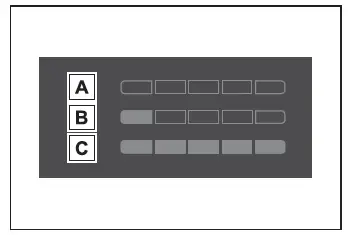
- Not yet evaluated
- Low
- High
- After the hybrid system is started, the Eco score will not be displayed until the vehicle speed exceeds approximately 30 km/h.
- The Eco score will be reset each time the hybrid system is started.
■ EV drive time ratio
Displays the ratio made up of the EV drive time within the overall drive time.
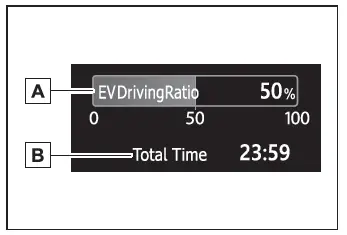
- EV driving ratio after starting
Displays the percentage of EV driving since the hybrid system was started.*
Elapsed time after starting
- Displays the elapsed time since hybrid system was started.*
*: It is reset each time the hybrid system stops.
■The ECO Accelerator Guidance/Eco score will not operate when
The ECO Accelerator Guidance/Eco score will not operate in the following situations:
- The Hybrid System Indicator is not operating.
- The vehicle is being driven using the dynamic radar cruise control.