Check / Clear DTCs
CHECK / CLEAR DTCs
NOTICE:
When the diagnostic system changes from normal mode to check mode, or vice versa, all DTCs and freeze frame data recorded in normal mode are erased. Before changing modes, always be sure to check and note the DTCs and freeze frame data.
HINT:
- DTCs stored in the ECM can be displayed using the Techstream. The Techstream can display current, pending and permanent DTCs.
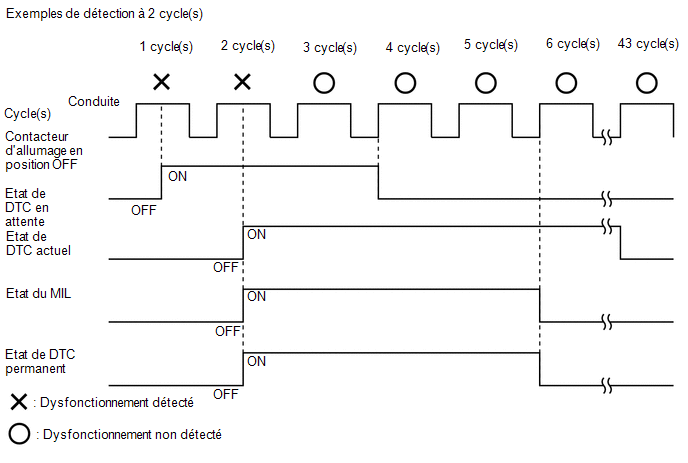
- If a malfunction is detected during the current driving cycle, current and permanent DTCs are stored.
- Some DTCs are not stored unless the ECM detects the same malfunction during a second consecutive driving cycle. However, malfunctions detected only once are stored as pending DTCs.
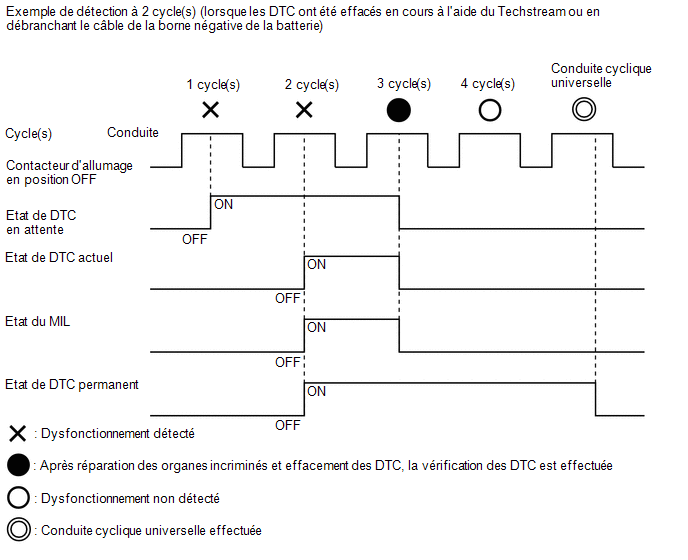
- Current and pending DTCs can be erased using the Techstream or by disconnecting the cable from the negative battery terminal. However, permanent DTCs cannot be erased by either of these methods.
- After erasing current DTCs using the Techstream (or by disconnecting the cable from the negative battery terminal), permanent DTCs can be erased when the system estimation result is normal for the relevant DTCs, and then the universal driving cycle is performed.
Pending DTC |
Storage condition |
Malfunction detected |
Erasing condition |
System estimated normal or DTCs erased using the Techstream or Cable disconnected from negative battery terminal |
|
Current DTC |
Storage condition |
Malfunction detected (2nd driving cycle) |
Erasing condition |
No malfunction detected in 40 driving cycles or DTCs erased using the Techstream or Cable disconnected from negative battery terminal |
|
Permanent DTC(s) |
Storage condition |
Malfunction detected (2nd driving cycle) |
Erasing condition |
Ignition switch turned ON after no malfunction has been detected for 3 driving cycles or After erasing DTCs using the Techstream or by disconnecting the cable from the negative battery terminal, no malfunction is detected when the universal driving cycle is performed |
|
MIL |
ON |
Malfunction detected (2nd driving cycle) |
OFF |
Ignition switch turned ON after no malfunction has been detected for 3 driving cycles or DTCs erased using the Techstream or Cable disconnected from negative battery terminal |
CHECK DTCs (using Techstream)
(a) DTCs stored in the ECM can be sent to the Techstream.
The Techstream can display current and pending DTCs. Some DTCs are not stored unless the malfunction is detected during consecutive driving cycles. If the malfunction is detected during only one driving cycle, the code is stored as a pending DTC.
(1) Connect the Techstream to the DLC3.
(2) Turn the ignition switch ON.
(3) Turn on the Techstream.
(4) Select the following menu items: Powertrain / Engine and ECT / Trouble Codes.
Powertrain > Engine and ECT > Trouble Codes(5) Confirm the DTCs and freeze frame data, then write them down.
(6) Confirm the details of the DTCs.
Click here
NOTICE:
When simulating a symptom using the Techstream to check DTCs, use the normal mode. For DTCs in the Diagnostic Trouble Code Chart that are subject to the "2 trip detection logic", perform the following:
Turn the ignition switch OFF after simulating the symptom the first time. Then repeat the simulation procedure. When the symptom has been simulated twice, the MIL illuminates and the DTCs are stored in the ECM.
CLEAR DTCs (PENDING AND CURRENT DTCs)
(a) Connect the Techstream to the DLC3.
(b) Turn the ignition switch to ON.
(c) Turn on the Techstream.
(d) Select the following menu items: Powertrain / Engine and ECT / Trouble Codes.
Powertrain > Engine and ECT > Clear DTCs(e) Clear the DTCs.
CLEAR DTCs (PENDING AND CURRENT DTCs WITHOUT TECHSTREAM)
(a) Perform one of the following operations.
NOTICE:
After turning the ignition switch OFF, a waiting time may be required before disconnecting the cable from the negative (-) battery terminal. Therefore, be sure to read the precautions for disconnecting the cable from the negative (-) battery terminal before performing the work.
Click here
(1) Disconnect the cable from the negative (-) battery terminal for at least 1 minute.
(2) Remove the ECU-B No. 3 and ETCS fuses from the No. 1 engine room relay block in the engine compartment for more than 1 minute.
CLEAR PERMANENT DTCs
HINT:
Even if the following procedure is not performed, permanent DTCs are cleared if no malfunction is detected for 3 consecutive driving cycles.
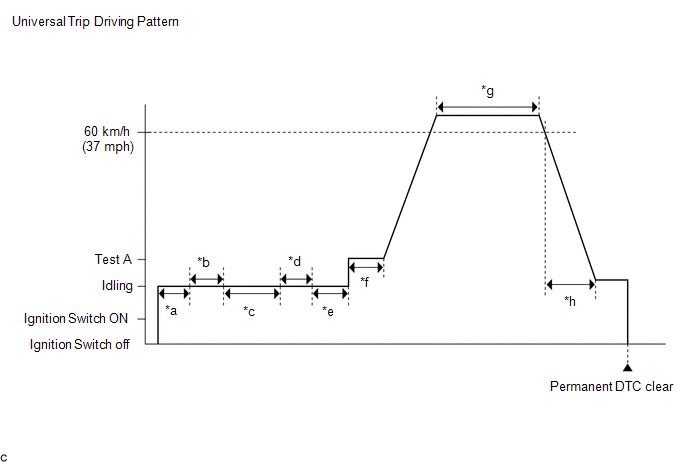
*a |
5 seconds minimum |
*b |
Shift lever from P to N |
*c |
30 seconds minimum |
*d |
Shift lever from N to D |
*e |
5 seconds minimum |
*f |
3 seconds minimum |
*g |
3 minutes minimum in total |
*h |
15 seconds minimum |
(a) Connect the Techstream to the DLC3.
(b) Turn the ignition switch to ON.
(c) Turn on the Techstream.
(d) Select the following menu items: Powertrain / Engine and ECT / Trouble Codes.
Powertrain > Engine and ECT > Trouble Codes(e) Check whether any permanent DTCs are stored.
HINT:
If no permanent DTCs are output, it is not necessary to continue this procedure.
(f) Clear DTCs.
Powertrain > Engine and ECT > Clear DTCs(g) Perform the universal driving cycle.
(1) Start the engine, wait at least 5 seconds, then move the shift lever from the P position to the N position.
(2) Wait at least 30 seconds.
(3) Move the shift lever to the D position and wait 5 seconds.
(4) While firmly depressing the brake pedal, slowly depress the accelerator pedal to increase engine speed to between 1,000 and 1,500 rpm and hold it for at least 3 seconds. (Test A)
(5) Release the brake pedal to start driving the vehicle.
(6) Drive the vehicle at a constant speed of 60 km/h or more for at least 3 minutes.
HINT:
- The driving test period can still be performed even if the vehicle decelerates below 60 km/h during the driving cycle, provided the vehicle is driven at 60 km/h or more for a total of 3 minutes.
- When accelerating through the gears, drive the vehicle so that all gears are used in order and no gear is skipped.*
*: With sequential Sport shift mode
(7) If the vehicle is traveling at 60 km/h, gradually decelerate over a period of at least 15 seconds and stop the vehicle.
(h) Turn the ignition switch OFF.
(i) Wait at least 3 minutes.
(j) Turn the ignition switch ON.
(k) Select the following menus: Powertrain / Engine and ECT / Trouble Codes.
Powertrain > Engine and ECT > Trouble Codes(l) Check that the permanent DTCs have been cleared.
HINT:
- If the permanent DTCs have not been cleared, perform the universal detection cycle again.
- Permanent DTCs are cleared once the universal driving cycle has been performed.