Collision warning* - Handling
The Collision Warning of the Volvo S80 (2nd generation, 2013–2016) offers various settings for adjusting the warning signals. This section explains how to activate light and sound signals and select the warning distance. It also provides notes on maintenance and cleaning of the sensors. Tips for optimal settings improve the effectiveness of the system.
Warning Signals On and Off

1. Audible and visual warning signal for collision risk.24
You can select whether the audible or visual warning signals of the Collision Warning are switched on or off.
When the engine is started, the setting that was selected when the engine was switched off is automatically retained.
CAUTIONBrake assistance and Auto Brake are always switched on - they cannot be switched off.
The Collision Warning settings are made via the center console display and the MY CAR menu system, see.
Light or Sound Signal
If the warning lamp and warning tone of the Collision Warning are activated, the warning lamp (No. [1] in the previous illustration) runs a test each time the engine starts, briefly lighting the individual lamp segments.
After the engine has started, the light and sound signals can be switched off:
- In the MY CAR menu system, open Collision Warning under Driver Support System and deactivate the function there.
Sound Signal
After the engine has started, the audible warning signal can be activated/deactivated separately:
- In the MY CAR menu system, open Warning Tone under Collision Warning and select On or Off there.
After this, the Collision Warning only warns with the warning lamp.
Setting the Warning Distance
The warning distance determines the distance at which the visual and audible warning is triggered.
- In the MY CAR menu system, open Warning Distance under Collision Warning and select Long, Normal or Short there.
The warning distance determines the sensitivity of the system. The Long warning distance gives an earlier warning. Initially set Long. However, if this setting triggers too many warnings, which can be perceived as irritating in certain situations, set the warning distance to Normal.
Use the Short warning distance only in exceptional cases, e.g. during dynamic driving.
CAUTIONWhen adaptive cruise control is in use, it uses the warning lamp and warning tone itself, even when the Collision Warning is switched off.
The Collision Warning System warns the driver of a collision risk, but the function cannot shorten the driver's reaction time.
For an effective Collision Warning System, always leave the distance warning set to time gap 4-5.
CAUTIONEven when the warning distance is set to Long, warnings may be perceived as late in some situations - for example with large speed differences or when the vehicle ahead brakes hard.
WARNINGNo automatic system can guarantee 100% correct function in all situations. The Collision Warning System with Auto Brake must therefore never be tested on people or vehicles - serious injury may result and there is a risk to life.
Checking the Settings
The current settings can be checked via the center console display and the MY CAR menu system.
Maintenance
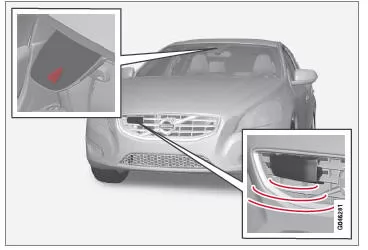
Camera and radar sensor25.
To ensure correct sensor function, keep them free of dirt, ice and snow and clean them regularly with water and car shampoo.
CAUTIONDirt, ice or snow on the sensors restricts their function and may prevent measurement.
Related information
- Collision warning system
24 The illustration is schematic - vehicle model and details may differ.
25 Warning! The illustration is schematic - details may vary depending on vehicle model.
The Collision Warning on the Volvo S80 (2nd gen) is conveniently operated via the MY CAR menu. There, warning signals and the warning distance can be set individually. Light and sound signals can be activated or deactivated separately, but Auto Brake always remains active.
Maintaining the system requires clean sensors. Dirt, ice or snow on the camera or radar can restrict function. Volvo places particular emphasis on intuitive operation combined with high reliability.
This is how the S80 becomes a safe companion in every driving situation.
Test yourself
A quick Volvo S80 quiz: every answer comes with an explanation and a link to the manual page.