Park Assist* - Function. Park Assist* - rear. Park Assist* - front. Park Assist* - Fault display
Park Assist in the Volvo S80 (2nd generation, 2013–2016) makes maneuvering easier through visual and audible signals. This section describes the function, the displays on the screen, and the tone sequences when approaching an obstacle. It also provides tips for safe use, for example when maneuvering with a trailer or in tight spaces. Notes on fault messages and their causes help ensure the system works correctly.
Park Assist* - Function
Park Assist is activated automatically when the engine starts - the switch indicator lights up. If Park Assist is switched off with the button, the indicator goes out.
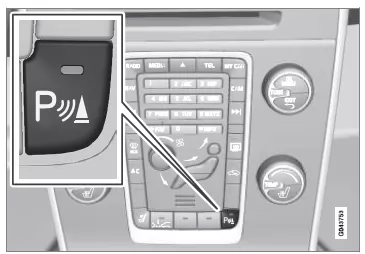
On/off button for Park Assist.
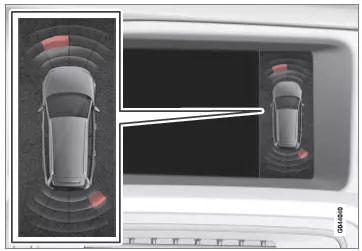
Screen display - shows obstacles at the front left and rear right.
An overview image appears on the center console display, showing the relationship between the vehicle and a detected obstacle.
The highlighted sector shows which of the four sensors has detected an obstacle. The closer the vehicle symbol is to a highlighted sector, the shorter the distance between the vehicle and the detected obstacle.
The shorter the distance to an obstacle in front of or behind the vehicle, the more frequently the signal sounds. Other audio system sounds are automatically lowered.
At a distance within the range of 30 cm, the tone is continuous and the field of the active sensor is fully filled. If a detected obstacle is within the continuous-tone range both in front of and behind the vehicle, the tone sounds alternately from different speakers.
IMPORTANTObjects such as chains, thin shiny posts or low obstacles may lie in the 'signal shadow' and therefore not be detected by the sensors for a short time. The pulsing tone may stop unexpectedly and not change into a continuous tone as expected.
The sensors cannot detect tall objects, e.g. protruding loading ramps.
- In such cases, exercise particular caution and maneuver or move the vehicle especially slowly. There is a high risk of damage to the vehicle or other objects, as the sensors may not function optimally for a short time.
Related information
- Park Assist*
- Park Assist* - front
- Park Assist* - rear
- Park Assist* - Cleaning the sensors
- Park Assist* - Fault display
- Park Assist Camera*
Park Assist* - rear
Park Assist helps you park.
An audible signal and symbols on the center console display show the distance to a detected obstacle.

The detection range directly behind the vehicle is approx. 1.5 m. The audible signal for obstacles behind the vehicle comes from one of the rear speakers.
Rear park assist is activated when reverse gear is engaged.
When reversing, e.g. with a trailer on the towing bracket, rear park assist is switched off automatically, otherwise the sensors would react to the trailer itself.
CAUTIONWhen reversing with e.g. a trailer or a bicycle carrier on the towing bracket, without Volvo original trailer wiring, rear park assist may need to be switched off manually, as the sensors should not react to these.
Related information
- Park Assist*
- Park Assist* - Function
- Park Assist* - front
- Park Assist* - Cleaning the sensors
- Park Assist* - Fault display
- Park Assist Camera*
Park Assist* - front
Park Assist helps you park.
An audible signal and symbols on the center console display show the distance to a detected obstacle.
Park assist is activated automatically when the engine is started; the indicator lamp in the on/off switch lights up. If park assist is switched off with the button, the lamp goes out.
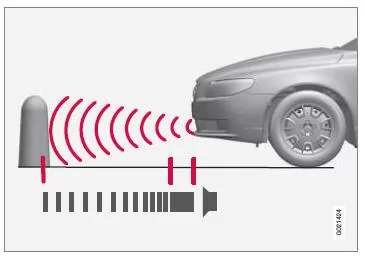
The detection range directly in front of the vehicle is approx. 0.8 m. The audible signal for obstacles in front of the vehicle comes from one of the front speakers.
Front park assist is active up to approx. 10 km/h. The lamp in the button is on to indicate that the system is switched on. If the speed falls below 10 km/h, the system is reactivated.
CAUTIONFront park assist is deactivated when the parking brake is applied or when the P position is selected in vehicles with automatic transmission.
IMPORTANTWhen fitting auxiliary headlights: make sure they do not cover the sensors. Otherwise, the auxiliary headlights may be detected as an obstacle.
Related information
- Park Assist*
- Park Assist* - Function
- Park Assist* - rear
- Park Assist* - Cleaning the sensors
- Park Assist* - Fault display
- Park Assist Camera*
Park Assist* - Fault display
Park Assist helps you park.
An audible signal and symbols on the center console display show the distance to a detected obstacle.
 If the information symbol in the instrument cluster lights up constantly and the message 'Park Assist: Service required' is displayed, park assist is out of operation.
Under certain circumstances, park assist may give false warnings.
These are caused by external noise sources that operate at the same ultrasonic frequency as the system.
Examples of such sources include horns, wet tyres on asphalt, pneumatic brakes, motorcycle exhaust noise and more.
Related information
- Park Assist*
- Park Assist* - Cleaning the sensors
- Park Assist* - Function
- Park Assist* - front
- Park Assist* - rear
- Park Assist Camera*
Volvo S80 (2nd generation) park assist provides precise support when maneuvering, both front and rear. Audible signals and graphic displays on the screen make it easier to recognize obstacles and reduce the risk of damage.
Intelligent deactivation when towing a trailer or deactivation at low speed ensures flexible use of the function.
FAQ
How is park assist activated?
Park assist is activated automatically when the engine is started, but can be switched off manually with a button.
What does the continuous tone of park assist mean?
A continuous tone indicates that an obstacle is very close, approx. 30 cm in front of or behind the vehicle.
Test yourself
A quick Volvo S80 quiz: every answer comes with an explanation and a link to the manual page.