Park Assist Camera*
The park assist camera in the Volvo S80 (2nd generation, 2013–2016) shows the driver the area behind the vehicle when reversing. This section explains the function, the guide lines and the display of limit areas. In addition, lighting conditions, limits of the camera image and maintenance tips are explained. Notes on safe use at night or in difficult visibility conditions complete the section.
The park assist camera is an aid and is activated when reverse gear is engaged.
The camera image is shown on the display in the centre console.
CAUTIONIf the electrical system is configured with a trailer hitch, the overhang of the trailer hitch is taken into account when the function measures the parking space.
WARNING- The park assist camera is an aid and can never relieve the driver of their own responsibility when parking.
- The camera has blind spots where obstacles cannot be detected.
- Watch for people and animals near the vehicle.
Function and Operation
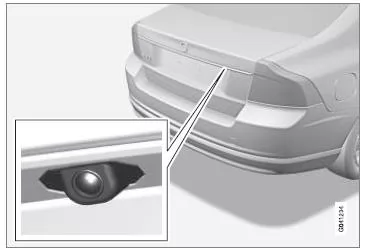
Camera location on the tailgate handle.
The camera shows what is behind the vehicle and whether anything appears at the sides.
The camera shows a wide area behind the vehicle, part of the bumper and, if fitted, the trailer hitch.
Objects on the screen may appear slightly tilted. This is completely normal.
CAUTIONObjects on the screen may be closer to the vehicle than they appear on the screen.
If another display is active, the parking camera system takes over automatically and the camera image is shown on the screen.
When reverse is selected, solid lines are displayed that show where the approximate vehicle outline will be with the current steering wheel angle. This makes reversing into a parking space, reversing in tight areas and towing a trailer easier. The guide lines can be hidden. See the Settings section.
If the vehicle is also equipped with parking sensors, their information is shown graphically as colored fields to illustrate the distance to detected obstacles. See the section "Vehicles with Reversing Sensors" later in this text.
The camera remains active for approx. 5 seconds after reverse is disengaged, or until the vehicle speed exceeds 10 km/h when driving forward or 35 km/h when reversing.
Lighting Conditions
The camera image is adjusted automatically to the prevailing lighting conditions.
As a result, the brightness and quality of the image may vary slightly. Poor lighting conditions may result in slightly reduced image quality.
CAUTIONKeep the camera lens free of dirt, snow and ice to ensure optimal function. This is especially important in poor lighting conditions.
Guide Lines
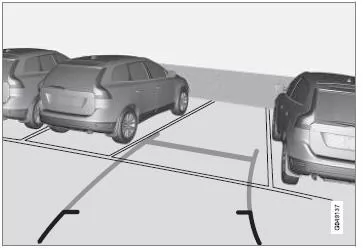
Example of how the guide lines can be shown to the driver.
The lines on the screen are projected as if they were on the ground behind the vehicle, and they depend directly on the steering angle. This shows the driver the path the vehicle will take when steering.
CAUTION- When reversing with a trailer that is not electrically connected to the vehicle, the lines on the screen show the path the vehicle will take, not the path of the trailer.
- No lines are shown on the screen when a trailer is electrically connected to the vehicle's electrical system.
- The parking assistance camera is automatically deactivated when towing a trailer if a genuine Volvo trailer cable is used.
Remember that when the rear camera view is selected, the screen only shows the area behind the vehicle. Therefore, also watch the areas to the sides and in front of the vehicle when reversing while steering.
Boundary Lines
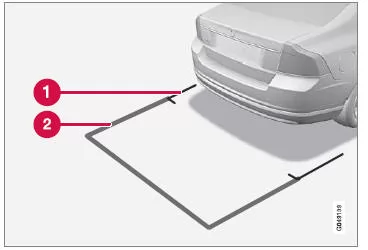
The lines of the system.
- Boundary line, 30 cm area behind the vehicle
- Boundary line, clear reversing area
The red line (1) frames an area of approx. 30 cm behind the bumper.
The yellow horizontal line (2) frames an area of up to approx. 1.5 m behind the bumper.
The yellow side lines end approx. 2.0 m behind the bumper.
The boundary lines enclose the parts of the vehicle that protrude furthest, e.g. outside mirrors and corners, including when turning.
Vehicles with Reversing Sensors*
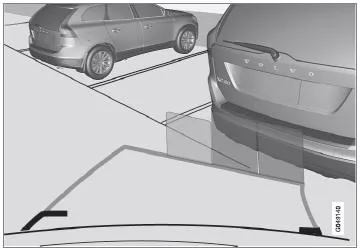
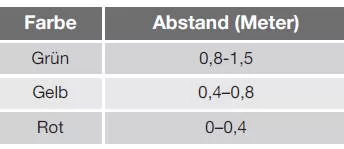
Colored fields (one field per sensor) show the distance.
If the vehicle is equipped with parking assistance (p. 249), the distance is shown with colored fields for each sensor that detects an obstacle.
The color of the field changes as the distance to the obstacle decreases: from green to yellow to red.
Related information
- Parking Assistance Camera - Settings
- Parking Assistance Camera - Limitations
- Parking assist
The parking assistance camera of the Volvo S80 (2nd generation) enhances safety when reversing with a clear camera image with guide lines and graphic markings. Combined with the parking sensors, it provides optimal visibility.
The system adjusts automatically to lighting conditions and remains active until a certain speed is reached. This ensures maximum support when maneuvering.
FAQ
What do the camera's guide lines show?
They show the expected path of the vehicle based on the current steering wheel angle.
Why does an object appear closer than it does in the image?
The camera image can visually distort distance. Obstacles are often closer than they appear in the image.
Test yourself
A quick Volvo S80 quiz: every answer comes with an explanation and a link to the manual page.