Book maintenance and repair* 1
The option to book maintenance and repair directly from the Volvo S80 (2nd generation, 2013–2016) makes vehicle care much easier. This section describes the requirements, use via the MY CAR system and communication with the dealer. It also explains how vehicle data is transmitted and appointments are coordinated. Information on integrating the navigation system completes the section.
In a vehicle with an internet connection, you can manage your maintenance, repair and appointment information directly through the vehicle.
This service1 offers you the very convenient option of booking maintenance appointments and workshop visits directly from the vehicle. The vehicle data is sent to your dealer, who can already prepare the workshop visit. Your dealer then calls you to arrange an appointment. In certain markets, the system reminds you of upcoming appointments.
When it is time for a workshop visit, you can also be guided there by the navigation system2.
Before using the service
Volvo ID and my profile
- Register a Volvo ID. For more information and on creating a Volvo ID, see Volvo ID.
- Log in to the owner portal My Volvo, open your profile and proceed as follows:
- Check that the vehicle is assigned to your profile.
- Check that your contact details are correct.
- Select the Volvo partner you want to contact for maintenance and repair.
- Select the preferred communication channel (phone). Booking information is always sent by email to the vehicle and to you.
Requirement for booking via the vehicle
- To send and receive booking information from the vehicle, the vehicle must be connected to the internet. For connecting the vehicle to the internet, see the Sensus Infotainment supplement.
- Because the booking information is sent via your private phone provider, you will be asked whether you really want to send the information.
The question is asked once; the answer then applies to the selected connection for a limited time.
- For the service to work and for the system to communicate with the vehicle display, messages/pop-up windows must be allowed.
In the normal view of the MY CAR source, press OK/MENU, then select Service and repair
 Select Show notifications.
Using the service
Press OK/MENU and then select Service and repair in the normal view of MY CAR to access all menus and settings.
When maintenance is due, and in some cases when a repair is required, a corresponding message is shown in the instrument cluster; a pop-up menu is also shown on the display.
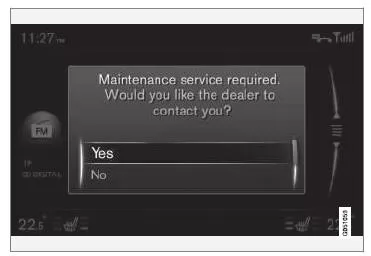
Maintenance message on the display.
Response options in the pop-up menu and their effects:
- Yes - A maintenance request is sent to your dealer, who then contacts you with an appointment proposal.
The maintenance indicator and the maintenance message in the instrument cluster go out.
- No - No further pop-up messages are shown on the display.
The message in the instrument cluster remains. After making this choice, you can also send a maintenance request manually via the vehicle; see below.
- Later - The pop-up menu is shown again the next time the vehicle is started.
Book maintenance or repair manually1
- Press the MY CAR button in the center console and select Service and repairDealer informationSelect Request service or repair.
> The vehicle data is sent automatically to your dealer.
- The dealer sends an appointment proposal to the vehicle.
- Accept the appointment proposal or ask for a new one.
After the appointment booking is confirmed, the booking information is stored in the vehicle; see My bookings.
The vehicle communicates with you automatically via the display: you are reminded of maintenance and finally guided to the workshop visit.
You can also book a maintenance appointment via My Volvo. Go to My bookings and then select Update to display bookings made in My Volvo.
My bookings1
Show booking information on the vehicle display. Accept the appointment proposal or ask for a new one.
- Service and repairSelect My appointments.
Call dealer1
You can call your dealer using a Bluetooth hands-free system connected to the vehicle. To connect a phone, see the Sensus Infotainment supplement.
- Service and repairDealer informationSelect Call dealer.
Using the navigation system1, 2
Enter your workshop in the navigation system as a destination or waypoint.
- Service and repairDealer informationSelect Set as single destination.
- Service and repairDealer informationSelect Add as waypoint.
Send vehicle data1
The vehicle data is not sent to your dealer, but to a central Volvo database. Your dealer can then retrieve it using the Vehicle Identification Number (VIN3). You can find the number in the service and warranty booklet or at the bottom left in front of the windshield.
- Service and repairSelect Send vehicle data.
Booking information and vehicle data
When you book a service appointment via your vehicle, booking information and vehicle data are sent. The vehicle data consists of information on the following areas:
- Service requirements
- Function status
- Fluid levels
- Odometer reading
- Vehicle Identification Number (VIN3)
- Vehicle software version
Related information
- Volvo ID
1 Applies to certain markets.
2 Applies to Sensus Navigation.
3 Vehicle Identification Number
The "Book service and repair" function of the Volvo S80 (2nd gen) lets you arrange appointments directly through the vehicle. Vehicle data is transmitted to the dealer, who will contact you with a proposed appointment. Navigation to the workshop is also possible.
An internet connection for the vehicle and a Volvo ID are required. The system makes it easier to organize service and repairs and adds convenience to everyday driving.
This combines modern technology with practical support for service.
Test yourself
A quick Volvo S80 quiz: every answer comes with an explanation and a link to the manual page.