General. Overview. Switching on/off. Camera perspective
With the different camera views of the BMW 5 Series (7th generation), drivers get a comprehensive view of the vehicle surroundings. From side view and rear view camera to Panorama View, all views can be adjusted via the iDrive system. Automatic camera switching selects the optimal view depending on the driving situation. The movable camera view, which can be controlled intuitively via a circular menu, is particularly helpful. Brightness and contrast can also be adjusted individually. For precise maneuvering and parking, functions such as obstacle markings, zoom on the trailer hitch and car wash view provide additional support. The system responds reliably, but when weather conditions or blocked lenses occur, the driver must remain attentive.
General
Several cameras capture the area from different selectable views.
Additionally, assistance functions, e.g.
guide lines, are overlaid in the display.
The following camera views can be displayed:
- Automatic camera view: Depending on the driving situation, the system automatically displays the appropriate camera view.
- Rear view camera: Shows the area behind the vehicle.
- Side view right and left: Shows the areas to the side of the vehicle.
- Movable camera view via iDrive.
- Panorama View: Shows crossing traffic, e.g. at junctions and exits, depending on the gear currently engaged.
Depending on the view, the vehicle surroundings or a partial area is displayed.
Safety information
WARNING The system does not relieve you of your own responsibility to correctly assess the traffic situation. There is a risk of an accident.
Adapt your driving style to the traffic conditions.
Additionally monitor the traffic situation and the vehicle surroundings by looking directly, and intervene actively in the relevant situations.
Overview
Buttons in the vehicle
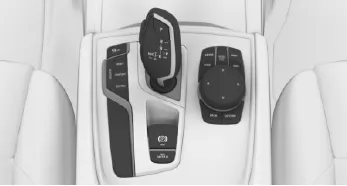
 Parking Assistant button
 Panorama View
Cameras
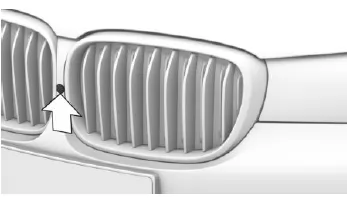
Front camera
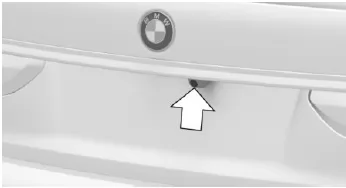
Rear view camera
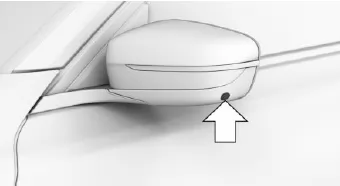
One camera is located at the bottom of each exterior mirror housing.
Dirt on the camera lenses can impair image quality.
If necessary, clean the camera lenses.
Switching on/off
Switch on automatically
The system switches on automatically when reverse (R) is selected with the engine running.
The camera view appropriate for the current driving situation is displayed.
Switch on/off manually
 Press the Parking Assistant button.
- On: LED lights up.
- Off: LED goes out.
Automatic switch-off when driving forward
The system switches off when a certain distance or speed is exceeded.
If necessary, switch the system on again.
Camera view
Overview
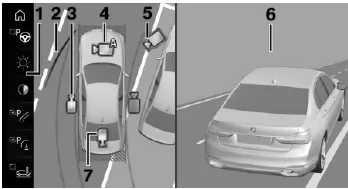
- Function bar
- Selection window
- Side view
- Automatic camera view
- Movable camera view
- Camera image
- Rear view camera
Selection window
In the selection window, the individual camera views can be selected via iDrive.
Side view
The side view can be selected for the right or left side of the vehicle.
This view helps position the vehicle at the curb or other lateral obstacles by showing the surroundings at the side.
The side view looks from rear to front and automatically focuses on possible obstacles when a hazard is detected.
Operation of Driver Assistance Systems 216 Online Version for Part No. 01 40 2 976 319 - X/16
Automatic camera view
The automatic camera view shows a steering-dependent view in the respective direction of travel.
This view adapts to the current driving situation.
As soon as obstacles are detected, the view switches to a fixed display of the area in front of or behind the bumper, or switches to a side view if necessary.
Movable camera view
When the movable camera view is selected, a circular track is shown on the Control Display.
By turning the controller or by touch function, defined views can be selected on the circular track.
The current view is indicated by a camera symbol.
With BMW Gesture Control: An additional camera symbol is shown on the circular track.
This camera symbol can be moved freely using BMW Gesture Control, see page 29.
To exit the circular track, tilt the controller to the side and press it, or tap the active camera symbol on the touchscreen.
Rear view camera
This view shows the image from the rear view camera.
Function bar
Assistance functions can be activated and settings made via the function bar, see page 217.
 "Park Assistant".
 "Brightness".
 "Contrast".
 "Parking guide lines".
 "Obstacle marking" 218.
 "Zoom trailer hitch" 218.
 "Car wash".
 "Settings": Make settings, e.g. for using the activation points with Panorama View.
The Surround View system of the BMW 5 Series (G30/G31) provides a comprehensive overview of the vehicle surroundings through various camera views. Whether automatic view, rear view camera, side view or Panorama View, the system adapts flexibly to the respective driving situation and effectively supports parking and maneuvering.
The movable camera view is particularly noteworthy, allowing the driver to adjust the view individually via the controller or touchscreen. Assistance functions such as parking guide lines or obstacle markings complement the display and help with orientation. The cameras deliver high-resolution images and can be easily cleaned if dirty.
FAQQuestion 1: Can Panorama View be activated automatically at defined positions?
Answer: Yes, GPS-based activation points can be saved at which Panorama View switches on automatically.
Question 2: Can the brightness and contrast of the camera image be adjusted?
Answer: Yes, both parameters can be adjusted individually via iDrive.
Test yourself
A quick BMW 5 quiz: every answer comes with an explanation and a link to the manual page.