Warning. With Parking Assistant and Steptronic transmission: emergency braking function, Active PDC. With Parking Assistant: side protection. System limits
The BMW 5 G30 combines acoustic and visual warning systems for optimal parking support. The warning tones adapt to the distance to detected objects, and a continuous tone sounds when the distance is less than 25 cm. At the same time, the display shows obstacles in different colors and perspectives. Especially in combination with the Steptronic transmission, the PDC emergency braking function provides automatic intervention when reversing. If an object is detected at a critically close distance, autonomous braking is applied, including when rolling. Side protection warns of lateral collisions through colored markings. Limits exist for moving objects, reflective surfaces, and certain weather conditions. Nevertheless, the system offers comprehensive protection when parking. It relieves the driver and increases safety, especially in narrow, confined areas.
Warning
Warning tones
General
The approach to an object is signaled by an interval tone corresponding to its position.
For example, if an object is detected behind the vehicle on the left, the warning tone sounds from the rear left speaker.
The shorter the distance to an object, the shorter the intervals.
If the distance to a detected object is less than approx. 25 cm, a continuous tone sounds.
If objects are simultaneously detected in front of and behind the vehicle at a distance of less than approx. 25 cm, an alternating continuous tone sounds.
Steptronic transmission: The interval tone and continuous tone are switched off when selector lever position P is engaged.
When the vehicle is stationary, the interval tone switches off after a short time.
Volume
The volume ratio between the PDC warning tone and the entertainment audio can be adjusted.
Via iDrive:
- "My Vehicle"
- "iDrive settings"
- "Sound"
- "Volume balance"
- "PDC"
- Set the desired value.
The setting is saved for the currently used driver profile.
Visual warning
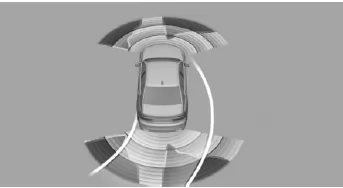
The approach to an object is shown on the Control Display. Objects that are farther away are already shown there before a tone sounds.
The display appears as soon as PDC is activated.
The detection range of the sensors is shown in green, yellow and red.
To better judge the space required, lane lines are displayed.
When the rear view camera image is displayed, you can switch to PDC or, if applicable, another view with obstacle markings:
 "Rear view camera"
Cross-traffic warning: Depending on equipment, the PDC display also warns of vehicles approaching from the side at the rear or front.
With Parking Assistant and Steptronic transmission: emergency braking function, Active PDC
Principle
The PDC emergency braking function initiates emergency braking when there is an acute risk of collision.
General
Due to system limits, a collision cannot be prevented under all circumstances.
The function is available below walking speed when reversing or rolling backward.
Pressing the accelerator pedal interrupts the braking intervention.
After emergency braking to a standstill, you can carefully move closer to an obstacle.
To move closer carefully, press the accelerator pedal lightly and release it again.
If the accelerator pedal is pressed more firmly, the vehicle pulls away as usual. Manual braking is possible at any time.
The system uses the ultrasonic sensors of PDC and Parking Assistant.
Safety information
WARNING The system does not relieve you of your own responsibility to correctly assess the traffic situation. There is a risk of an accident.
Adapt your driving style to the traffic conditions.
Additionally monitor the traffic situation and the vehicle surroundings by looking directly, and intervene actively in the relevant situations.
Activate/deactivate system
Via iDrive:
- "My Vehicle"
- "Vehicle settings"
- "Parking"
- "Active PDC emergency braking function"
- "Active PDC emergency braking function"
The setting is saved for the currently used driver profile.
With Park Assistant: side protection
Principle
The system warns of obstacles at the side of the vehicle.
General
The system uses the ultrasonic sensors of PDC and Parking Assistant.
Display
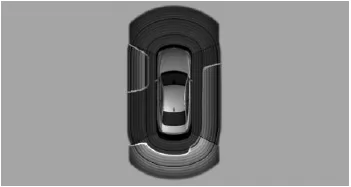
To protect the sides of the vehicle, obstacle markings are shown along the sides of the vehicle.
- Colored markings: warning of detected obstacles.
- Gray markings, hatched area: no obstacles have been detected.
- No markings, black area: the area next to the vehicle has not yet been detected.
Limits of side protection
The system only displays stationary obstacles that were previously detected by the sensors while driving past them.
The system cannot detect whether an obstacle moves afterward. If the vehicle is stationary, the markings are displayed in gray after a certain time. The area next to the vehicle must be detected again.
If the trailer socket is in use, side protection is not available.
System limitations
Safety information
WARNING Due to system limitations, the system may respond incorrectly or not at all. There is a risk of accident or property damage. Observe the notes on system limitations and intervene actively if necessary.
With trailer or if the trailer socket is in use
The rear PDC functions are switched off.
 White symbol is displayed.
On vehicles with the corresponding equipment, the detection range of the sensors is shown darkened on the Control Display.
Limits of ultrasonic measurement
Detecting objects can reach the limits of physical ultrasonic measurement, e.g. in the following situations:
- With small children and animals.
- With people wearing certain clothing, e.g. a coat.
- With external interference to the ultrasound, e.g. from passing vehicles or loud machinery.
- With dirty, iced, damaged or misaligned sensors.
- Under certain weather conditions, e.g. high humidity, rain, snowfall, extreme heat or strong wind.
- With trailer drawbars and couplings of other vehicles.
- With thin or wedge-shaped objects.
- With moving objects.
- With objects positioned higher up or protruding, e.g. wall projections or cargo.
- With objects that have corners, edges and smooth surfaces.
- With objects that have fine surfaces or structures, e.g. fences.
- With objects that have porous surfaces.
- With protruding cargo.
- With small and low objects, e.g. crates.
- With obstacles and people at the edge of the lane.
- With soft obstacles or obstacles covered in foam.
- With plants or bushes.
- Low objects that have already been displayed, e.g. curbs, may enter the blind zone of the sensors before or after a continuous tone has already sounded.
- Cargo that extends beyond the vehicle is not taken into account by the system.
False warnings
The system may display a warning under the following conditions even though there is no obstacle within the detection range:
- In heavy rain.
- With heavy dirt or ice on the sensors.
- With sensors covered in snow.
- On rough road surfaces.
- With uneven ground, e.g. speed humps.
- In large, rectangular buildings with smooth walls, e.g. underground car parks.
- In car washes and automatic car wash tunnels.
- Due to strong exhaust fumes.
- If the trailer hitch cover is incorrectly fitted.
- By other ultrasound sources, e.g.
Street sweepers, steam cleaners or neon tubes.
To reduce false warnings, switch off the automatic activation of PDC when obstacles are detected, if necessary, e.g. in car washes.
Malfunction
 A Check Control message is displayed.
White symbol is displayed and the detection range of the sensors is shown darkened on the Control Display.
PDC has failed. Have the system checked by a service partner of the manufacturer, another qualified service partner or a specialist workshop.
The Active PDC emergency braking function in the BMW 5 G30/G31 is an important safety component when maneuvering. In case of an imminent risk of collision, the system initiates automatic braking when reversing or rolling backwards, thus preventing an impact. Side protection also helps to avoid damage to the side of the vehicle.
The system's clear visual and acoustic feedback is particularly noteworthy, helping the driver find their way even in confusing situations. The driver always remains responsible and can override the system at any time, for example by accelerating or braking manually.
With these functions, the BMW 5 G30/G31 underlines its high standards for active safety and intelligent assistance when parking and maneuvering.
Test yourself
A quick BMW 5 quiz: every answer comes with an explanation and a link to the manual page.