B2622 Inside Antenna
Check Intelligent Key relative signal strength.
Confirm Nissan Murano vehicle Intelligent Key antenna signal strength.
DTC DETECTION LOGIC
| DTC No. | CONSULT screen terms (Trouble diagnosis content) | DTC Detection Condition | |
|---|---|---|---|
| B2622 | INSIDE ANTENNA [(Inside key antenna (console)] |
Diagnosis condition | When ignition switch is ON. |
| Signal (terminal) | BCM terminals 116, 128 | ||
| Threshold | An excessive high or low voltage from inside key antenna (console) is sent to BCM | ||
| Diagnosis delay time | — | ||
POSSIBLE CAUSE
Inside key antenna (console)
Harness or connector
[Inside key antenna (console) circuit is open or shorted]
BCM
FAIL-SAFE
—
PERFORM DTC CONFIRMATION PROCEDURE
 CONSULT
Select "Self Diagnostic Result" mode of "BCM".
Check BCM for DTC.
Is inside key antenna DTC detected?
YES>>Refer to DTC Diagnosis Procedure.
NO>>Inside key antenna (console) is OK.
Check Intelligent Key relative signal strength.
Confirm Nissan Murano vehicle Intelligent Key antenna signal strength.
CHECK INSIDE KEY ANTENNA INPUT SIGNAL 1
Ignition switch OFF.
Check signal between BCM harness connector and ground using oscilloscope.
(+) (–) Condition Signal
(Reference value)BCM Connector Terminal M80 116 Ground When Intelligent Key is in the antenna detection area. 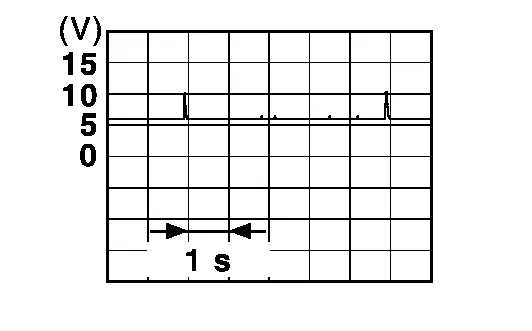
When Intelligent Key is not in the antenna detection area. 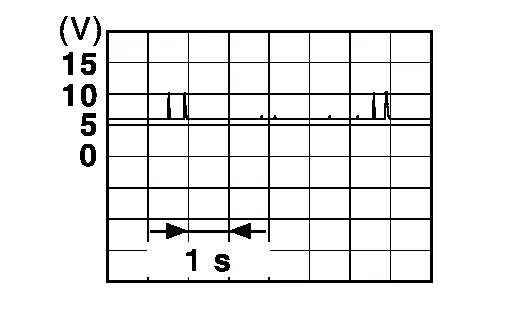
128 Ground When Intelligent Key is in the antenna detection area. When Intelligent Key is not in the antenna detection area.
Is the inspection result normal?
YES>>Replace BCM. Refer to Removal and Installation.
NO>>GO TO 2.
CHECK INSIDE KEY ANTENNA CIRCUIT
Disconnect BCM connector and inside key antenna (console) connector.
Check continuity between BCM harness connector and inside key antenna (console) harness connector.
BCM Inside key antenna (console) Continuity Connector Terminal Connector Terminal M80 116 B83 1 Yes 128 2 Check continuity between BCM harness connector and ground.
BCM Ground Continuity Connector Terminal M80 116 No 128
Is the inspection result normal?
YES>>GO TO 3.
NO>>Repair or replace harness.
CHECK INSIDE KEY ANTENNA INPUT SIGNAL 2
Replace inside key antenna (console) (New antenna or other antenna).
Connect BCM connector and inside key antenna (console) connector.
Check signal between BCM harness connector and ground using oscilloscope.
(+) (–) Condition Signal
(Reference value)BCM Connector Terminal M80 116 Ground When Intelligent Key is in the antenna detection area. When Intelligent Key is not in the antenna detection area. 128 Ground When Intelligent Key is in the antenna detection area. When Intelligent Key is not in the antenna detection area.
Is the inspection result normal?
YES>>Replace inside key antenna (console). Refer to Removal and Installation.
NO>>Replace BCM. Refer to Removal and Installation.