Back Door Switch
CHECK FUNCTION
 CONSULT
Select “DOOR SW-BK” in “Data Monitor” mode of “BCM(DOOR LOCK)”.
Check that the function operates normally according to the following conditions:
| Monitor Item | Condition | Status | |
|---|---|---|---|
| DOOR SW-BK | Back door | Open | On |
| Closed | Off | ||
Is the inspection result normal?
YES>>Door switch is OK.
NO>>Refer to Diagnosis Procedure (With Automatic Back Door)
NO>>Refer to Diagnosis Procedure (Without Automatic Back Door).
CHECK BACK DOOR SWITCH INPUT SIGNAL
Ignition switch OFF.
Disconnect back door lock assembly connector.
Check signal between back door lock assembly harness connector and ground using oscilloscope.
(+) (–) Signal
(Reference value)Back door lock assembly Connector Terminal D557 7 Ground 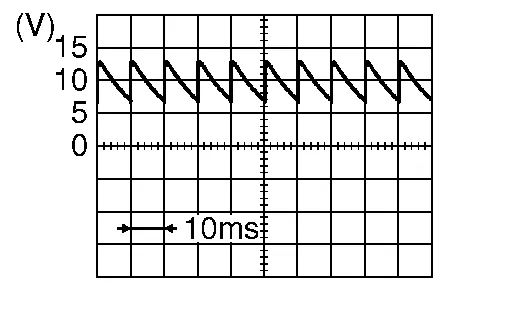
Is the inspection result normal?
YES>>GO TO 3.
NO>>GO TO 2.
CHECK BACK DOOR SWITCH CIRCUIT
Disconnect BCM connector.
Check continuity between back door lock assembly harness connector and BCM harness connector.
Back door lock assembly BCM Continuity Connector Terminal Connector Terminal D557 7 M20 97 Yes Check continuity between back door lock assembly harness connector and ground.
Back door lock assembly Ground Continuity Connector Terminal D557 7 No
Is the inspection result normal?
YES>>Replace BCM. Refer to Removal and Installation.
NO>>Repair or replace harness.
CHECK BACK DOOR SWITCH GROUND CIRCUIT
Check continuity between back door lock assembly harness connector and ground.
Back door lock assembly Ground Continuity Connector Terminal B557 8 No
Is the inspection result normal?
YES>>GO TO 4.
NO>>Repair or replace harness.
CHECK BACK DOOR SWITCH
Refer to Component Inspection (With Automatic Back Door).
Is the inspection result normal?
YES>>GO TO 5.
NO>>Replace back door lock assembly. Refer to Removal and Installation.
CHECK INTERMITTENT INCIDENT
Refer to Intermittent Incident.
>>Inspection End.
CHECK BACK DOOR SWITCH INPUT SIGNAL
Ignition switch OFF.
Disconnect back door lock assembly connector.
Check signal between back door lock assembly harness connector and ground using oscilloscope.
(+) (–) Signal
(Reference value)Back door lock assembly Connector Terminal D567 3 Ground
Is the inspection result normal?
YES>>GO TO 3.
NO>>GO TO 2.
CHECK BACK DOOR SWITCH CIRCUIT
Disconnect BCM connector.
Check continuity between back door lock assembly harness connector and BCM harness connector.
Back door lock assembly BCM Continuity Connector Terminal Connector Terminal D567 3 M20 97 Yes Check continuity between back door lock assembly harness connector and ground.
Back door lock assembly Ground Continuity Connector Terminal D567 3 No
Is the inspection result normal?
YES>>Replace BCM. Refer to Removal and Installation.
NO>>Repair or replace harness.
CHECK BACK DOOR SWITCH GROUND CIRCUIT
Check continuity between back door lock assembly harness connector and ground.
| Back door lock assembly | Ground | Continuity | |
| Connector | Terminal | ||
| D567 | 4 | Yes | |
Is the inspection result normal?
YES>>GO TO 4.
NO>>Repair or replace harness.
CHECK BACK DOOR SWITCH
Refer to Component Inspection (Without Automatic Back Door).
Is the inspection result normal?
YES>>GO TO 5.
NO>>Replace back door lock assembly. Refer to Removal and Installation.
CHECK INTERMITTENT INCIDENT
Refer to Intermittent Incident.
>>Inspection End.
CHECK BACK DOOR SWITCH
Ignition switch OFF.
Disconnect back door lock assembly connector.
Check continuity between back door lock assembly terminals.
Back door lock assembly Condition Continuity Terminal 7 8 Door switch Pressed No Released Yes
Is the inspection result normal?
YES>>Inspection End.
NO>>Replace back door lock assembly. Refer to Removal and Installation.
CHECK BACK DOOR SWITCH
Ignition switch OFF.
Disconnect back door lock assembly connector.
Check continuity between back door lock assembly terminals.
Back door lock assembly Condition Continuity Terminal 3 4 Door switch Pressed No Released Yes
Is the inspection result normal?
YES>>Inspection End.
NO>>Replace back door lock assembly. Refer to Removal and Installation.