Warning Symbols on the Multi-Information Display
If a problem is detected, such as low engine oil level or a door that is not fully closed, the corresponding warning message is displayed on the multi-information display.
In this case, the normal display sequence is interrupted, and one or more symbols and/or text messages are shown. Most warning messages remain on the display for 5 seconds, after which normal display operation resumes. Some warning messages remain on the display until the problem is corrected.
Information such as the settings of the adaptive cruise control, the Collision Mitigation Braking System (CMBS), the overspeed warning function, etc. is also displayed on the multi-information display.
On a new vehicle, only symbols without text messages are displayed on the information display. This mode is set by default for all vehicles delivered from the factory. You can set the mode for displaying symbols with accompanying text messages yourself (page 129). For some symbols, such as the low outside air temperature warning and the reminder that rear passengers have not fastened their seat belts, no text messages are provided.
Almost all examples in this section of the manual use only symbols without messages.
Warning symbols and messages are normally displayed in the upper and middle parts of the display. If Adaptive Cruise Control (ACC) or Collision Mitigation Braking System (CMBS) is turned on, information from these systems will be displayed in the upper part of the display, and only warning symbols will be displayed in the middle part.
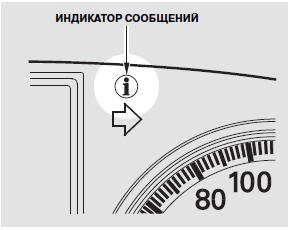
When warning symbols with or without messages are displayed, the corresponding warning lights and the message indicator will illuminate on the instrument cluster.
The message indicator will not turn off until the problem is corrected.
When a system status message first appears, you will also hear a warning chime.
If several messages appear at the same time, each message will be displayed for 5 seconds.
To move to the next message before 5 seconds have elapsed, or to return to normal display mode, press the information button on the steering wheel.
To redisplay the symbols/messages, repeatedly press the information button if the message indicator remains illuminated on the instrument cluster.
If you switch the display from message mode to normal mode, some symbols/messages will reappear on the display at intervals until the problem is corrected.
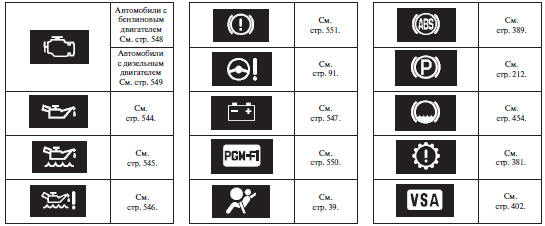
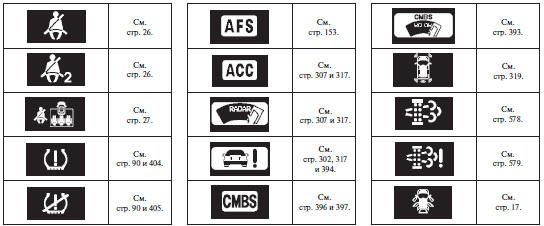
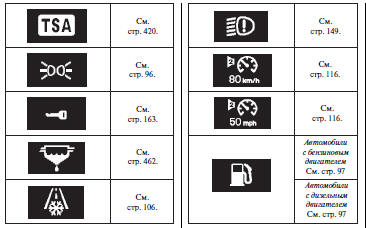
The following pages contain a list of all symbols and warning messages. The following symbols may be displayed:
Test yourself
A quick Honda CR-V quiz: every answer comes with an explanation and a link to the manual page.