System Settings
You can customize some of the settings as desired. The table below lists the settings that you can customize.

*1: This setting can be changed while the vehicle is moving
*2 : Factory setting
*3 : The setting selected last is selected by default
*4 : For vehicles equipped with Adaptive Cruise Control (ACC)
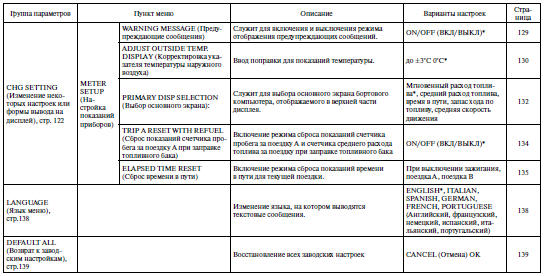
*: Factory setting
To enter the settings mode, stop the vehicle and turn the ignition key to ON (II). On vehicles with a manual transmission, also apply the parking brake. On vehicles with an automatic transmission, the selector lever must be in P (Park). (This requirement does not apply to some speed warning chime settings.) In normal multifunction display mode, press and hold the information button on the steering wheel for at least 3 seconds. The settings modes are listed below:
• SPEED ALARM: To set the speed alarm function, refer to page 116.
• DEFLATION WARNING SYSTEM INITIALISATION: To activate the system, refer to pages 121 and 407.
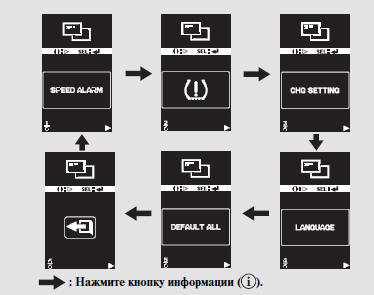
• CHG SETTING (Change settings):
To change the settings, refer to page 122.
• LANGUAGE: To select the menu language, refer to page 138.
• DEFAULT ALL (Restore factory settings): To restore the factory settings, refer to page 139.
Each time the information button is pressed, the settings mode changes as shown in the figure above.
You can select the speed at which the speed warning chime is activated while the vehicle is moving. To set the speed alarm while driving, select "SPEED ALARM". For details, refer to page 119.
To change any other settings, refer to the instructions on page 122.
To restore all settings to the factory defaults, select "DEFAULT ALL" as described on page 139.
Select the desired setting using the information button on the steering wheel, and confirm your selection by pressing the SEL/RESET button.
If you do not press any button after pressing the information button and the settings menu is displayed, the display will return to normal operation after 10 seconds.

If the vehicle starts moving while settings are being adjusted, the settings mode will be cancelled after a few seconds.
The settings mode is also cancelled automatically if the ignition key is turned from ON (II) to ACCESSORY (I) or LOCK (0), if the parking brake is released (vehicles with a manual transmission), or if the selector lever is moved out of P (Park) (vehicles with an automatic transmission).
If you select and press the SEL/RESET button, the display will return to normal operation.
Test yourself
A quick Honda CR-V quiz: every answer comes with an explanation and a link to the manual page.