Vehicle speed warning
The speed at which the warning chime sounds can be set either while the vehicle is stationary or while it is moving. While the vehicle is moving, you can select either of two preset speed values. While the vehicle is stationary, you can set any speed at which the warning chime will sound.
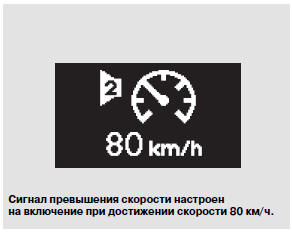
Once the vehicle reaches the set maximum speed, the corresponding symbol will appear on the multifunction display and the warning chime will sound. You can set two maximum speed values at which the warning chime is activated.
To activate the speed alarm function, perform the following steps with the vehicle stationary:
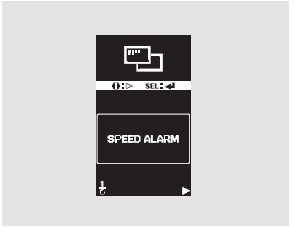
Press and hold the information button to enter the settings modes, then briefly press the same button as many times as needed to select the "SPEED ALARM" mode. When the "SPEED ALARM" message is displayed, press the SEL/RESET button. The display will switch to the settings mode.
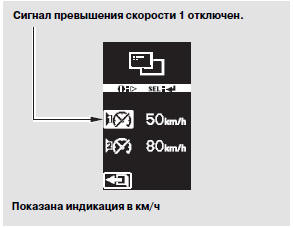
Depending on the vehicle specification, the speed at which the warning chime sounds can be set in km/h or mph. The multi-information display shows two speed settings at which the function activates, and the on and off symbols.
Speed Alert 1: You can turn the warning chime function on or off. You can also select a speed above or below 50 km/h.
Speed Alert 2: You can turn the warning chime function on or off. You can also select a speed above or below 80 km/h.
Each time the information button ( i) is pressed, the display selection changes between "Speed 1" (50 km/h) and "Speed 2" (80 km/h). To exit the setting mode, press the information button again.

Select "Speed 1" or "Speed 2", then use the SEL/RESET button to turn the warning chime function on or off.
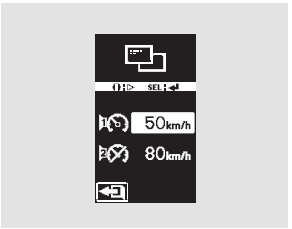
To change the speed value, select "Speed 1" or "Speed 2", then press and hold the SEL/RESET button. The speed selection screen will appear on the display.
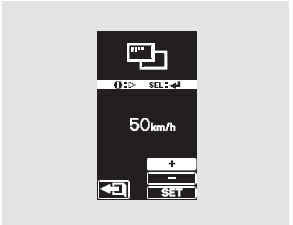
The value on the display corresponds to the currently set warning speed. To change this value, first select the "+" or "–" symbol by pressing the information button repeatedly, then press the SEL/RESET button to change the speed value.
Each time the SEL/RESET button is pressed, the selected speed value changes by 5 km/h. You can set the warning speed starting from 5 km/h in steps of 5 km/h. Always observe the posted speed limit and never exceed a speed that is safe for the driving conditions.
To enter a correction into memory, first press the information button to select the SET icon, then press the SEL/RESET button.
After making your selection, press and release the information button to exit the mode. Press the SEL/RESET button to save your setting to memory. If you press the information button instead, the display returns to the setting mode. In this case, you must repeat the setting procedure.
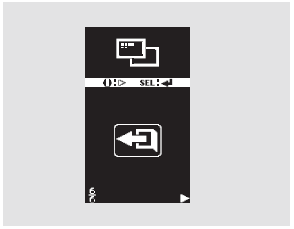
To exit the setting mode without changing the value, select EXIT by pressing the information button, then press the SEL/RESET button. The display returns to normal operation.
Setting the speed warning chime while driving:

Press and hold the information button for approximately 1 second. The speed selection screen for the warning chime will appear on the multi-information display.
You can select one of two speed values: 50 km/h or 80 km/h (30 mph or 50 mph, depending on the vehicle specification). Each press of the information button changes the display in this order: Speed 1, Speed 2, Exit, Speed 1, and so on.
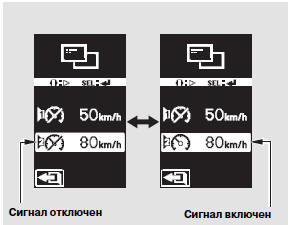
Select the desired speed (1 or 2), then press the SEL/RESET button. Each press of the SEL/RESET button alternately activates and deactivates the warning chime at the selected speed.
After making your selection, press and release the information button to go to the exit mode. Press the SEL/RESET button to save your setting to memory. If you press the information button instead, the display returns to the setting mode. In this case, you must repeat the setting procedure.

After pressing the SEL/RESET button, the selected settings will be shown on the display for several seconds, then the display returns to normal operation.
If no button is pressed, the display returns to normal operation after 10 seconds.
Your vehicle is equipped with a Tire Pressure Monitoring System. When the system detects a possible significant loss of tire pressure, the low tire pressure warning light illuminates on the instrument panel. In addition, the symbol is shown on the multi-information display which may be accompanied by the message "CHECK TYRE PRESSURE".
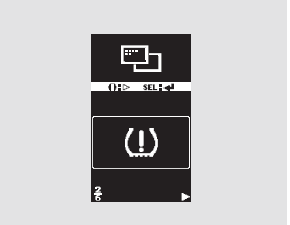
After replacing a wheel or repairing a wheel with a flat tire, you must activate the Tire Pressure Monitoring System to restore its operation. The system must also be activated after checking the tire pressure.
For more information, refer to page 407.
Test yourself
A quick Honda CR-V quiz: every answer comes with an explanation and a link to the manual page.