Information Messages and Symbols
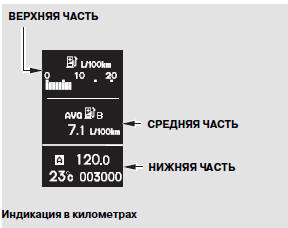
The multi-information display has three sections: upper, middle, and lower. Each section can show two lines of messages.
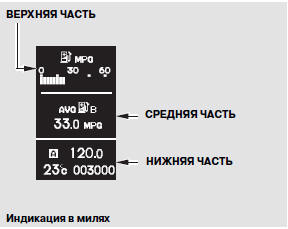
During normal operation, the upper and middle sections show trip computer information and the rear seat belt reminder system, and the lower section shows the odometer, trip meter, and outside air temperature.
The trip computer displays instantaneous fuel economy, average fuel economy, driving range, elapsed time, and average speed. The upper section always shows one trip computer function as the main display. The middle section shows the item that was selected when the ignition was last turned off. You can customize some of the settings.
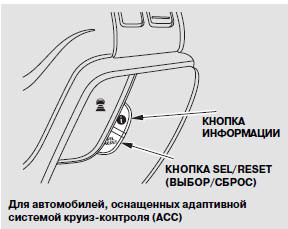
For vehicles equipped with Adaptive Cruise Control (ACC)
The middle section also shows the rear seat belt status.
When the ignition switch is turned to the ON (II) position, the upper section first shows instantaneous fuel economy (page 103). The other trip computer functions are shown in the middle section.
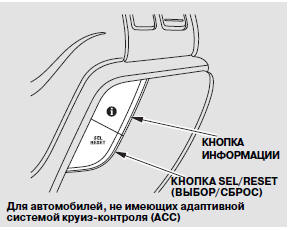
Each time you press the INFO button, the trip computer display changes in the following order: average fuel economy, driving range, elapsed time, average speed, and rear seat belt status (see next page).
If the system generates a warning message, it is displayed after the maximum speed setting parameter. When the ignition switch is turned to the ON (II) position, messages with the highest priority are displayed first.
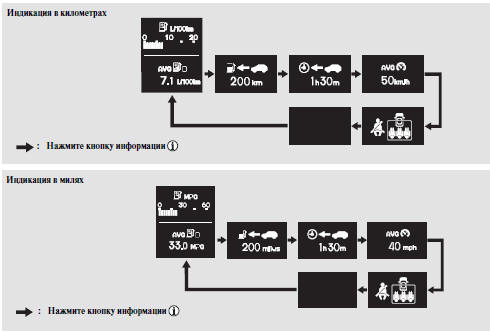
If the middle part of the display is switched to a blank screen, the upper part will also switch to a blank screen.
Test yourself
A quick Honda CR-V quiz: every answer comes with an explanation and a link to the manual page.