Automatic brake hold
Basic information
The automatic brake hold function maintains the braking force without the driver having to depress the brake pedal when the vehicle is stopped at a traffic light or intersection. As soon as the driver depresses the accelerator pedal again, the automatic brake hold function is deactivated and the braking force is released. The operating status of the automatic brake hold function can be displayed.
WARNING
- The automatic brake hold function is not designed to hold the vehicle on a steep hill or slippery road. Never use the automatic brake hold function when the vehicle is stopped on a steep hill or slippery road. Failure to do so may cause the vehicle to move.
- Warnings may appear to request that the driver retake control by depressing the brake pedal.
- When the automatic brake hold function is activated but fails to maintain the vehicle at a standstill, depress the brake pedal to stop the vehicle. If the vehicle unexpectedly moves due to outside conditions, the chime may sound and warnings may appear.
- Be sure to deactivate the automatic brake hold function when using a drive-thru car wash or towing your vehicle.
- Make sure the vehicle is in the P (Park) position and apply the electronic parking brake when parking your vehicle, riding on or off the vehicle, or loading or unloading luggage. Failure to do so could cause the vehicle to move or roll away unexpectedly and result in serious personal injury or property damage.
- If any of the following conditions occur, the automatic brake hold function may not function. Have the system checked promptly. It is recommended that you visit a NISSAN certified ARIYA dealer for this service.
- A warning message appears.
- The indicator light on the automatic brake hold switch does not illuminate when the switch is pushed.
Failure to operate the vehicle in accordance with these conditions could cause the vehicle to move or roll away unexpectedly and result in serious personal injury or property damage.
- The automatic brake hold function will not be activated if the slip indicator light, electronic parking brake warning light, brake system warning light (yellow), or master warning light illuminates and the Chassis control system Error warning message appears.
- To maintain the braking force to keep the vehicle to a standstill, a noise may be heard. This is not a malfunction.
NOTE
To maintain the braking force to keep the vehicle to a standstill, a noise may be heard. This is not a malfunction. The automatic brake hold function is operated by applying sufficient braking force to hold the vehicle in its place, so there are cases when this hold function is maintained even if the accelerator pedal is depressed. In this situation, it is advised to depress the brake pedal first, then to turn off the automatic brake hold switch.
This will cancel the hold function.
How to activate/deactivate the automatic brake hold function
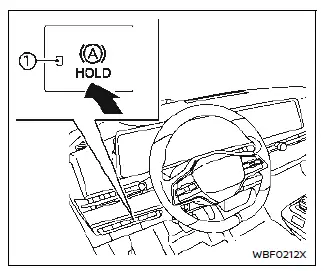
How to activate the automatic brake hold function
1. With the power switch in the ON position, push the automatic brake hold switch. The indicator light 1 on the automatic brake hold switch illuminates.
2. When the automatic brake hold function goes into standby, the automatic brake hold indicator light (white) illuminates.
To use the automatic brake hold function, the following conditions need to be met.
- The driver's seat belt is fastened.
- The electronic parking brake is released.
- The vehicle is not in the P (Park) position.
- The vehicle is not parked on a steep hill.
NOTE
The automatic brake hold function retains the last state until the driver changes the option even if the power switch is turned off.
How to deactivate the automatic brake hold function
While the automatic brake hold function is activated, push the automatic brake hold switch to turn off the automatic brake hold indicator light and deactivate the automatic brake hold function. To deactivate the automatic brake hold function while the brake force has been maintained by the automatic brake hold function, depress the brake pedal and push the automatic brake hold switch.
WARNING
Make sure to firmly depress and hold the brake pedal when turning off the automatic brake hold function while the brake force is applied. When the automatic brake hold function is deactivated, the brake force will be released. This could cause the vehicle to move or roll away unexpectedly.
Failure to prevent the vehicle from rolling may result in serious personal injury or property damage.
How to use the automatic brake hold function
Basic information
For additional information on using the automatic brake hold function, refer to the instructions outlined in this section.
To maintain braking force automatically
With the automatic brake hold function activated and the automatic brake hold indicator light (white) illuminated, depress the braking pedal to stop the vehicle, and the indicator light (green) illuminates. The brake force is automatically applied without your foot depressed on the brake pedal. While the brake force is maintained, the automatic brake hold indicator light (green) illuminates.
NOTE
The automatic brake hold indicator light (green) will not illuminate if the brake pedal is not depressed with sufficient force to hold the vehicle or is released too quickly when the vehicle is stopped.
CAUTION
Confirm the automatic brake hold indicator light (green) is illuminated before removing your foot from the brake pedal.
To start the vehicle from a standstill
With the vehicle not in the P (Park) or the N (Neutral) position, depress the accelerator pedal while the brake force is maintained.
The brake force will automatically be released to restart the vehicle. The automatic brake hold indicator light (white) illuminates and the automatic brake hold function returns to standby.
Parking
When the vehicle is in the P (Park) position with the brake force maintained by the automatic brake hold function, the electronic parking brake will automatically be applied and the brake force of the automatic brake hold will be released. The automatic brake hold indicator light turns off. When the electronic parking brake is applied with the brake force maintained by the automatic brake hold function, the brake force of the automatic brake hold will be released. The automatic brake hold indicator light turns off.
NOTE
- Under the following conditions, the electronic parking brake will automatically be applied and the brake force of the automatic brake hold will be released (the automatic brake hold indicator light turns off):
- The braking force is applied by the automatic brake hold function for 3 minutes or longer.
- The vehicle is in the P (Park) position.
- The electronic parking brake is applied manually.
- The driver's seat belt is unfastened.
- The driver's door is opened.
- The power switch is placed in the OFF position.
- A malfunction occurs in the automatic brake hold function.
- When the vehicle stops, but the brake force is not automatically applied, depress the brake pedal firmly until the automatic brake hold indicator light (green) illuminates.
- When the vehicle stops on a slope, depress the brake pedal firmly until the automatic brake hold indicator light (green) illuminates.