Li-ion battery
- Basic information
- Driving with a discharged Li-ion battery
- Charging the 12-volt battery
Basic information Nissan Ariya 2026
WARNING
Your vehicle contains a sealed Li-ion high voltage battery. If the Li-ion battery is disposed of improperly, there is a risk of severe burns and electrical shock that may result in serious injury or death and there is also a risk of environmental damage.
CAUTION
To prevent damage to the Li-ion battery:
- Do not expose the vehicle to extreme ambient temperatures for extended periods.
- Do not store the vehicle in temperatures below −13ºF (−25ºC) for over seven days.
- Do not leave your vehicle for over 14 days where the Li-ion battery available charge gauge reaches a zero or near zero.
- Do not use the Li-ion battery for any other purpose.
- Do not spill water onto the Li-ion battery or load large amounts of water in open containers (aquariums or buckets) into the vehicle.
If the water spills onto the Li-ion battery, it may cause a short circuit and damage the Li-ion battery.
NOTE
- If the outside temperature is −13ºF (−25ºC) or less, the Li-ion battery may freeze and it cannot be charged or provide power to drive the vehicle.
Move the vehicle to a warm location.
- The capacity of the Li-ion battery in your vehicle to hold a charge will, like all such batteries, decrease with time and usage. As the battery ages and capacity decreases, this will result in a decrease from the vehicle's initial driving range. This is normal, expected, and not indicative of any defect in your Li-ion battery.
- The Li-ion battery has limited service life, and when its charging capacity falls below a specific level, the EV system warning light will illuminate.
Owners should bring their vehicle in for inspection and possible battery replacement.
- It is recommended that you visit a NISSAN certified ARIYA dealer for information about recycling or disposal of the Li-ion battery. Do not attempt to recycle or dispose of the Li-ion battery yourself.
Driving with a discharged Li-ion battery Nissan Ariya SUV
When a destination is set in the navigation system that exceeds the available vehicle range, the navigation system automatically searches the location of nearby charging stations. When the nearby charging station locations are displayed, charge the Li-ion battery as soon as possible.
Warning lights illuminate on the instrument panel and messages are displayed on the vehicle information display to inform you that the Li-ion battery charge is low.
The vehicle's range is very limited when these warning lights illuminate and messages are displayed. Follow the instructions on the vehicle information display and immediately charge the vehicle at the nearest charging station.
There are three levels of information that will be displayed as the Li-ion battery becomes discharged:
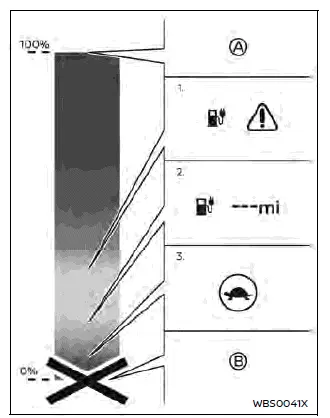
- Full charge
- Low Li-ion battery warning
- "---" indication
- Traction motor output limited
- Battery discharged
- The following warning lights illuminate on the meter and messages are displayed on the vehicle information display at the same time to indicate low Li-ion battery charge. Charge the Li-ion battery as soon as possible.
- The low battery charge warning light (yellow)

- The master warning light
 (yellow)
- "Can't start Battery too Low Please charge now" or "Battery too Low Power reduced Please charge now" warning message is displayed on the vehicle information display. See "Vehicle information display warnings and indicators".

- If the vehicle is driven and the Li-ion battery continues to discharge, the estimated driving range changes to "-- -".
- When the power limitation indicator light
 illuminates, traction motor output is limited resulting in reduced vehicle speed. Stop the vehicle in a safe location before the Li-ion battery becomes completely discharged and there is no power available to drive the vehicle. See "If the Li-ion battery becomes completely discharged".
Charging the 12-volt battery Nissan Ariya
Basic information
The 12-volt battery is charged automatically using electricity stored in the Li-ion battery.
When the 12-volt battery is being charged, the charging status indicator light on the instrument panel flashes (except when charging the Li-ion battery or the power switch is in the READY to drive position).
While vehicle is in use
The Li-ion battery charges the 12-volt battery as necessary when the power switch is in the READY to drive position or ON position.
The 12-volt battery is not charged in the following conditions.
- When the power switch is in Auto ACC position.
- When the power switch is in ON position and shift position is in the N (Neutral) position.
While the vehicle is not in use When the EV (Electric Vehicle) system is off for an extended time, the 12-volt battery may be automatically charged for a short period of time on a regular basis.
Li-ion battery temperature control system
Basic information
This system helps to prevent the Li-ion battery temperature from becoming too high or low.
Li-ion battery cooler
- When the Li-ion battery temperature becomes higher, it can cause an acceleration decline and longer charging time by the quick charger.
- The Li-ion battery temperature tends to rise in the case of continued driving on a freeway, repeated use of quick charger, and combination of both operations.
- The Li-ion battery cooler will automatically turn on when the Li-ion battery temperature rises during driving or quick charging. It will keep the Li-ion battery temperature to a level that does not activate power limitation or charging inhibition. This function is useful when driving a long distance with repeated use of quick charger.
- When the Li-ion battery cooler operates, more electric power will be consumed than in normal driving condition, which could result in a decreased energy economy and driving range. Avoid unnecessary acceleration and deceleration and drive at a moderate speed.
Li-ion battery warmer
- When the Li-ion battery temperature becomes lower, it can cause longer charging time by the quick charger.
- The Li-ion battery temperature tends to fall, for example, when parking the vehicle for a long period of time while the outside temperature is below 32 ºF (0 ºC). The Li-ion battery temperature is lowered to the outside temperature.
- The Li-ion battery warmer will automatically turn on when the Li-ion battery temperature is cold during quick charging. It will also turn on while driving, if the function is enabled on the touch screen display. It will raise the Li-ion battery temperature to avoid extending charging time when using the quick charger.
- When the Li-ion battery warmer operates while quick charging, it uses electrical power from the quick charger.
However, the Li-ion battery warmer can increase an amount of charge in 30 minutes by approximately 1.3 times to twofold*, in the case that the Li-ion battery temperature is below 32 ºF (0 ºC).
*: It varies depending on the temperature and/or remaining capacity of the Li-ion battery at the start of charging.
- When the quick charge is performed immediately after the Li-ion battery warmer operated while driving, an amount of charge in 30 minutes is increased by 1.2 to 1.7 times*, in comparison with the case that the Li-ion battery warmer only operates during quick charging.
*: It varies depending on the temperature and/or remaining capacity of the Li-ion battery at the start of charging.
- To allow the Li-ion battery warmer to operate while driving, enable the function on the touch screen display in the following steps:
- Place the power switch in the READY to drive position. (The setting cannot be performed while driving.)
- Touch the "
 " key on the Launch bar.
- Touch the "
 " key and then touch "EV" key.
- Touch the "Battery Heater" key and touch the "ON" key to enable the function.
NOTE
- When the Li-ion battery warmer operates while driving, more electric power will be consumed than in normal driving condition, which could result in a decreased energy economy and driving range. Take account of remaining Li-ion battery charge and estimated driving range while driving.
- If the outside temperature is low and a low temperature alert [
 ] is displayed in the vehicle information display, it is recommended to turn ON "Battery Heater" 30 minutes to 1 hour before arriving at a quick charging station.
- The "Battery Heater" setting will be turned OFF when the quick charging is completed or the power switch is placed in the OFF position.