Moonroof
Basic information
WARNING
- In an accident you could be thrown from the vehicle through an open moonroof. Always use seat belts and child restraints.
- Do not allow anyone to stand up or extend any portion of their body out of the moonroof opening while the vehicle is in motion or while the moonroof is closing.
CAUTION
- Remove water drops, snow, ice or sand from the moonroof before opening.
- Do not place any heavy object on the moonroof or surrounding area.
The moonroof only operates when the power switch is placed in the ON position.
The moonroof is operational for a period of time, even if the power switch is placed in the OFF position. If the driver's door or the front passenger's door is opened during this period of time, the power to the moonroof is canceled.
Automatic moonroof and sunshade
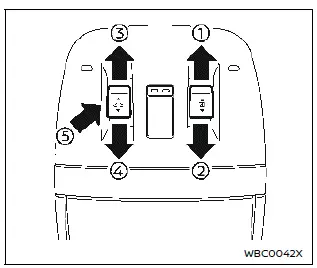
Sliding sunshade and moonroof
Basic information
When the sunshade switch is pushed to the OPEN position , the sunshade will open. When the moonroof switch is pushed to the OPEN position , the moonroof opens to the comfort mode position. (If the sunshade is close, the sunshade will open half first. When the switch is pushed again, the moonroof will open fully.)
When the sunshade switch is pushed to the OPEN position 1, the sunshade will open. When the moonroof switch is pushed to the OPEN position 3, the moonroof opens to the comfort mode position. (If the sunshade is close, the sunshade will open half first. When the switch is pushed again, the moonroof will open fully.)
When the moonroof switch is pushed to the CLOSE position 4, the moonroof will automatically close. When the sunshade switch is pushed to the CLOSE position 2, the sunshade will close.
To stop the sunshade or moonroof during the operation, push the moonroof switch to either of the OPEN 1, 3, CLOSE 2, 4 or UP 5 position.
Tilting moonroof
To tilt up the moonroof, push the moonroof switch to the up position 5.
To tilt down the moonroof, push the switch again or push to the CLOSE position 4.
Comfort mode
This is the position used when driving with the moonroof open. When driving with the moonroof fully open, wind noise may be very loud. Use the comfort mode position when driving.
Auto-reverse function
WARNING
There are some small distances just before the closed position which cannot be detected. Make sure that all passengers have their hands, etc. inside the vehicle before closing the moonroof and sunshade.
The auto-reverse function enables the moonroof and sunshade to automatically reverse when something is caught in the moonroof and sunshade as it is closing.
When the control unit detects an obstacle, the moonroof and sunshade will open immediately.
Depending on the environment or driving conditions, the auto-reverse function may activate if an impact or load similar to something being caught in the moonroof and sunshade occurs.
If the auto-reverse function activates consecutively or the battery is discharged, the moonroof and sunshade may not close properly. In this case, push and hold the switch to the CLOSE position 4 to close the moonroof.
Operating moonroof with Intelligent Key
The moonroof can be opened by pushing the UNLOCK  button on the Intelligent Key. This function will not operate while the moonroof timer is activated or when the moonroof needs to be initialized. For details about the Intelligent Key button usage, see "How to use remote keyless entry function".
To open the moonroof, push and hold the UNLOCK  button on the Intelligent Key. The operation will stop after about 7 seconds. You can continue the operation by pushing and holding the UNLOCK
 button again. To stop opening, release the UNLOCK
 button.
If the moonroof does not operate
If the moonroof and sunshade do not operate properly, perform the following procedure to initialize the operation system.
1. If the moonroof and sunshade are open, close them fully by repeatedly pushing the moonroof switch to the CLOSE 2 and 4 position.
2. Push and hold the moonroof switch to the CLOSE position 4 for 10 seconds.
The moonroof will be tilted up.
3. Release the moonroof switch once, and immediately push the moonroof switch again and hold it to the CLOSE position 4.
The moonroof and sunshade will move as follows: Sunshade fully open → moonroof tilt down → moonroof fully open → moonroof fully close → sunshade fully close
4. Release the moonroof switch after the moonroof and sunshade stopped.
5. Check if the moonroof switch operates normally.
WARNING
The driver is always responsible for operating the moonroof properly, including the operation by all passengers.
Failure to follow the warnings and instructions for proper use of the moonroof could result in serious injury or death.
- Do not allow children to operate the moonroof. Improper operation by children may cause an accident. If children or others get caught in the moonroof, it could cause serious injury.
- To help avoid risk of injury or death through unintended operation of the moonroof, place the power switch in the OFF position when leaving the vehicle, and do not leave children and the Intelligent Key inside the vehicle.
- Do not activate the auto-reverse function intentionally. If hands or face, etc. get caught in the moonroof, it could cause serious injury.
CAUTION
- Do not place objects (such as newspapers, handkerchiefs, etc.) on the sunshade when it is extending or retracting causing improper operation or damage to the sunshade.
- Do not push the sunshade arm with your hands, etc., as this may deform it. Improper operation or damage to the sunshade may result.
- Do not put any object into the sunshade inlet port as this may result in improper operation or damage the sunshade.
- Do not hang any object on the arm rail as this may result in improper operation or damage the sunshade.
- Do not forcefully pull the sunshade. Doing so may elongate the sunshade. Improper operation or damage to the sunshade may result.
If the moonroof does not operate properly after performing the procedure above, have your vehicle checked. It is recommended that you visit a NISSAN certified ARIYA dealer.