Charge port lid

In this manual: Charge port lid
Foreword — 1Seats, seat belts and Supplemental RestraintSystem (SRS) — 1Passenger compartment — 1Instrument panel — 1Warning and indicator lights — 1The EV (Electric Vehicle) system — 1Li-ion battery — 1High voltage precautions — 1EV (Electric Vehicle) characteristics — 1Life with an EV (Electric Vehicle) (scene guide) — 1Efficient use of your vehicle — 1EV (Electric Vehicle) unique information — 1Types of charge and how to charge the Li-ion battery — 1Charging methods — 1Charging related indicator lights — 1Seats — 1Head restraints/headrests — 1Seat belts — 1Child safety — 1Child restraints — 1Supplemental Restraint System (SRS) — 1Cockpit — 1Meters and gauges — 1Warning lights, indicator lights and audible reminders — 1Vehicle information display — 1Head Up Display (HUD) — 1Security systems — 1Wiper and washer switch — 1Rear window and outside mirror defroster switch — 1Headlight and turn signal switch — 1Horn — 1Heated seats — 1Climate controlled seats — 1Rear Door Alert — 1Power outlets — 1Emergency Call (SOS) button — 1Storage — 1Roof rack — 1Windows — 1Moonroof — 1Interior lights — 1HomeLink Universal Transceiver — 1Keys — 1Doors — 1Intelligent Key system — 1Hood — 1Liftgate — 1Charge port lid — 1Tilt/telescopic steering — 1Sun visors — 1Mirrors — 1Memory seat — 1NissanConnect Owner's Manual — 1RearView Monitor — 1Intelligent Around View Monitor — 1Moving Object Detection (MOD) — 1Ventilators — 1Heater and air conditioner — 1Radio antenna — 1Push-button power switch — 1Before starting the EV system — 1Driving the vehicle — 1e-Step system — 1Parking brake — 1Automatic brake hold — 1Drive Mode Selector — 1Driver Assistance systems — 1Traffic Sign Recognition (TSR) — 1Lane Departure Warning (LDW) — 1Intelligent Lane Intervention (I-LI) — 1Blind Spot Warning (BSW) — 1Intelligent Blind Spot Intervention (I-BSI) — 1Rear Cross Traffic Alert (RCTA) — 1ProPILOT Assist Systems — 1Automatic Emergency Braking (AEB) with Pedestrian Detection system — 1Intelligent Forward Collision Warning (I-FCW) — 1Intelligent Driver Alertness (I-DA) — 1Rear Automatic Braking (RAB) — 1Increasing power economy — 1All-Wheel Drive (AWD) system — 1Electric power steering — 1Brake system — 1Brake assist — 1Vehicle Dynamic Control (VDC) system — 1Chassis control — 1Hill Start Assist system — 1Sonar system — 1ProPILOT Park — 1Cold weather driving — 1Hazard warning flasher switch — 1Flat tire — 1Jump starting — 1If the Li-ion battery becomes completely discharged — 1Towing your vehicle — 1Cleaning exterior — 1Cleaning interior — 1Corrosion protection — 1Cooling system — 1Reduction gear oil — 1Windshield wiper blades — 1Window washer fluid — 112-volt battery — 1Intelligent Key battery replacement — 1Lights — 1Wheels and tires — 1Maintenance requirement — 1General maintenance — 1Explanation of scheduled maintenance items — 1Maintenance schedules — 1Recommended fluids/lubricants and capacities — 1Vehicle identification — 1Vehicle loading information — 1Towing a trailer (2WD models) — 1Flat towing — 1Reporting safety defects — 1Event Data Recorders (EDR) — 1
2steps
~12min
1/5difficulty
Done 0 of 2

Opening charge port lid

CAUTION

Make sure that the charge port lid is completely closed and latched before driving. Failure to do so could cause the lid to open suddenly during driving.

The charge port lid is linked to the door locking mechanism of the vehicle.
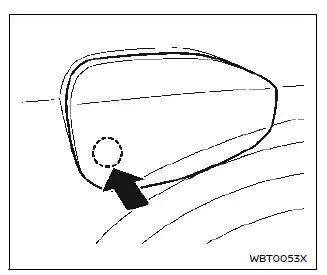
Nissan Ariya. Charge port lid

To open the charge port lid, unlock the doors and push the rear part of the lid as illustrated.

When closing the charge port lid, push the lid to latch it.

Charge port cap
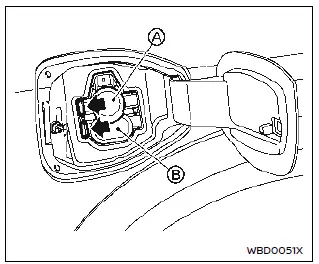
Nissan Ariya. Charge port lid
  1. Normal charge
  2. Quick charge

When opening the charge port cap, push the tab and open the cap.

When the charge port cap is closed to its previous position, it will lock automatically.

CAUTION

  • When charging is finished, be sure to close the charge port cap. If water or dust gets inside the charge port, this may cause a malfunction.
  • Pay particular attention when using the normal charge port as the charge port lid can be closed even when the normal charge port cap is open.
  • Close the quick charge port cap before closing the charge port lid.

    The quick charge port cap can be damaged if it is open when closing the charge port lid.

  • If the charge port lid is closed after vehicle's door has been locked, the charge port lid is not locked.

    Be sure that firstly close the lid and then lock the vehicle.

Charge port light

Nissan Ariya. Charge port lid
  1. Charge port light

Basic information

The charge port has a light. The charge port light illuminates as follows.

When the normal or trickle charging starts

  • When you approach the vehicle while the vehicle doors are locked with the Intelligent Key with you or unlock the vehicle, the light illuminates for about 3 minutes.
  • When the charge connector is connected, the light turns off.

When the charge connector lock mode has been changed to LOCK or AUTO, the light will turn off after connecting the charge cable and the charge connector is locked.

When the normal or trickle charging finished

  • When you approach the vehicle while the vehicle doors are locked with the Intelligent Key with you or unlock the vehicle, the light illuminates for about 30 seconds.
    • If the charge connector is not disconnected, the connector will be locked again after about 30 seconds.

      When the charge connector lock mode has been changed to LOCK or AUTO;

    • The light will turn on after the charge connector lock is unlocked.
    • The light will turn off after the charge connector lock is locked.
  • When the charge connector is disconnected, the light illuminates for about 30 seconds.

NOTE

If you walk away from the vehicle with the Intelligent Key with you, the light illuminates for about 30 seconds. If the light has already been illuminated, the light turns off after about 30 seconds.