Life with an EV (Electric Vehicle) (scene guide)
Basic information
This section provides a brief explanation of the most important EV functions. Refer to the specific sections of this manual for detailed explanations of the vehicle features and operation.
Charging the Li-ion battery
WARNING
The EV (Electric Vehicle) system uses a high voltage current. Failure to follow the proper handling instructions may cause serious injury or death. Be sure to read the "CH. Charging" section and follow the procedures and guidelines described.
Checking Li-ion battery charging status
The Li-ion battery charge status can be checked on the MyNISSAN App (if so equipped).
If the Li-ion battery is not sufficiently charged, you can start charging the Li-ion battery via the remote charge function.
For additional information, see "Charging related remote function".
Operating the climate control system before driving

The vehicle's heating and air conditioning system can be turned on via remote control with an internet enabled smart phone using MyNISSAN App (if so equipped).
This allows the interior of the vehicle to be heated or cooled while the vehicle is charging. This reduces the load on the Li-ion battery while the vehicle is being driven and can help increase the vehicle driving range. For additional information, please visit http://www.nissanusa.com/connect/.
Starting your vehicle

1. Firmly depress the brake pedal.
2. Push the power switch.
3. Check that the READY to drive indicator light illuminates. 4. Check the Li-ion battery level and the estimated driving range shown on the vehicle information display.
NOTE
- Before driving, compare the driving distance to the destination displayed on the navigation system screen with the estimated driving range shown on the meter. Determine if it will be necessary to charge the Li-ion battery before or while driving to your planned destination.
- If it is necessary to charge the Li-ion battery, use the navigation system to search for available charging stations on your planned driving route.
Driving the vehicle
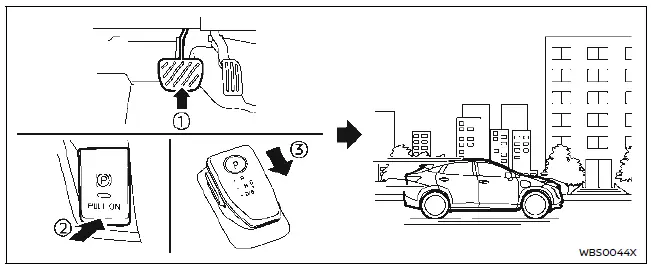
Basic information
1. Depress the brake pedal.
2. Release the parking brake.
3. Move the shift lever into the D (Drive) position. When released, the shift lever returns to its original center position.
4. Confirm that the vehicle is in the D (Drive) position. The shift indicator on the shift lever illuminates and "D" is displayed on the vehicle information display.
5. Release the brake pedal.
6. Depress the accelerator pedal and start driving.
There are the following gear positions for driving the vehicle forward:
- Use the D (Drive) position for optimum driving performance.
- Use the B position for downhill driving.
When the B position is used, more regenerative brake is applied when the accelerator pedal is released in comparison to the D (Drive) position.
NOTE
The regenerative brake converts the vehicle's forward motion to electric power to help slow the vehicle.
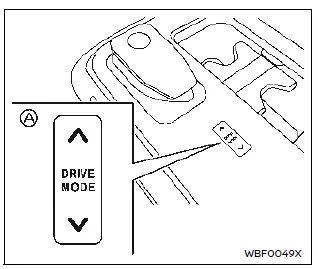
Use the Drive Mode Selector A located on the center console to select the ECO mode. Use the ECO mode for maximum driving range and for city driving. The ECO mode helps reduce power consumption by reducing acceleration when compared to the same accelerator pedal position in the STANDARD mode.
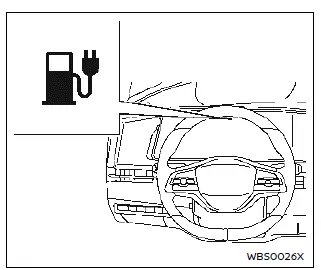
If the low battery charge warning light  (yellow) illuminates, the Li-ion battery charge is too low for travel. See "Low battery charge warning light". Charge the Li-ion battery as soon as possible.
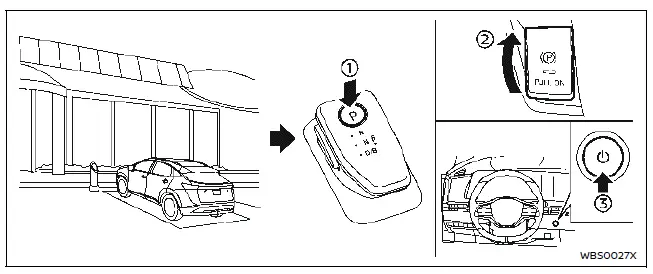
Parking the vehicle
1. When stopping the vehicle, push the park button on the shift lever while depressing the brake pedal. Confirm that the vehicle is in the P (Park) position by checking the shift indicator on the shift lever or on the vehicle information display.
2. Apply the parking brake.
3. Push the power switch to the OFF position.
4. If a parking lot is equipped with charging facilities, charge the Li-ion battery as necessary.
Charging after driving
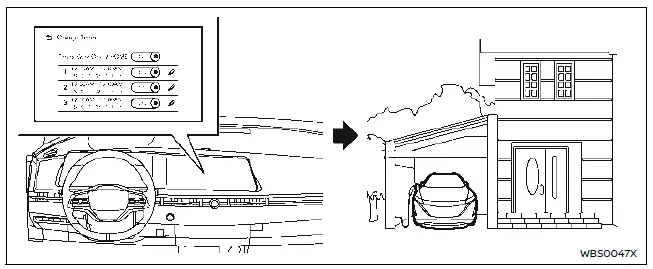
Charging the Li-ion battery
When you return home, connect the vehicle to the charging station installed at your home using the normal charge connector.
Charge the vehicle or set the charging timer function on the touch screen display to have the vehicle charge at a specific time.
1. When the power switch is turned off, the settings of the charging timer, the Climate Ctrl. Timer and charge connector lock functions are displayed on the vehicle information display.
2. Open the charge port lid and charge port cap.
3. Connect the charge connector to the vehicle.
4. When a charging timer is turned on, charging starts at the set time. When a charging timer is not turned on, charging starts immediately.
NOTE
- Charging can be started remotely, even if the charging timer is set up.
- When you have forgotten to connect the charge connector at home, there is a function that can notify you via a text message capable cellular phone, internet enabled smart phone using MyNISSAN App (if so equipped). For additional information, see "Charging related remote function".
- NISSAN recommends that you connect the normal charge cable to your vehicle when getting out of the vehicle, even if it is not going to be used. By doing this, you can get the most out of the Climate Ctrl. Timer functions the next time you use the vehicle.