Charging related indicator lights
- Charging status indicator light
- NISSAN EVSE (Electric Vehicle Supply Equipment) control box indicator light
Charging status indicator light Nissan Ariya 1st generation
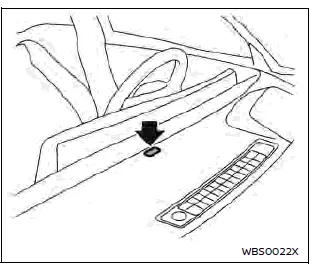
The charging status indicator light primarily indicates the charging status, and is visible from both inside and outside the vehicle.
When the charge connector is connected incorrectly
The indicator light will flash in red and a beep will sound three times for 30 seconds when the charge connector is connected incorrectly to the charge port.
The charging cannot be performed in this condition.
Ready for charging timer
If the charging timer is set, the indicator light flashes in green. (The indicator light illuminates for approximately 2 seconds and will turn off for approximately 2 seconds, repeatedly.) The indicator light turns off after approximately 5 minutes.
When charging
When the Li-ion battery is being charged, the charging status indicator light flashes in blue and it will change the flashing speed depending on the amount the Li-ion battery is charged. As the lithium-ion battery charging improves, the indicator flashes slowly.
The amount the Li-ion battery is charged is also displayed by the Li-ion battery available charge gauge on the vehicle information display.
When fully charged
The indicator light illuminates in blue when the Li-ion battery is fully charged.
The indicator light turns off after approximately 5 minutes or when the charge connector is removed.
When the EV system automatically turns on
The indicator light flashes in green when the EV system automatically turns on.
(The indicator light illuminates for approximately 1 second and will turn off for approximately 1 second, repeatedly.) For example, the EV system will automatically turn on in the following situations:
- When 12-volt battery is charging.
- When the software is updating.
- When the air conditioning system, such as Climate Ctrl. Timer, remote climate control or Li-ion battery temperature control is working.
- When the plug of the EVSE is pulled off from the outlet.
The indicator light flashes in green as follows:
- Ready for charging timer: flashes every two seconds
- EV system on: flashes every one second
NISSAN EVSE (Electric Vehicle Supply Equipment) control box indicator light Nissan Ariya first Gen
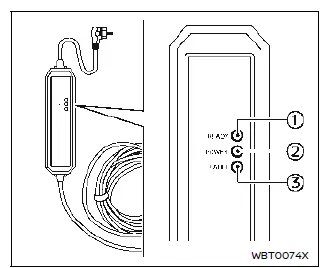
Type A (if so equipped)
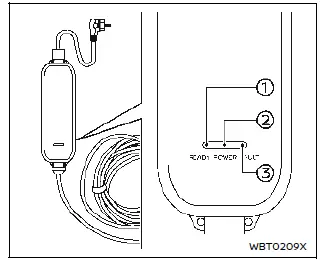
Type B (if so equipped)
- READY: GREEN
- POWER: ORANGE
- FAULT: RED
When a normal or trickle charge is being performed using the NISSAN EVSE (Electric Vehicle Supply Equipment), the charging status as well as any EVSE malfunction can be checked with the indicator lights on the EVSE control box.

Status and action to be taken : All indicator lights will illuminate for a 0.5 second check when the EVSE is first connected to the outlet socket.

Status and action to be taken : The EVSE is connected to the outlet socket. If the normal charge connector is connected to the vehicle normal charge port, charging is complete or the charging timer is set (refer to "Charging timer").

Status and action to be taken : The EVSE is charging the vehicle.

Status and action to be taken : No power is detected by the EVSE from the outlet socket. Check the outlet supply breaker. If the outlet supply is OK and all the indicator lights do not illuminate for 0.5 seconds, the EVSE may be broken. Stop using the EVSE. It is recommended that you visit a NISSAN certified ARIYA dealer.

Status and action to be taken (Type A) (if so equipped): The EVSE could not detect sufficient outlet socket earth grounding for reliable EV charging.
Consult a qualified electrician to have the outlet checked.

Status and action to be taken (Type B) (if so equipped): The EVSE could not detect sufficient outlet socket earth grounding for reliable EV charging.
Consult a qualified electrician to have the outlet checked.
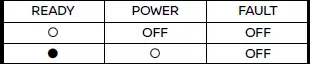
Status and action to be taken : The temperature detection circuit in the domestic plug of the EVSE is malfunctioning.
Indicator light status: Light OFF = Charge is stopped, Flashing = Charge current is reduced.
The EVSE is restricting the charging current. It is recommended that you contact a NISSAN certified ARIYA dealer.

Status and action to be taken (Type A) (if so equipped): The EVSE detected excessive heat in the domestic plug.
Indicator light status: Light OFF = Charge is stopped, Flashing = Charge current is reduced.
The EVSE is restricting the charging current for safety. This may be caused by a malfunction in the outlet. Stop using the outlet and it is recommended that you contact a NISSAN certified ARIYA dealer. If the same indication continues after checking the outlet, it is recommended that you contact a NISSAN certified ARIYA dealer.
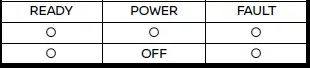
Status and action to be taken (Type B) (if so equipped): The EVSE detected excessive heat in the domestic plug.
Indicator light status: Light OFF = Charge is stopped, Flashing = Charge current is reduced.
The EVSE is restricting the charging current for safety. This may be caused by a malfunction in the outlet. Pull out the plug once, and after a while then reconnect it. If the same indication continues after reconnecting an outlet, immediately stop using the outlet and consult a qualified electrician. If the same indication continues after consulting a qualified electrician, it is recommended that you contact a NISSAN certified ARIYA dealer.

Status and action to be taken : The EVSE internal circuits malfunction. Stop use immediately it is recommended that you contact a NISSAN certified ARIYA dealer.
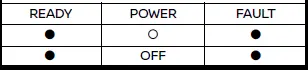
Status and action to be taken : The EVSE detected leakage current or PWM signal error. Stop using the EVSE immediately.
It is recommended that you contact a NISSAN certified ARIYA dealer and check EVSE and vehicle.

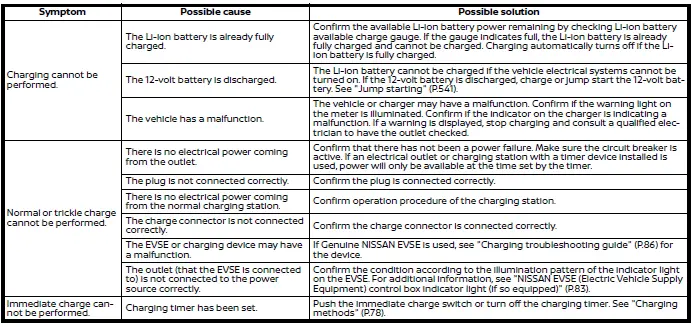
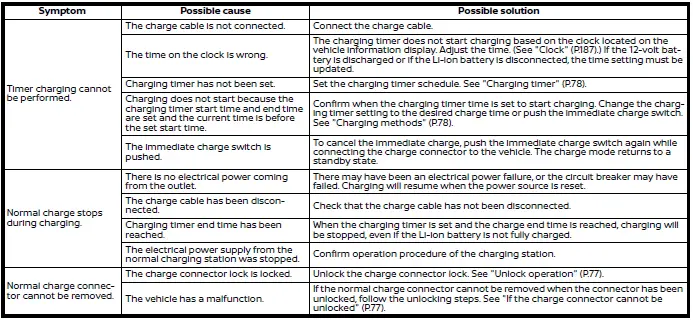
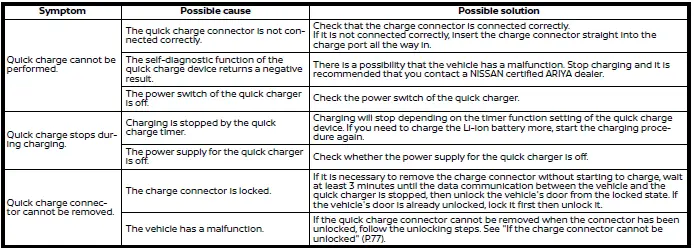
Charging troubleshooting guide