Charging methods
- Charging timer
- Charging related remote function
Charging timer Nissan Ariya 1st generation
Basic information
Use charging timer to schedule when the Li-ion battery charges. You can save three timer settings that include the charging start time and end time. The timer settings can be applied to each day of the week. The vehicle automatically begins charging at the scheduled times when the charge connector is connected to the vehicle. The timers do not need to be reset each time the Li-ion battery needs to be charged.
How to set charging timer
The charging timer settings can be changed with the touch screen display.
1. Touch the "  " key on the Launch bar.
2. Touch the "All Apps" key and then touch "EV" key.
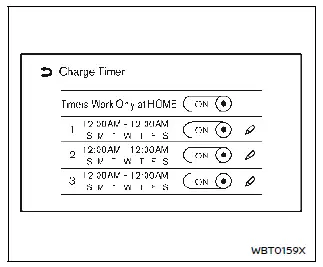
3. Touch "Charge Timer" key. Charging Timer screen is displayed.
Available actions:
- Timers Work Only at Home: When this item turns on, charging timer works only at home.
- Timer settings: Touch to turn on/off the timer. The indicator light will turn on when the timer setting is turned on.
- "
 " key: Touch to display the charging timer settings screen. Set preferred time and day of the week for vehicle charging.
Charging timer setting screen
Three different timer setting can be registered.
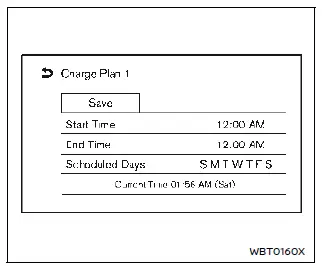
1. Touch to change the start time.
2. Touch to change the end time.
3. Touch to change the weekly schedule.
4. Touch to save the settings.
Operating tips for charging timer
- Charging timer is performed according to the current time setting on the display. When setting the charging timer function, be sure to check that the current time displayed is correct.
- The Li-ion battery may not be fully charged if the charging timer start time and end time are set such that there is not enough time to charge the Li-ion battery.
- To turn off the charging timer function, touch [ON] on the charging timer setting screen until the indicator lights are turned off. After this operation has been performed, the charging timer function is turned off. The start and stop time settings are not deleted, even if the charging timer function is turned off.
- If the day of the week is not selected on the charging timer setting screen, the charging timer will not operate on that day. The system will wait until the next set charging time to perform charging.
- The timer setting can be changed while charging timer is in operation.
When the setting is changed while charging timer is in operation, the new settings are applied immediately.
- The Li-ion battery will not charge when the charge connector is connected to the vehicle until the next scheduled charge start time when the charging timer is active. If necessary, use immediate charge or remote charge (if so equipped) to charge the Li-ion battery.
- Some charging stations used to perform normal charge are equipped with timer functions. If the charger timer function and the vehicle timer are both set, and the two timers are not set to operate at the same time, it is possible that the charger will not start or that the Li-ion battery will not be fully charged.
- The Li-ion battery may not be fully charged or the charging time may be longer when the Li-ion battery temperature control system (if so equipped) or the air conditioning system operates while charging using the Charging Timer.
- Li-ion battery electricity will be consumed if the Li-ion battery temperature control system (if so equipped) or the air conditioning system operates while the vehicle is not in charging state.
Immediate charge
When the charging timer is not turned on, charging automatically starts when a normal charge connector is connected to the vehicle.
Use the immediate charge mode any time you need to start charging immediately while a charging timer is turned on.
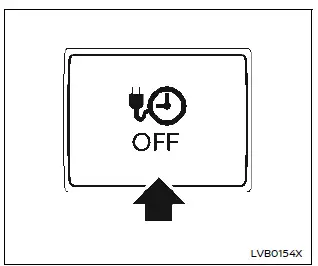
To perform the immediate charge:
1. Place the power switch in the OFF position and connect the normal charge connector to the charge port.
2. Push the immediate charge switch.
NOTE
- When the charging status indicator light (see "Charging status indicator light") flashes in green after the charge connector is connected, the charge state is in the charging timer mode. You can push the immediate charge switch to start the immediate charge.
- When the immediate charge switch is pushed, the immediate charge mode is kept for 15 minutes even if you connect or disconnect the charge connector.
- To cancel the immediate charge mode, push the immediate charge switch while connecting the charge connector to the vehicle. The charge mode switches to charging timer and the vehicle will be in a charging standby state.
However, even if you push the immediate charge switch once again, the immediate charge mode will not start and the charging timer mode will continue.
Charging related remote function Nissan Ariya 2026
This vehicle incorporates a communication device that is called a TCU (Telematics Communication Unit). The communication connection between this unit and the NISSAN Data Center allows for various remote function services.
- Remote battery status check: The charging status of the Li-Ion battery can be checked using the MyNISSAN App (if so equipped), even if you are not in the vehicle.
- Remote start charge: The function of starting the Li-ion battery charge is available using your internet enabled smart phone.
- Plug-in reminder: A notification can be sent to your internet enabled smart phone if the plug is not connected at the specific time you selected, after turning off the power switch.
NOTE
- Enrolling in NissanConnect Services is necessary before using this service.
- To check the Li-ion battery charging status using an internet enabled smart phone, the following conditions must be met:
- The vehicle must be located in a cellular phone coverage area.
- The cellular phone must be located in an area with cellular phone coverage.
- Some cellular phones are not compatible and cannot be used to check the Li-ion battery charging status. Please confirm beforehand.
- Certain remote functions require a compatible smart phone, which is not included with the vehicle.
- NissanConnect Services information system features are included through a subscription service which requires owner consent to activate.
The subscription must be active to use these features.
- NissanConnect Services communications may be received at a verified e-mail address or via SMS/text message or push notification on compatible mobile phones.
- Standard text rates and/or data usage may apply depending on your carrier.